
All businesses depend on digital tools, making them all vulnerable to cyber attacks to a smaller or larger degree. We regularly read about cyber attacks in media, and figures for the cost of the average data breach are reported in various publications – and they are ranging from small and insignificant to billions. If you operate a 5-person UX design consultancy, an average cost based on Fortune 500 company incidents is obviously not very useful.
The true cost is the combination of impact across multiple categories. First, the immediate costs include lost current business and direct handling costs. Long-term costs include lost future business, liability costs, need for extra marketing to counteract market loss of trust, as well as follow-on technology and process improvement costs due to identified security gaps. The actual cost depends on the readiness to handle the event, including backup procedures and training to use them.
Let’s consider the UX consultancy Clickbait & Co, and help them think about the potential cost of cyber attacks with the aid of a BIA. The founder and CEO Maisie “Click” Maven had been listening to a podcast about cyber disruption while doing her 5am morning run along the river, and called the CTO into her office early in the morning. The CTO, Dr. Bartholomew Glitchwright, was a technical wizard who knew more about human-machine interaction that was good for himself. Maisie told him: “I am worried about cyber attacks. How much could it cost us, and what would be the worst-case things we need to plan for?”. Dr. Glitch, who usually had an answer to everything, said “I don’t know. But let’s find out, let’s do a BIA”.

Dr. Glitch’s BIA approach
Dr. Glitch is always in favor of systematic approaches, and doing BIA’s was no exception. He liked to follow a 7-step process:
- Identify the value creating business processes
- Describe the business processes in flowcharts
- For each flowchart, annotate with digital dependencies in terms of applications, data flows, users and suppliers
- Create a “super-flow” connecting the business processes together to map out dependencies between them, from sales lead to customer cash flow. This can be done at the end too, but is important to assess cross-process impact of cyber events.
- Consider digital events with business process impact:
- Confidentiality breaches: data leaks, data theft
- Integrity breaches: data manipulation
- Availability breaches: unavailability of digital tools, users, data
- Assess the impact, starting with direct impact. For each digital event, assess business process impact in terms of downtime (day, week, month). Mark the most likely duration of disruption.
- Evaluate the total cyber disruption cost (TCDC) including
- Immediate costs: lost current business, recovery costs
- Longer-term costs: lost future business, marketing spend increase, tech investment needs, legal fees
Dr. Glitch and Maisie got coffees and got to work. They decided to focus on the main processes of the UX firm:
- Sales
- Digital design
- Invoicing and accounting
Sales
They created simple flow charts for the 3 processes, starting with sales. The sales in the firm was mostly done by the two of them. They had two main sources of business: requests for proposals from customers coming in to their e-mail inbox, and direct sales outreach by phone and e-mail. The outline of the process looks as follows:

Now they started annotating the flowchart with the digital dependencies.

They had identified several digital dependencies here:
- Hubspot CRM: used for all CRM activity, lead capture, tracking deals, etc
- Office 365: create sales decks, e-mail, vidoe meetings
- uxscan.py: internally developed tool to identify poor practice on web pages, used for identifying prospects to contact, and also in their own QA work
- Digisign: a digital signature service used to sign contracts before work is started
As for users, they identified their own personal user accounts. Dr. Glitch had set up SSO for Hubspot and Digisign, so there was only one personal account to care about. The Python script was run on their own laptops, no user required. There are a few integrations, between Office365 and Hubspot, and between WordPress and the Hubspot lead capture form (not using an API here, just a simple iframe embed).
Dr. Glitch had made a shortlist of events to consider in the cyber BIA:
- Ransomware targeting Sharepoint/Office365
- Hacking of user accounts, followed by data theft (Hubspot, O365)
- Mainpulation of uxscan.py code
- DDoS of Digisign, Hubspot, Office365
- Hacking of user accounts, followed by issuing fake contracts or bids (signed with Digisign)
- Data breach of personal data (Hubspot)
Then they together made an assessment of the impact of each event on the shortlist in a table. The average deal value for Clicbait & Co is NOK 400 000.
| Digital asset | Worst-case impact | Immediate cost | Long-term cost | Total cost |
| O365 | Data leak and encryption (ransomware) | 1 week downtime: 1 lost deal. Assume as base case. 2 week downtime: 2 lost deals Recovery consultants: 200 hours x 2000 NOK/hr = 400 000. | Marketing campaign to reduce brand damage: NOK 150k Lost business: 5 deals = 2 MNOK Legal fees: none, assuming no GDPR liability Cyber improvements: 100 000. | Immediate (800k) + Long-term (150k + 2M + 100k) = 3 050 000 3MNOK |
| Hubspot | Theft of customer list, deal sizes, by competitor. Duration may be short or ongoing, but the disruptive effect can be long-term. | No immediate business impact. | Future lost business: 30% of bids in the first year, 20 deals x 400k = 8 MNOK. Possible GDPR fine: 500 kNOK. | 8.5 MNOK |
| Digisign DDoS | Cannot sign digitally, resort to manual process | No immediate impact, reduced efficiency. | No long-term impact, reduced efficiency. | 0 MNOK |
| WordPress website | Unavailability – no leads collected | Lost business, assume 1 lost customer for a week of downtime. Direct cost: up to 50k to reestablish website if a destructive attack. | Loss of trust, leading to 1 lost future deal. | 850 kNOK |
From this quick high-level assessment they decide that a few mitigating activities are in order for the sales process; they need to improve the security of the O365 environment. This will likely include buying a more expensive O365 license with more security features, and setting up a solid backup solution, so it will carry some cost.
For the Hubspot case the impact is high, but they are unsure of the security is good or not. They decide to do a risk assessment of the Hubspot case, to see if anything will need to change. Maisie also decides to do a weekly export of ongoing deals to make sure an event making Hubspot unavailable can’t stop them from bidding on jobs in the short term.
For the Digisign case, they agree that this is a “nice-to-have” in terms of availability. They discussed the case of an attacker creating fake offers from Clickbait & Co and sign it with Digisign, but agree that this is far-fetched and not worth worrying about.
The BIA is a very useful tool to decide where you need to dig more into risk assessments and continuity planning – that is the primary value, not the cost of the worst-case impact itself.
Dr. Glitch.
Some thoughts on BIA’s for information processing events
Looking at the business impact of cyber attacks on the sales process we see that we expect some events to cause long-term damage to the business, without upsetting the internal workings of the process (information theft, data leaks). This is different from what we would find in BIA’s focusing on other aspects than information processing, but it does not make handling the event less important.
For events that lead to immediate disruption of the process, we can use the traditional metrics such as recovery time objective (RTO) and recover point objective (RPO). The latter is the target for when the system should be back up an functioning again, and the latter is about how much data loss you accept: basically it dictates the maximum time of data lost that is acceptable in an event requiring recovery.
Summarizing the findings from Maisie’s and Dr. Glitch’s business impact assessment, we can create the following table:
| Process | Events | Impact | Recovery targets | Immidiate action |
| Sales | Ransomware attack | Downtime and data leak. Cost 3 MNOK | RTO: 2 days RPO: 4 hours | GAP assessment of security practices for O365 and backup |
| Sales | Data theft from Hubspot by competitor | Long-time business loss, possible GDPR fine. Cost 8 MNOK. | No process disruption Mitigation requiring marketing and communication efforts, future improvements, possibly certification/audits. | Risk assessment |
Finally, lets’ summarize the process. The purpose is for each process to find the dimensioning disruptive events, and decide what the next step should be. The next step could be one of the following:
- Do nothing (if the expected impact is low)
- Do improvements (if it is obviously a problem and clear improvements are known)
- Perform a risk assessment (if the uncertainty about the events is too high to move to improvements directly)
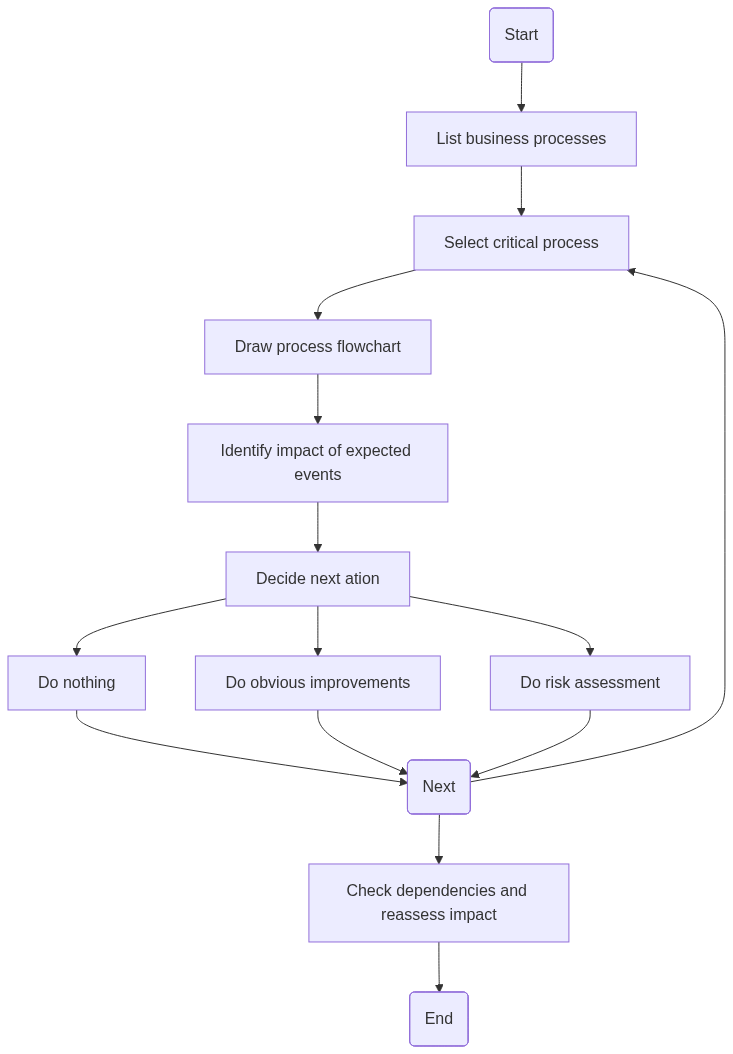
This means, look at each process alone, identify impact of disruptive events, plan next steps. After this is done for all processes, review the impact of each process on each other, to see if disrupting one process will have impact on another. if this is the case, it should be given higher priority in continuity planing and risk management.
Remember to subscribe to get the next post in your inbox – and get a free supply-chain assessment spreadsheet too!








 safecontrols