Physically tracking people using their cloud service accounts

Nobody likes being tracked. Still, most people store a detailed account of their movements on their phones, often shared with multiple apps. If you can get access to some of these user accounts you can track their whereabouts down to a relatively detailed level. In real time.

Tracking People – Google Maps Style
google_position_tracking
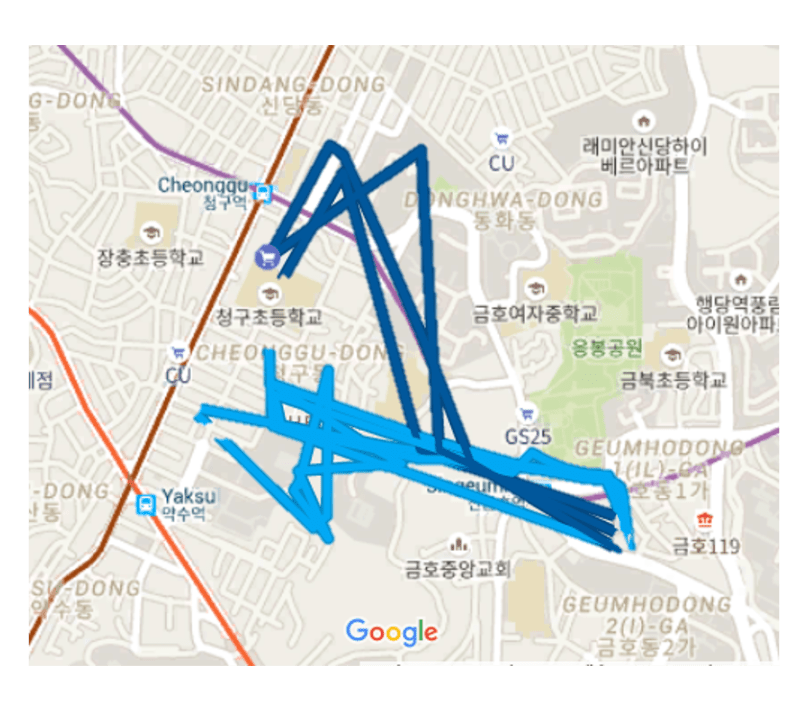
Google Maps: tracking your movements. These are my movements, the light blue ones are on foot, the darker color is me driving a car. I’ve taken the real movement patterns and moved them to Seoul for the sake of not showing you all of the things I did yesterday (I was not in Seoul last night – so this is #FakeNews). They track where you go, when you go there, how long you stay at each location, and stuff you add to your Google account at various locations, like pictures.  

I have a 9-year old son, and one night I was watching the news with him. There was one story that got him curious, and almost angry, and rightly so. It was about a smartwatch for kids that was becoming popular as a gift from parents. This particular smartwatch allowed surveillance of the kids’ whereabouts via GPS, and they could also call their kids on the watch instead of giving them a phone. Parents can also turn on a one-way audio channel that allows them to eavesdrop on their kids’ conversations. My son told me he thinks this is unfair and outrageous – and I completely agree. He felt somewhat better when I told him that he is not going to get a watch like that (he has an analog wristwatch, a ting with no internet). More kids should care about privacy too.

Note to parents and teachers: when we teach kids it is OK to be spied on, they will be less concerned with privacy in adult life too. Surveillance is a key feature of authoritarian regimes, and our world is increasingly moving in the wrong direction here. Don’t teach your kids it is OK for people to spy on them. Protect our democracies by teaching your kids to take care of their own privacy.

Next I asked him if he believed people could be spied on using their cell phones. The answer was “maybe”. I told him that they can but most parents don’t know how, and hopefully have no wish to do so. He has an Android phone – and I told him that I’ve made the settings on that phone such that it does not store his location data in a Google account but that most people who use Android never think about this. And the same goes for Apple. He was skeptical about this, so I told him I would turn on the “timeline” feature on my own Android, and show him later what the app stores on Google’s servers. Afterwards I showed him what they track (including where I was, how much time I spent where, the photos I’d taken, and the like).

Take-away points

  • Think it through if you choose to turn on features like Google’s timeline. Or rather, think it through if you are not taking steps to turn it off – it is on by default.
  • Guard your account’s security like a hawk; especially if you choose to use these features. Turn on two-factor authentication now.
  • Talk to your kids about privacy. The habits they learn now is what they bring with them into adulthood. Teaching your kid about privacy is an important contribution to safeguarding democracy and freedom of speech.
  • The example here was using Android phones. The story is the same on other platforms, and with other mapping and location based service providers than Google.
  • If your password is leaked, change it immediately.

What do you think about this? Let me know in the comments! Especially – do you think it is OK to track your kids like the watch described above? Are you OK with Google and their competitors storing such detailed location data about you?

6 things everyone can do to avoid hacking by cyber criminals

Protecting your personal data is important, whether you are a teenager or in retirement. A lot of people are confused about what they can do to avoid becoming victims of internet fraud. Cyber criminals use phishing attacks – email scams where they trick you to click a download link to viruses, or to open attachments that are no good for you. This is by far the most common way to steal someones data, and to abuse it.

lockouthorse
Keep the criminals away from your personal data!
There are two common ways hackers steal your money;

  • They hold your computer hostage by using a virus type known as ransomeware or cryptovirus. What this does is it locks your computer files with a password, and they demand money to give you the password back. Sometimes they make you pay several times and don’t give it back to you anyway.
  • They steal your payment data, like a credit card. Malware that monitors your purchases can send your credit card data to the hacker, who then abuses the credit card by buying things or paying to himself by setting up a merchant account with a credit card processing company like PayPal.

The question is: what can you do to avoid this? The following list contains about the same information that big companies are offering their employees as cyber awareness training. If you follow these 6 rules you will reduce the risk of this type of cyber attack by around 90%:

  1. Always be critical of e-mails you receive and don’t open links or attachments you are not sure about. Check the actual internet address of the link and see if it makes sense before opening it. Copy and paste it into your browser instead of clicking it to see this. Don’t visit the site if it looks suspicious.
  2. Keep all of your software up-to-date.  Software upgrades are normally security fixes – they are removing vulnerabilities hackers need to attack your software. Only use software from reputable sources.
  3. Don’t use public open wifi without a virtual private network (VPN). A VPN creates a protected path for your data communication with the internet, making it impossible for hackers on the network to read your data traffic.
  4. Always have antivirus software running on your computer, and a firewall.
  5. Regularly back up your data. You can use a USB drive for this, and disconnect it when you are done backing up. This way hackers can’t lock your files away from you, because you have a safe backup they cannot reach.
  6. Don’t use the same passwords for many online sites. Sites on the internet are hacked quite often, and if you have used the same email and password on many sites, they get access to everything. ID theft is a big problem, partly because people use the same password everywhere.

Major discount grocery store chain (REMA 1000) exposes their whole customer database

REMA1000 did not use any form of authentication on their customer database used by a loyalty program. They claim that this is nothing to worry about. I disagree. Identity theft, blackmail and potential surveillance are threats worth worrying about.

REMA1000, a Norwegian discount store chain, recently released a new customer loyalty program they named ‘Æ’. The letter ‘Æ’ is also the local word for ‘I’ in the Norwegian dialect in the area where Rema1000 is headquartered (Trondheim, the city where I live).


ae_rema
The Æ app promising you discounts. And previously it was exposing your data to the world.


The way the loyalty system works, is that you install an app on your smartphone, and register your debit card in the app. Whenever you make a purchase they will register what you have bought, and you are offered a 10% discount on the 10 items you spend the most money on, as well as on all vegetables and fruits. Sounds like a sweet deal, right?

The problem is only that the app was launched without requiring any form of authentication between the app and the backend database. This is reported by the Norwegian newspaper Aftenposten.no today. The vulnerability would allow anyone to download customer data from their database, down to each item purchased, as well as key customer data such as phone mumbers and partial credit card numbers. The vulnerability was discovered by infosec professional Hallvared Nygård, who spoke to Stavanger Aftenblad about the issue (another Norwegian newspaper).

In a comment to Aftenposten, Rema1000 claims that they “take the situation seriously”, and accuse the security researcher of having obtained access to the information in an illegal way. They say customers have no reason to worry with regard to security with regard to the data they leave with the stores.

This attitude shows a lack of understanding of security risks from REMA1000. First of all, lack of authentication between frontend and backend in a web application is close to inexcusable. It would be disovered by any reasonable web app security scanner. Protecting database access through secure authentication is the core concept of web application security and should be taught in any introduction to secure development class at your nearest university. Even more worrisome is perhaps that REMA1000 claims customers have nothing to worry about. Identity theft, blackmail and surveillance is pretty serious stuff to worry about if you ask me.  On top of this, REMA1000 is seemingly looking to blame the security researcher for reporting the vulnerability.


40 tracking cookies from 2 news sites: this is why you need VPN

You have probably (hopefully) been told that open wifi is insecure, and that you should use a virtual private network to encrypt and protect your traffic. Most people don’t do this, perhaps because it seems hard to do?

Opera software now offers free VPN. It is built into the browser on the desktop, and a standalone app on smartphones. It also comes with the ability to block tracking cookies! Those are cookies that track the pages you look at on the web – for commercial purposes (or so they claim). An old but nice nontechnical write-up on tracking cookies is found at geek.com. The difference from back then is that big data and AI have amplified trackers abilities to spy on you and analyze your online life. 

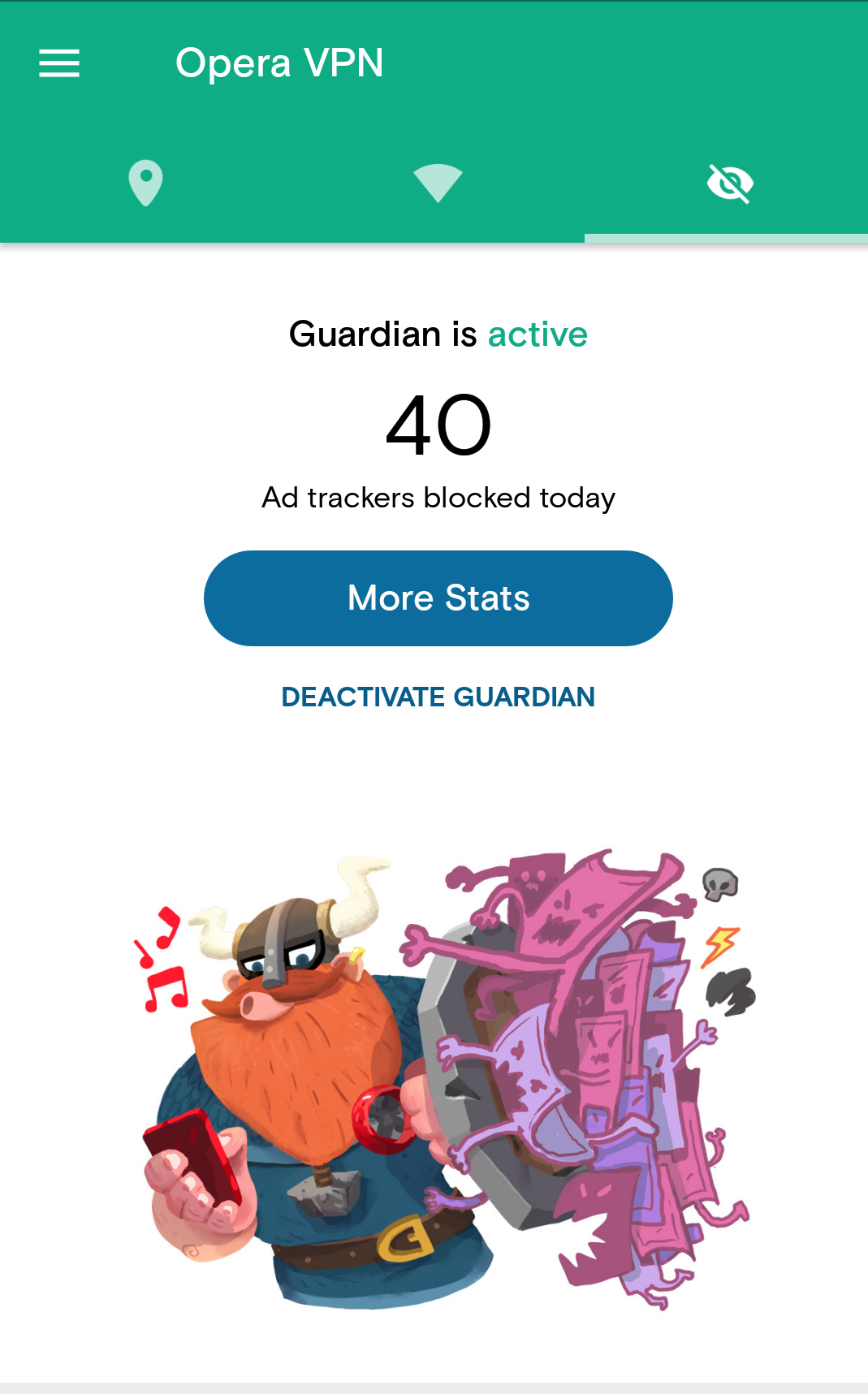
How many trackers are you exposed to by visiting high traffic news sites? Here’s what Opera VPN reported after visiting CNN.com and Bloomberg.com without clicking a single link on those pages. 

40 trackers? I have no interest in feeding ad networks with my online habits. I suggest you go ahead and activate VPN and cookie filters on you mobile in addition to your desktop, also when browsing on secure networks!