Do you consider security when buying a SaaS subscription?

tl;dr;  SaaS apps often have poor security. Before deciding to use one do a quick security review. Read privacy statements, ask for security docs, and test authentication practices, crypto and console.log information leaks before deciding if you want to trust the app or not. This post gives you a handy checklist to breeze through your SaaS pre-trial security review.

Over the last year I’ve been involved in buying SaaS access for lots of services in a corporate setting. My stake in the evaluation has been security. Of course, we can’t do active attacks or the like to evaluate if we are going to buy a software, but we can read privacy statements, look for strange things in the HTML and test their login process if they allow you to set up a free account or a trial account (most of them do). Here’s what I’ve generally found of challenges:

  • Big name players know what they are doing, but they have so many options for setup that you need to be careful what you select, especially if you have specific compliance needs.
  • Smaller firms (including startups)  don’t offer a lot of documentation, and quite often when talking to them they don’t really have much in place in terms of security management (they may still make great software, it is just harder to trust it in an enterprise environment)
  • Authentication blunders are very common. From HR support systems to payroll to IT management tools, we’ve found a lot of bad practices:
    • Ineffective password policies (5 digits and digits only, anyone?)
    • A theoretical password policy in place but validation is only performed client-side (that means it is easy to trick the server into setting a very weak password, or even no password in same cases, if you should so desire)
    • Lack of cookie security for session cookies (missing HTTPOnly and Secure flags, allowing for cookie theft by XSS attacks or man-in-the-middle attacks)
    • Poor password reset processes. In one case I found the supposedly random string used for a password reset link to be a base 64 encoding of my username…. how hard is that to abuse?
  • When you ask about development practices and security testing, many firms will lack such processes but try to explain that they implicitly have them because their developers are so smart (even with the authentication blunders mentioned above).

Obviously, at some point, security will be so bad that you have to say “No, we cannot buy this shiny thing, because it is rotten on the inside”. This is not a very popular decision in some cases, because the person requesting the service probably has some reason to request it.

egg power fear hammer
Don’t put your data and business at risk by using a SaaS product you can’t trust. By doing a simple due dilligence job you can at least identify services you definitely should be avoiding!

In order to evaluate SaaS security without spending too much time on it I’ve come up with a process I find works pretty well. So, here’s a simple way to sort the terrible from the average!

  1. Read the privacy statement and the terms and conditions. Not the whole thing, that is what lawyers are for (if you have some), but scan it and look for anything security related. Usually they will try to explain how they protect your personal data. If it is a clear and understandable explanation, they usually know what they are doing. If not, they usually don’t.
  2. Look for security or compliance documentation, or request it from their sales/support team. Specific questions to consider are:
    1. Do they offer encryption at rest (if this is reasonable to expect)?
    2. Do they explain how they store passwords?
    3. Do they use trustworthy data centers, and have some form of compliance proof for good practice for their data centers? SOC-2 reports, ISO certificates, etc?
    4. Do they guarantee limited access for insiders?
    5. Do they explain what cryptographic controls they are using for TLS, signatures and at-rest encryption? That means how they perform key management and exchange, what ciphers they allow, and the key strength they require?
    6. Do they say anything about vulnerability management and security testing?
    7. Do they say anything about incident handling?
  3. Perform some super-lightweight testing. Don’t break the law but do your own due diligence on the app:
    1. Create a free account if possible, and test if the authentication practices seem sound:
      • Test the “I forgot my password functionality” to see if the password reset link has an expiry time, and if it is a unguessable” link
      • Try changing your password to something really bad, like “password” or “dog”. Try to replay post requests if stopped by client-side validation (this can be done directly from the dev tools in Firefox, no hacker tool necessary)
      • Try logging in many times with the wrong password to see what happens (warning, lockout,… or most likely, nothing)
    2. Check their website certificate practices by running sslscan, or by using the online version at ssllabs.com. If they support really weak ciphers, it is an indicator that they are not on the ball. If they support SSL (pre TLS 1.0) it is probably a completely outdated service.
    3. Check for client-side libraries with known vulnerabilities. If they are using ancient versions of jQuery and other client side libraries, they are likely at risk of being hacked. This goes for WordPress sites as well, including their plugins.
    4. Check for information leaks by opening the console (Ctrl + I in most browsers). If the console logs a lot of internal information coming from the backend, they probably don’t have the best security practices.

So, should you dump a service if any of these tests “fail”? Probably not. Most sites have some weak points, and sometimes that is a tradeoff for some reason that may be perfectly legitimate. But if there are a lot of these “bad signs” in the air and you would be running some critical process or storing your company secrets in the app, you will be better off finding another service to suit your needs – or at least you will be able to sleep better at night.


 

When society breaks down: how do we respond?

Consider this: internet is down. Power is out. And the water in the tap is no longer safe to drink. The stores are basically out of groceries. And the banking sector is not working. No mobile payments. No credit cards accepted. And no ATM’s are working. Scenarios like this may be dystopia but are perhaps less far-fetched today than a few years ago. Some recent reports hinting of this have come out of the Ukrainian conflict as well as more recent events of cyber attacks targeting the utility sectors in the United States, Europe and the Middle East. There is no other way to put it than this: we are as a society vulnerable.

action active activity adult
When social functions break down, a failure of businesses and organizations to provide basic services make the situation even more difficult ot cope with from the individual to the government level.

Sweden is taking steps to increase the population’s preparedness for a major crisis, up to and including invasion by a foreign power. Norwegian authorities are planning a similar move. This type of communication was common during the cold war but feels chilling today. We are no longer used to thinking about disasters that target society at this scale.

A major conflict today would for sure include cyber domain operations, and most likely not only for information gathering. Availability of key services would be hit, and this could lead to power outages, water supply failure and payment system collapse. How do we cope in this situation?

Most people are not prepared for the “usual channels” to be unavailable. Most organizations are unprepared for disasters like this. This further exacerbates the challenges individuals would be faced with in the event of a crisis, because many businesses are essential for providing services and goods. When these businesses cannot deliver, it means power is unavailable, hospitals close, food is not available in the store and the fancy autonomous public transport systems grind to a halt.

Because of this, it is a civic duty for businesses to plan not only for a rainy day, but for long-term hurricane conditions. When the economy fails to produce the services and goods people depend on, we all suffer. Here are five bullet points for building resilience from the individual level, to our workplaces, and to society as a whole.

  1. Do like the Swedes: keep an emergency supply of food, water, and other necessities at home. Have a plan for how to act in the case of a crisis.
  2. At the workplace, do not stop at a risk assessment for “normal operations”. Identify business continuity challenges, and abnormal situations that can occur, including natural disasters, nationwide cyber attacks, terror attacks and a state of war. What services should the organization be able of supplying under such conditions? How can a plan be put in place to be able of doing so?
  3. Planning is smart, but without training its value is very limited. This is why businesses run stress tests, table-top exercises, red-team simulations and the like. We do, however, focus on risks under “normal conditions”. Have you tested your business continuity handling plan the same way? You probably should. Exercise emergency response with no network access, with phone lines down and your staff dispersed.
  4. Do not get paranoid, but also do not be afraid to mention what people typically would see as “black swans”. Only by acknowledging that disasters do happen, we can prepare to restore functionality to the level we have defined necessary.
  5. Engage in conversations and organizations that keep you on top of societal risks, and how you can contribute. Contributing to the security of society as a whole is the essence of social corporate responsibility.

If we keep contributing during a crisis, we will increase our collective ability to handle adversity. This is why business continuity needs to be part of our thinking around social corporate responsibility.


How to build emergency preparedness for cybersecurity incidents

Business continuity and emergency preparedness have become familiar concepts for many businesses – and having such risk management practices in place is expected in many industries. In spite of this, apart from software companies, inclusion of cybersecurity and preparing for handling of serious cyber attacks and security incidents is far from mature. Many businesses have digitized their value chains to a very high degree without thinking about how this affects their overall risk picture. Another challenge for many businesses that have seen the need to include their digital footprint in their risk management process, is that they don’t know where to start. That is what this post is about: how do you start to think about emergency preparedness for cyber incidents? If you have a robust process for this in place, this post is not meant for you. This is a “how-to” for those who stand bewildered at the start position of their crisis management planning process.

night-office-shirt-mail.jpg
You need a clear plan and a trained crew for efficient cyber incident response.

Know what you have

Before planning your incident response, or emergency preparedness plan, you should have a clear overview of what assets you have that is worth protecting. Creating a detailed asset inventory can be a daunting task. However, for most organizations, it is sufficient to identify the key information and organizational assets without aiming for completeness.

  • What are your main business processes? Identify all of the main processes you need to work in order for your organization to serve its purpose. The breakdown can be of different granularity, but here’s an example for an e-commerce business:
    • Management and leadership
    • Sales and marketing
    • Procurement and logistics
    • Software development
    • Customer support
    • Accounting
  • For each of the main business processes you have, there will be various types of assets that are necessary to make that process work. Think about what you need in various categories:
    • Key personnel
    • Software you need to get the job done
    • Data that is needed to support the function (if you know what software you depend on, this is often easier to identify)

Why are we mentioning people here? Often people have knowledge that cannot easily be replaced within the organization, or that would require considerable effort and investment. If such a person disappears, the situation can be hard to deal with. That is why, also from an information security point of view, it is important to know who your key employees are, and put down a plan for what to do if they are not available.

When you have identified these assets, it is a good idea to group them into two categories: critical and non-critical (you can use more than 2 categories if you want to, but a binary division is usually sufficient). Critical assets would lead to serious consequences if the security is breached: if data is leaked, or changed in an unauthorized manner, or made unavailable. It is unfortunate if non-critical assets are breached too, but not at a level where the business itself can be threatened. The critical assets are your crown jewels – the assets you need to protect as good as you can.

Baseline defense: do the small things that matter

Before planning how to respond to a cyber attack, we should introduce some baseline practices that do not depend on criticality or risk assessments. These are practices all organizations should aim to internalize; they significantly reduce the likelihood that a cyber attack would be successful, and they also prepare you to respond to an attack when it happens.

  • Introduce a security policy and make it known to the organization. Work systematically to make sure the policy is adhered to.
  • Maintain the data register (using the process described above for “knowing what you have”). This way you make sure critical assets do not get overlooked.
  • Include security requirements when selecting suppliers. Do not get breached because a supplier or business partner has weak security practices.
  • Take regular backups of all critical data. This way, you can restore your data if they should become unavailable or destroyed, whether this happens because of a hacker’s malicious actions or due to a hardware failure.
  • Use firewall rules to deny all traffic that is not needed in your business. Deny all incoming requests, unless there is a specific reason to keep a service available.
  • Run up-to-date endpoint protection such as antivirus software on all computers.
  • Keep all of your software up-to-date and patched. Do not forget appliances and IoT devices.
  • Do not give end users administrative access to their computers.
  • Give security awareness training to all employees.

With this in place, 80% of the job is done. Now you can focus on the “disaster scenarios”; those where you crown jewels are at risk.

Prepare to defend your assets

You know what assets you have. You know what your crown jewels are. You have your baseline security in place. Now you are ready to take on the remaining risk – responding to attacks and more advanced incidents. Here’s how you prepare for that.

Threat modeling

Before you develop your incident response plan, it pays off to create a simple threat model. Your model should describe credible attack patterns. In order to identify such attack patterns, you should think about who the attacker would be, and what their motivation would be. Is it a script kiddie, a person without deep technical knowledge hacking for fun using tools downloaded from the internet? Is it a cyber crime group hoping to earn money on extortion or by selling your intellectual property? Is it a nation-state actor, hoping to use your company as a foothold for attacking government assets? Or perhaps it is an insider threat, a dishonest or angry employee attacking his own employer? Likely scenarios depend on your assumptions here.

You don’t need a very detailed threat model to gain understanding that can aid your incident response planning. You should think about phases of the attack?

  • How is the initial breach obtained? In most cases this would be some form of social engineering, like phishing.
  • How do they get a foothold and gain persistence? Malware based? Using built-in functions?
  • How do they get access to the crown jewels? What actions will they perform on the object?
  • What are the consequences of the attack for your organization and its stakeholders?

Having this down, you should start to prepare an incident response plan. Thinking about this in phases too is helpful:

  • Preparation
  • Incident detection and escalation
  • Containment
  • Eradication
  • Recovery
  • Lessons learned

During preparation you should get down who is responsible for incident handling, who should be communicated with and how suspected incidents should be reported. Include a budget for training and running exercises. Cyber threat incident response needs to be tested the same way we do fire drills.

Incident detection is difficult. Various reports all indicate the average time from compromise to detection of advanced attacks is somewhere between 3 months and 2 years. There are many ways to detect that something is wrong:

  • A user notices strange behavior of lack of access
  • Monitoring of logs and security systems may report unusual signals
  • A hacker contacts you for a ransom or to state demands

In all cases the company should have a clear process for categorizing potential incidents, verifying if it is a real incident or not, and making a decision to start incident response.

Containment is about stopping the problem from spreading throughout the network, and gathering evidence. Be aware that cutting access to the internet can sometimes set off pre-programmed destructive routines. Therefore containment should be based on observation of the hacker behavior within the network on a case by case basis.

Eradication is about removing the problem: taking away the persistent access, removing malware, patching security holes. The right way to do this is to format all disks, clean all data, and then restore from original media and trusted backups.

Recovery is about getting back to business: recovering the service at an acceptable level. It is not uncommon to see malware reappear after recovery, so testing in a controlled environment is always good practice, before connecting the restored system to the business network again.

Lessons learned is important. In this phase an after action review is done: how could this happen, what was the reason? Do a root cause analysis. Summarize what worked well in response, and what did not. Make recommendations for changes in practice or policy – and follow up on it.

If you have this down: knowing what your crown jewels are, a solid baseline security system and a risk based incident response plan your organization will be much more robust than before. The risk exposure of your organization to cyber threats will be greatly reduced – but do not forget that security is a continuous process: as the threat landscape changes, your security management should too. This is why you need to maintain your threat model, and update your response plan.

Packaging a Node app for Docker – from Windows

Container technologies are becoming a cornerstone of development and deployment in many software houses – including where I have my day job. Lately I’ve been creating a small web app with lots of vulnerabilities to use for security awareness training for developers (giving them target practice for typical web vulnerabilities). So I started thinking about the infrastructure: packing up the application in one or more containers – what are the security pitfalls? The plan was to look at that but as it turned out, I struggled for some time just to get the thing running in a Docker container.

First of all, the app consists of three architectural components:

  • A MongoDB database. During prototyping I used a cloud version at mlab.com. That has worked flawlessly.
  • A Vue 2.0 based frontend (could be anything, none of the built-in vulnerabilities are Vue specific)
  • An Express backend primarily working as an API to reach the MongoDB (and a little sorting and such)

So, for packing things up, I started with taking the Express backend and wanting to add that to a container to run with Docker. In theory, the container game should work like this:

  1. Create your container image based on a verified image you can download from a repository, such as Docker Hub. For node applications the typical recommendation you will find in everything from Stack Overflow to personal blogs and even official doc pages from various projects is to start with a Node image from Docker Hub.
  2. Run your docker image using the command
    docker run -p exposedIP:hostIP myimage
  3. You should be good to go – and access the running NodeJS app at localhost:hostIP

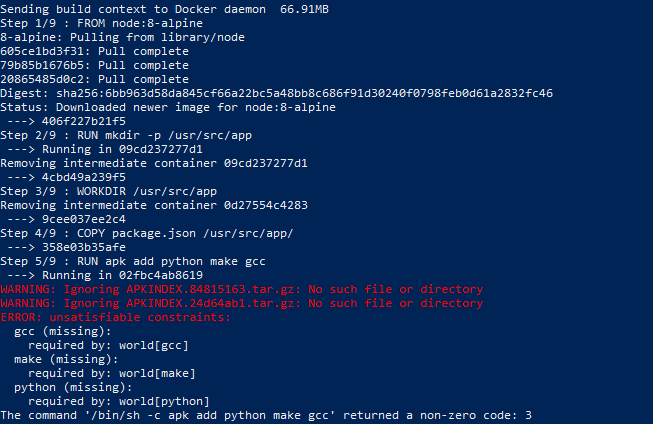
So, when we try this, it seems to run smoothly…. until it doesn’t. The build crashes – what gives?

docker_build_failure
After some more googling we tried to use node:8-alpine as the base image. Didn’t work, it cannot install the necessary build tools to run libxmljs, with a warning that a required file is not available for the Alpine package manager.

Building on top of Alpine, a minimal Linux distribution popular for use in containers in order to reduce the image size, we try to install some OS specific build tools required in order to install the npm package libxmljs. This package is a wrapper for the xmllib2 library for C (part of the Gnome project). Because that is what it is, it needs to set up those bindings locally for the platform it is running on, hence it needs a C compiler and a version of Python 2.7 to make this happen. To install packages on Alpine one uses the apk package manager. These packages are obviously there, so why does it fail?

Normally building a NodeJS application for production would involve putting the package.json file on the production environment and running npm install. The actual JavaScript files are not transferred (stored on the folder node_modules), they are fetched from their sources. When installing modules that need to hook into platform specific resources, this is reflected in the contents of the local node module after first installation. So if you copy your node_modules folder over to the container, this can fail. In my case it did: the app was developed on a Windows 10 computer, and we were trying to install it now on Alpine Linux in the container. The image was built with the local dev files copied to the app directory of the container image: and I had not told it what not to copy. Here’s the Dockerfile:

EDIT: use node:8 official image, not alpine, as it does not play well with glibc dependencies (such as libxml2).

FROM mhart/alpine-node:8
FROM node:8

WORKDIR /app
COPY . .

# Fixing dependencies for node-gyp / libxmljs
RUN apk add –no-cache make gcc g++ python
RUN apt-get install make gcc g++ python

RUN npm install –production

EXPOSE 9000
CMD [“node”, “index.js”]

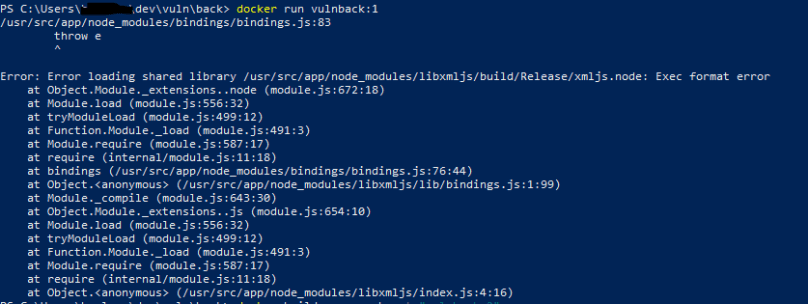
After adding the “no-cache” option on the apk command the libraries installed fine. But running the container still led to crash.

app_crash_vulnback
The error message we got when running the container was “Error loading shared library…. Exec format error”. This is because shared library calls are platform specific and built into the built version of libxmljs in node_modules.

After a few cups of coffee I found the culprit: I had copied the node_modules folder from my Windows working folder. Not a good idea. So, adding a .dockerignore file before building the image fixed it. That file includes this:

node_modules
backlog.log

The backlog file is just a debug log. After doing this, and building again: Success!

Now running the image with

docker run -p 9000:9000 -d my_image_name

gives us a running container that serves the Exposed port 9000 to the localhost port 9000. I can check this in my browser by going to localhost:9000

api_resposne

OK, so we’re up and running with the API. Next tasks will be to set up separate containers for the frontend and possibly for the database server – and to set up proper networking between them. Then we can look at how many configuration mistakes we have made, perhaps close a few, and be ready to start attacking the application (which is the whole purpose of this small project).

How to recognize a customized spear-phishing email

Phishing is still the most common initial attack vector. Mass mailed spam is now taking cues from targeted campaigns, improving conversion rates through personalization and the use of seemingly authoritative content.

You are targeted!

Scammers are getting better at targeting. Sharpen your defenses today – including your awareness training!

Here are some indicators that can help identify phishing:

  • Sender: the name and the email address don’t match. Your colleague is probably not emailing you from someone else’s Gmail account or a Mexican car dealership (unless you are in the car sales business in Mexico)
  • The link in the email leads somewhere else than the text of the link. Hover over to see the real url- or press an hold on a touch device. Here’s an example: https://bbc.co.uk
  • The logo in the email is hosted on a different domain than the email address of the sender, and it is not a CDN or cloud storage bucket.

Training people to look for these indicators will help reduce damage from the more advanced phishing campaigns!

How the meltdown CPU bug adds 50 million tons of CO2 to the atmosphere

The first few days of 2018 have been busy for security professionals and IT admins. As Ars Technica put it: every modern processor has “unfixable” security flaws. There are fixes – sort of. But they come with a cost: computers will run up to 30% slower because of it, depending on the type of work being performed. A lot of the heavy lifting performed in large data centers is related to data processing in databases. Unfortunately, this is the type of operation that looks to have the worst impact of fixing the Meltdown and Specter vulnerabilities. A selection of tests shows that a performance reduction of about 20% is at least realistic (see details at phoronix.com). This is equivalent to increasing the power consumption of data centers by 25%. That is a lot of energy! With assumed growth in data center consumption of 5% per year we should expect the total electricity consumption by data centers globally to hit 480 TWh this year.

polar-bear-ice-arctic-white-162320.jpeg
Meltdown may be a very fitting name for the CPU bug on everyone’s mind in the beginning of 2018: adding another 50 million tons of CO2 to the atmosphere doesn’t help the polar bear. 

A 2013 estimate of the US use of data centers put the 2020 electricity use at 139 TWh, and the Independent reported that the 2015 global data center energy consumption was 416 TWh. For comparison, the total electricity generation globally is approximately 25000 TWh, so data center usage is not insignificant – and it is growing fast.

Our energy mix is still heavily dependent on fossil fuels, mainly coal and natural gas. Globally about 40% of our electricity generation is done based on coal, and another 30% is based on petroleum, primarily natural gas. In OECD countries coal use is on the decline but demand growth for electricity in particularly the BRICS economies still outnumbers the achievable growth in renewable energy generation in these areas. This means that short-term increases in global electrical energy generation will still be heavily influenced by fossil fuels  – meaning coal and natural gas, and to some extent oil.

According to an article on curbing greenhouse gas emissions in the Washington Post, average coal fired power plants in the United States emits the equivalent of 1768 lb CO2/MWh, whereas for natural gas the average number would be around 800-850 lb/MWh. This corresponds to 800 g/kWh and 385 g/kWh for coal and natural gas, respectively.

Based on these numbers we can estimate an approximate value of extra CO2 emissions based on the Meltdown and Specter vulnerability fixes. If the unadjusted data center electricity consumption for 2018 is estimated at 480 TWh, and the bug fixes will lead to a 25% increase in consumption we are talking about and extra energy demand of 120 TWh for running our data centers. If 40% of that energy is generated by coal fired power plants, and 30% by natural gas, and the remaining by nuclear and renewable energy sources we are looking at 48 TWh extra to be produced from coal, and 36 TWh extra to be produced from natural gas. The combined expected “extra” CO2 emissions would be 52 million tons!

That is the same as all the climate gas emissions from the Norwegian economy in 2016 – including the entire petroleum sector (source: SSB). Another “yard stick” for how huge this number is: it corresponds to 1/3 of all emissions from U.S. aviation (source: EPA). Or – it would correspond to driving the largest version of a Hummer with a 6.2l V8 engine 3 million times around the earth (source: energy.eu).

This is a huge increase in emissions due to data processing because the CPU optimizations we have come to rely on since 1995 cannot be used safely. Also note that we have only included data centers in our estimate; this excludes all PC’s, Macs and smartphones that could see hits in performance too – meaning we’d have to charge our tech toys more often, thereby consuming even more electricity.


Making your signup page safe to use – by knowing how a secure development process looks

When you are signing up to a new web service – what are the risks? Obviously, there are some things you should think about before making the decision to sign up, such as their privacy policy and if the page seems to be good at securing your personal data. Lots of sites have not done too well in that arena, including several big name web sites. We’ve had numerous data leaks, fake social media profiles and stories about fraud and identity theft over the last few years to think that “any web service with lots of users must be following best practice”. They are not. Here are a few examples of what people do, that they really shouldn’t be doing:

  • Uploading source code with hardcoded credentials to GitHub (Uber)
  • Using weak passwords for administrator access. Really weak passwords. Like admin/admin.  (Equifax)
  • Failure to implement authentication and access control in a robust way (Filesilo – with plain text password storage)
  • Allowing people to sign up without any verification of identity or ownership of e-mail address or other information used to sign up (Lots of second-tier sites)

That’s about the service itself, but what about the sign-up page and the sign-up process? Here’s a checklist for your signup page – and similar use cases.

  • Sanitize your inputs (protects your database from injection attacks, and your users from stored cross-site scripting attacks)
  • Validate your inputs (protects against injection attacks, user errors and garbage content)
  • Verify e-mail addresses, phone numbers etc (protects your users against abuse, and your service against spam)
  • Handle all exceptions: exceptions can give all sorts of trouble when not handled in a good way – ranging from poor user experience (due to unhelpful error messages) to information leaks containing sensitive data from your database
  • Treat secrets as secrets – use strong cryptographic controls to protect them. Hash all passwords before storing them.

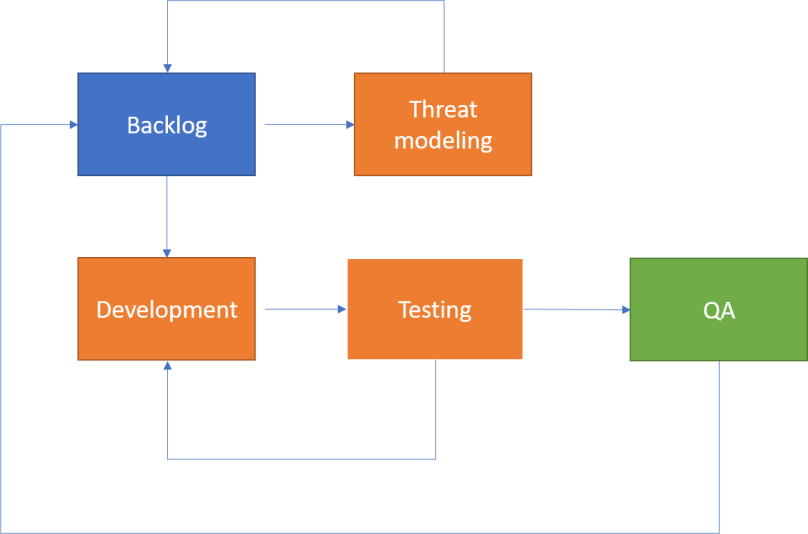
OK, that was a brief checklist – but that’s by far not the most important part of creating a secure sign-up process, or any process for that matter. The key to secure software is to follow a good workflow that takes security into account. Here’s how I like to think about this process.

secdev
A process for building security in

Whenever you are building something, the first thing that comes to mind is “functionality”. We don’t build security, and try to integrate functionality. It is the other way around. Although a secure development lifecycle includes a lot of “other things” like competence development, team organization and so on, let’s start with the backlog of functionality we want to build – and focus on the actual development, not the organization around it. Having a list of functionality is a good start for thinking about threats, and then security. Let’s take a signup page as the starting point – here are a few things we’d like the page to have:

  • Easy signup with username, password, e-mail
  • Good privacy control: data leaks should be unlikely, and if they occur they should not reveal sensitive info

So, how can we build a threat model based on this? We’d probably like some more information about the context, and the technology stack being used.

  • Who are the stakeholders (users, owners, developers, customers, competitors, etc)?
  • Who could be interested in attacking the site? (Script kiddies? Cybercriminals? Hacktivists?)
  • What is the value of the service to the various stakeholders?

If we know the answers to these questions, it is easier to understand the threat landscape for our web page, and the signup component in particular. We also need to know something about the technology stack. For example, we could build our signup page based on (it could be anything but lots of websites use these technologies today):

  • MongoDB for datastorage in the cloud
  • Nodejs for building a RESTful API backend
  • Vuejs for frontend

So, having this down, we see the contours of how things work. We can start building a threat model that looks at people, infrastructure, software, etc.

People risk: someone signs up with a different persons credentials and pretends to be this person (a personal risk on a social media platform for example)

Software risk: user inputs used to conduct injection attacks in order to leak data about users (MongoDB can be attacked in pretty similar manner as an SQL database)

Software risk: secrets are stored in unprotected form and they are leaked. User credentials sold on the dark web or posted to a pastebin.

Creating a big list of threats like this, we can rank them based on how serious the impact would be, and how likely they are. Based on this we create security requirements, that are then added to the backlog. These security requirements should then also be added to the testing plans (whether it is unit testing or integration testing), to make sure the controls actually work.

Testing and development is iterative – but at some point it seems we have covered the backlog and passed all tests. It is QA time! In many development projects QA will focus on functionality first, then performance. That is of course very important – but if users cannot trust the software, they will leave. That’s is why security should be a part of QA as well. This means more extensive testing, typically adding static testing, coding reviews and vulnerability scans to the QA process. Normally you would find something here, which could range from “small stuff” to “big stuff”. If the quality is not sufficient, say performance is poor or functionality fails, one would go back to the backlog and update for the next sprint. The same should be done directly for security.

When the backlog is updated – we need to update our threat model as well – also informed by what we’ve learned in the previous sprint.

Following a process like this will not give you a 100% bug-free, super-secure software – but it will certainly help. And by tracking some metrics you can also measure if quality improves over time. Especially static testing gives good metrics for this – the number of code defects, vulnerabilities or not, should decrease from one sprint to the next.

That’s why we need a good process, this way we can learn to build better things over time. Run fast and break things – but repair them fast as well. This way it is possible to combine innovation with good security. Innovation is of limited use unless we can trust its results.

Privacy practice and the GDPR

This has really been the year of marketing and doomsday predictions for companies that need to follow the new European privacy regulations. Everyone from lawyers to consultants and numerous experts of every breed is talking about what a big problem it will be for companies to follow the new regulations, and the only remedy would be to buy their services. Yet, they give very few details on what those services actually are.

Let’s start with the new regulation; not the “what to do” but the “why it is coming”. The privacy conscious search engine duckduckgo.com gives the following definition:

Privacy: The state of being free from unsanctioned intrusion: a person’s right to privacy.

study-group_4460x4460
Investing some time in studying requirements and understanding what strategy best serves the interest of your organization as well as the people whose data you are processing before investing in “GDPR services” is probably a good idea. 

Who hasn’t felt his or her privacy intruded upon by marketing networks and information brokers online? The state of modern business is the practice of tracking people, analyzing their behavior and seeking to influence their decisions, whether it is how they vote in an election, or what purchasing decisions they make. In the vast majority of cases this surveillance based mind control activity occurs without conscious consent from the people being tracked. It seems clear that there is a need to protect the rights to privacy and freedoms of individuals in the age of tech based surveillance.

This is what the new regulation is about – the purpose is not to make life hard for businesses but to make life safe for individuals, allowing them to make conscious decisions rather than being brain washed by curated messages in every digital channel.

Still, for businesses, this means that things must change. There may be a need for consultants but there is also a need for practical tools. The way to dealing with the GDPR that all businesses should follow is:

  1. Understand why this is necessary
  2. Learn to see things from the end-user or customer perspective
  3. Learn the key principles of good privacy management
  4. Create an overview of what data is being gathered and why

With these 4 steps in place, it is much easier to sort the good advice from the bad, and the useful from the wasteful.

Most businesses are used to thinking about risk in terms of business impact. What would the consequence to our business be, and how likely is it to happen? That will still be important after May 2018, but this is not the perspective the GDPR takes. If we are going to make decisions about data protection for the sake of protecting privacy, we need to think about the risk the data collection and processing exposes the data subjects to (data subject is GDPR speak for people you store data about).

What consequences could the data subjects see from the processing itself? Are you using it for profiling or some sort of automated decision making? This is the usual “privacy concern” – and rightly so. Even felt it is creepy how marketers track your digital movements?

Another perspective we also need to take is what can the consequences for individuals be of data abuse? This can be a data breach like the Equifax and Uber stories we’ve heard a lot about this fall, or it can be something else, like an insider abusing your data, a hacker changing the data so that automated decisions don’t go your way, or that the data becomes unavailable and thereby stopping you from using a service or getting access to something. The personal consequences can be financial ruin, a poor reputation, family troubles or perhaps even divorce?

A key principle in the GDPR is data minimization; you shall only process and store the data where you have a good reason and a legal basis for doing so. Practicing data minimizaiton means less data that can be abused, thereby a lower threat to the freedoms and rights of the persons you process data about. This is perhaps the most important principle of good privacy practice: try to avoid processing or storing data that can be linked to individuals as far as you can (while getting your things done).

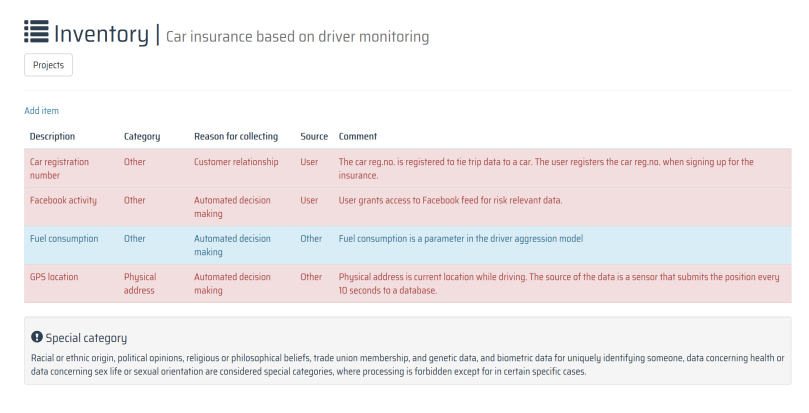
Surprisingly, many companies have no clue what personal data they are storing and processing, who they share it with, and why they do it. The starting point for achieving good privacy practice, good karma – and even GDPR compliance – is knowing what you have and why.

gdprinventory
Example of a simple data inventory – from early development of cybehave.com’s privacy hunter tool.

From scare-speak to tools and practice

We’ve had a year of data breaches, and we’ve had a year of GDPR themed conference talks, often with a focus on potential bankruptcy-inducing fines, cost of organizational changes and legal burdens. Now is the time for a more practical discussion; getting from theory to practice. In doing this we should all remember:

  • There are no GDPR experts: the regulation has yet not come into force, and a both regulatory oversight and practical implementations are still in its infancy phases
  • The regulation is risk-based: this means the data controllers and processors must take ownership of the risk and governance processes.
  • Documenting compliance should be a natural part of performing the thinking and practical work required to safeguard the privacy of customers, users, employees, visitors and whatever category of people you process data related to.

We need practical guidance documents, and we need tools that make it easier to follow good practice, and keep compliance documentation alive. That’s what we should be discussing today – not fines and stories about monsters eating non-compliant companies.

Why you should be reading privacy statements before using a web site

If you are like most people, you don’t read privacy statements. They are boring, often generic, and seem to be created to protect businesses from lawsuits rather than to inform customers about how they protect their privacy. Still, when you know what to look for to make up your mind about “is it OK to use this product”, such statements are helpful.

payphone-on-brick-wall_4460x4460
If somebody was wiretapping all of your phone calls you wouldn’t be happy. Why should you then accept surveillance when you use other services? Most people do, and while they may have a feeling that their browsing is “monitored” they may not have the full insight into what people can do with the data they collect, or how much data they actually get access to. 

Even so, there is much to be learned from looking at a privacy statement. If you are like most people you are not afraid of sharing things on the internet, but still you don’t want the platforms you use to abuse the information you share. In addition, you would like to know what you are sharing. It is obvious that you are sharing a photo when you include it in a Facebook status update – but it is obvious that you are sharing your phone number and location when you are using a browser add-on? The former we are generally OK with (it is our decision to share), the latter not so much – we are typically tricked into sharing such information without even knowing that we do it.

Here’s an example of a privacy statement that is both good and bad: http://hola.org/legal/privacy.  It is good in the way that it is relatively explicit about what information it collects (basically everything they can get their hands on), and it is bad because they collect everything they can get their hands on.. Hola is a “VPN” service that markets itself as a security and privacy product. Yet, their website does not use SSL, their socalled VPN service does not use encryption but is really an unencrypted proxy network, they accept users that register with “password” as password, and so on… So much for security. So, here’s a bit on what they collect (taken from their privacy policy):

  • So-called anonymous information: approximate geo-location, hardware specs, browser type and version, date of software installation (their add-on I presume), the date you last used their services, operating system type and version, OS language, registry entries (really??), URL requests, and time stamps.
  • Personal information: IP address, name, email, screen names, payment info, and other information we may ask for. In addition you can sign up with your Facebook profile, from which they will collect usernames, email, profile picture, birthday, gender, preferences. When anonymous information is linked to personal information it is treated as personal information. (OK….?)
  • Other information: information that is publicly available as a result of using the service (their socalled VPN network) may be accessed by other users as a cache on your device. This is basically your browser history.

Would you use this service when seeing all of these things? They collect as much as they can about you, and they have pretty lax security. The next thing in their privacy statement that should be of interest is “Information we share”. What they call anonymous they share with whoever they please – meaning marketing people. They may also share it for “research purposes”. Note that the anonymous information is probably enough to fingerprint exactly who you are, and to track you around the web afterwards using tracking cookies. This is pretty bad. They also state when they share “personal information” – it includes the usual reason; due to legal obligations (like subpoenas, court orders). In addition they may share it to detect, prevent or address fraud, security, violations of policy or other technical issues (basically, this can be whatever you like it to be), to enforce the privacy policy or any other agreements between the user and them, and finally the best reason they share personal information: to protect against harm to the rights, property or safety of the company, its partners, users or the public. So basically, they collect as much as they want about you and they share it with whoever they like for whatever reasons they like. Would anyone be using such a service? According to their web page they have 125 million users.

125 million users accept that their personal data is being harvested, analysed and shared at will by a company that provides “VPN” with no encryption and that accepts the use of “password” as password when signing up for their service.

So, here’s the take-away:

  • Read the privacy policy, look specifically for:
    • What they collect
    • How they collect it
    • What they are using the information for
    • With whom do they share the informaiton
    • How do they secure the information?
  • Think about what this means for the things that are important to your privacy. Do you accept that they do the stuff they do?
  • What is the worst-case use of that information if the service provider is hacked? Identity theft? Incriminating cases for blackmail? Political profiling? Credibility building for phishing or other scams? The more information they gather, the worse the potential impact.
  • Finally, never trust someone claiming to sell a security product that obviously does not follow good security practice. No SSL, accepting weak passwords? Take your business elsewhere, it is not worth the risk.

Does cyber insurance make sense?

Insurance relies on pooled risk; when a business is exposed to a risk it feels is not manageable with internal controls, the risk can be deferred to the capital markets through an insurance contract. For events that are unlikely to hit a very large number of insurance customers at once, this model makes sense. The pooled risk allows the insurer to create capital gains on the premiums paid by the customers, and the customers get their financial losses covered in case of a claim situation. This works very well for many cases, but insurers will naturally try to limit their liabilities, through “omissions clauses”; things that are not covered by the insurance policy. The omissions will typically include catastrophic systemic events that the insurance pool would not have the means to cover because a large number of customers would be hit simultaneously. It will also include conditions with the individual customer causing the insurance coverage to be voided – often referred to as pre-existing conditions. A typical example of the former is damages due to acts of war, or natural disasters. For these events, the insured would have to buy extra coverage, if at all offered. An example of the latter omission type, the pre-existing condition, would be diseases the insured would have before entering into a health insurance contract.

20150424_155646090_iOS
Risk pooling works well for protecting the solvency of insurers when issuing policies covering rare independent events with high individual impact – but is harder to design for covering events where there is systemic risk involved. Should insurers cover the effects of large-scale virus infections like WannaCry over normal cyber-insurance policies? Can they? What would the financial aggregate cost of a coordinated cyber-attack be on a society when major functions collapse – such as the Petya case in the Ukraine? Can insurers cover the cost of such events?

How does this translate into cyber insurance? There are several interesting aspects to think about, in both omissions categories. Let us start with the systemic risk – what happens to the insurance pool if all customers issue claims simultaneously? Each claim typically exceed the premiums paid by any one single customer. Therefore, a cyberattack that spreads to large portions of the internet are hard to insure while keeping the insurer’s risk under control. Take for example the WannaCry ransomware attack in May; within a day more than 200.000 computers in 150 countries were infected. The Petya attack following in June caused similar reactions but the number of infected computers is estimated to be much lower. As the WannaCry still looks like a poorly implemented cybercrime campaign intended to make money for the attacker, the Petya ransomware seems to have been a targeted cyberweapon used against  the Ukraine; the rest was collateral damage, most likely. But for Ukrainian companies, the government and computer users this was a major attack: it took down systems belonging to critical infrastructure providers, it halted airport operations, it affected the government, it took hold of payment terminals in stores; the attack was a major threat to the entire society. What could a local insurer have done if it had covered most of those entities against any and all cyberattacks? It would most likely not have been able to pay out, and would have gone bankrupt.

A case that came up in security forums after the WannaCry attack was “pre-existing condition” in cyber insurance. Many policies had included “human error” in the omissions clauses; basically, saying that you are not covered if you are breached through a phishing e-mail.  Some policies also include an “unpatched system” as an omission clause; if you have not patched, you are not covered. Not all policies are like that, and underwriters will typically gauge a firm’s cyber security maturity before entering into an insurance contract covering conditions that are heavily influenced by security culture. These are risks that are hard to include in quantitative risk calculations; the data are simply not there.

Insurance is definitely a reasonable control for mature companies, but there is little value in paying premiums if the business doesn’t satisfy the omissions clauses. For small businesses it will pay off to focus on the fundamentals first, and then to expand with a reasonable insurance policy.

For insurance companies it is important to find reasonable risk pooling measures to better cover large-scale infections like WannaCry. Because this is a serious threat to many businesses, not having meaningful insurance products in place will hamper economic growth overall. It is also important for insurers to get a grasp on individual omissions clauses – because in cyber risk management the thinking around “pre-existing condition” is flawed – security practice and culture is a dynamic and evolving thing, which means that the coverage omissions should be based on current states rather than a survey conducted prior to policy renewal.