
Securing media stored in cloud storage buckets against unauthorised access

Insecure direct object reference (IDOR) is a common type of vulnerability online. Normally we think of this as a vulnerable parameter in a URL or a form that allows forced browsing, but file downloads can also be an issue here. For a general background on IDOR and how to secure against it, see this cheatsheet from OWASP.

Our case is a bit different. Consider storing files in a cloud storage bucket (Google Cloud Storage, Amazon S3, etc). This may be for a file sharing site for example, where users are allowed to upload documents that are then stored in a bucket. We only want the users with the right authorisation to have access to these files. What are our options?

  1. Use cloud identity management and bucket security rules to manage access. This may be impractical as we don’t necessarily want to give app users IAM users in the cloud environment, but where applicable it is a direct solution to our little security problem.
  2. Allow full access to the bucket from the app and manage user permissions in the app.
  3. Make the object public but use non-descriptive and random filenames so unauthorised users cannot easily guess the right path. Maintain the link to contextual data in the backend code to not expose it publicly.
  4. Same as 3 but with a signed URL – a temporary ‘secret’ URL where permissions can be controlled without creating specific IAM users.

Google has made a list of best practices for cloud storage here. In our use case we want the shared object to have permanent permissions. Let us consider how to achieve acceptable security using option 2.

A simple architecture for sharing files securely

For this set-up there are a few things we need to take care of:

  1. For uploaded files do not expose the actual bucket meta data or file names to the user in the frontend. Create a reference in the database that maps to the object name in the bucket
  2. Manage access to objects through the database references, for example by adding a “shared with” key containing user ID’s for all users who are going to have read access to the object.
  3. Do not make the object publicly accessible. Instead use a service account IAM user for the application and allow the permissions you need. Download content to the app, and relay this to the frontend using the mapping described above to avoid exposing the actual object name.

What are the threat vectors to this method for securing shared files?

This is a relatively simple setup that avoids making a bucket, or objects in that bucket, publicly available. It is still possible to exploit to gain unauthorised access but this is no longer as easy as finding an unsecured bucket.

Identity spoofing: a hacker can take on the identity of a user of the application, and thus get access to the files this user has access to. To avoid this, make sure to follow good practices for authentication (strong passwords, two-factor authentication). Also keep identity secrets on the client side hard to get at by securing the frontend against cross-site scripting (XSS), turning on security headers and setting parameters on cookies to avoid easy exposure.

Database server: A hacker may try to guess the database credentials directly, either using a connection string or through the management plane of a cloud provider. Make sure to use multiple layers of defence. If using a cloud accessible database, make sure the management plane is sufficiently secured. Use IP whitelisting or cloud security groups to limit access to the database, and use a strong authentication secret.

Bucket security: Hackers will look for publicly available buckets. Make sure the bucket is not accessible from the internet. limit accessibility to the relevant cloud security group, or from whitelisted IP addresses if accessed from outside the cloud.

Monitoring: turn on monitoring of file access in the application, and consider also logging access on database and bucket level. Regularly review logs to look for unauthorised access or unusual behaviour.
CCSK Domain 5: Information governance

Information governance is the management practices we introduce to enusre that data and information complies with organizational policies, standards and strategy, including regulatory, contractual and business objectives. 

There are several aspects of cloud storage of data that has implications for information governance. 

Public cloud deployments are multi-tenant. That means that there will be other organizations also storing their information in the same datacenter, on the same hardware. The security features for account separation will thus be an important part of achieving information compliance in most cases. 

As data is shared across cloud infrastructure, so is the responsibility for securing the data. To define a working governance structure it is important to define data ownership and who the data custodian is. The difference between the two, is that the former is who actually owns the data (and is accountable for its governance), and the latter who manages the data (and is responsible for ensuring compliance in practice). 

When we host third-party data in the cloud, we are introducing a third-party into the governance model. This third-party is the cloud provider; the information governance now depends on the provider’s management practices and technologies offered by the cloud provider. This complicates the regulatory compliance considerations we need to make and should be taken into account when designing a project’s regulatory compliance matrix. First, legal requirements may change because the cloud stores, or makes data available, in more geographical regions that would otherwise be the case. Compliance, regulations, and in particular privacy, should be carefully reviewed with regard to how governance is managed in the cloud for customer data. Further, one should ensure that customer requirements to deletion (destruction) of data is possible to satisfy given the technical offerings from the cloud provider. 

Moving data to the cloud provides a welcome opportunity to review and perhaps redesign information architectures. In many organizations information architectures have evolved over a long time, perhaps with little planning, and may have resulted in a fractured model where it is hard to manage compliance. 

Cloud information governance domains

Cloud computing can have an effect on multiple aspects of data governance. The following list defined issues the CSA has described as affected by cloud artifacts: 

Information classification. Often tied to storage and handling requirements, that may include limitations on access, location. Storing information in an S3 bucket will require a different method for access control than using a file share on the local network. 

Information management practices. How data is managed based on classification. This should include different cloud deployment models (or SPI tiers: SaaS, PaaS, IaaS). You need to decide what can be allowed where in the cloud, with which products and services and with which security requirements. 

Location and jurisdiction policies. You need to comply with regulations and contractual obligations with respect to data storage, data access. Make sure you understand how data is processed and stored, and the contractual instruments in place to manage regulatory compliance. One primary example here is personal data under the GDPR, and how data processing agreements with cross-border transfer clauses can be used to manage foreign jurisdictions. 

Authorizations. Cloud computing does not typically require much changes to authorizations but the data security lifecycle will most likely be impacted. The way authorization controls are implemented may also change (e.g. IAM practices of the cloud vendor for account level authorization). 

Ownership. The organization owns its data and this is not changed when moving to cloud. One should be careful with reviewing the terms and conditions of cloud providers here, in particular SaaS products (especially those targeting the consumer market).

Custodianship. The cloud provider may fully or partially become the custodian, depending on the deployment model. Encrypted data stored in a cloud bucket is still under custody of the cloud provider. 

Privacy. Privacy needs to be handled in accordance with relevant regulations, and the necessary contractual instruments such as data processing agreements must be put in place. 

Contractual controls. Contractual controls when moving data and workloads to control will be different from controls you employ in an on-premise infrastructure. There will often be limited access to contract clause negotiations in public cloud environments. 

Security controls. Security controls are different in cloud environments than in on-premise environments. Main concepts are security groups and access control lists.

Data Security Lifecycle

A data security lifecycle is typically different from information lifecycle. A data security lifecycle has 6 phases: 

  • Create: generation of new digital content, or modification of existing content
  • Store: committing digital data to storage, typically happens in direct sequence with creation. 
  • Use: data is viewed, processed or otherwise used in some activity that does not include modification. 
  • Share: Information is made accessible to others, such as between users, to customers, and to partners or other stakeholders. 
  • Archive: data leaves active use and enters long-term storage. This type of storage will typically have much longer retrieval times than data in active storage. 
  • Destroy. Data is permanently destroyed by physical or digital means (cryptoshredding)

The data security lifecycle is a description of phases the data passes through, without regard for location or how it is accessed. The data typically goes through “mini lifecycles” in different environments as part of these phases. Understanding the physical and logical locations of data is an important part of regulatory compliance. 

In addition to where data lives and how it is transferred, it is important to keep control of entitlements; who accesses the data, and how can they access it (device, channels)? Both devices and channels may have different security properties that may need to be taken into account in a data governance plan. 

Functions, actors and controls

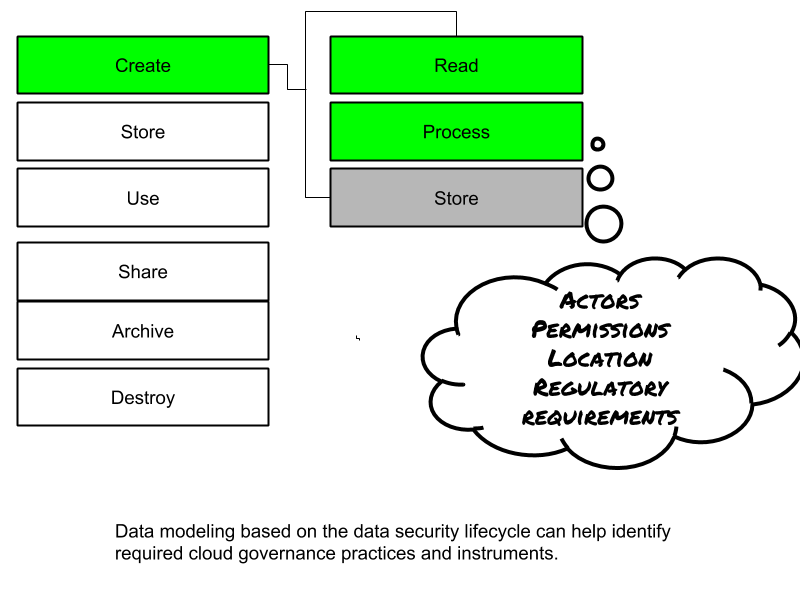
The next step in assessing the data security lifecycle is to review what functions can be performed with the data, by a given actor (personal or system account) and a particular location. 

There are three primary functions: 

  • Read the data: including creating, copying, transferring.
  • Process: perform transactions or changes to the data, use it for further processing and decision making, etc. 
  • Store: hold the data (database, filestore, blob store, etc)

The different functions are applicable to different degrees in different phases. 

An actor (a person or a system/process – not a device) can perform a function in a location. A control restricts the possible actions to allowed actions. The key question is: 

What function can which actor perform in which location on a given data object?

An example of data modeling connecting actions to data security lifecycle stages.

CSA Recommendations

The CSA has created a list of recommendations for information governance in the cloud: 

  • Determine your governance requirements before planning a transition to cloud
  • Ensure information governance policies and practices extent to the cloud. This is done with both contractual and security controls. 
  • When needed, use the data security lifecycle to model data handling and controls. 
  • Do not lift and shift existing information architectures to the cloud. First, review and redesign the information architecture to support the current governance needs, and take anticipated future requirements into account.